The misalignment is caused by the usual paragraph indentation. \( starts an inline math, similar to normal text starting a pagraph.
With standard settings a paragraph is indented, i.e., the first line is indented by initial horizontal space (of width \parindent), whereas the following lines are unindented.
See Remove Indentation for a Single Paragraph how to suppress the indentation for some paragraphs or use a package like "parskip" to change from indentation to vertical skip between two paragraphs.
Use display math, e.g., \[ or one of the math environments, e.g., equation or align, if you want to get your formulas in separate lines and aligned.
\documentclass{article}
\usepackage{amsmath, amssymb}
\begin{document}
\begin{align}
f: I \to \mathbb{R}
\
x_1, x_2 \in I
\end{align}
\end{document}
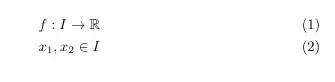
(Avoid using \\ to start a new line in a normal paragraph. Use \\ only within environments in which it is defined with the meaning to start a new line entry. Within a normal text paragraph you will get an "underfull hbox" warning message. A new paragraph is started at a new line ìf you input an empty line or a \par in your document file, usually with the first line indented.)


