I'm not sure to understand exactly what you want, but here is a suggestion with the environment {NiceTabular} of nicematrix.
\documentclass{article}
\usepackage{xcolor}
\usepackage{nicematrix}
\usepackage{tikz}
\usetikzlibrary{calc}
\begin{document}
\NewDocumentCommand{\rot}{m}{\rlap{\hspace*{2mm}\rotatebox{45}{#1}}}
\NewDocumentCommand{\ColumnColor}{mm} % #1 : number of column ; #2 ; color
  {
    \begin{tikzpicture} [fill = #2]
    \fill let \p1 = (1) , \p2 = (2) , \n1 = { \y1 - \y2 }
          in (2-|#1) -- ($(2-|#1)+(\n1,\n1)$)
                     -- ($(2-|\inteval{#1+1})+(\n1,\n1)$)
                     -- (2-|\inteval{#1+1})
                     -- cycle ;
    \fill (2-|#1) rectangle (last-|\inteval{#1+1}) ;
    \end{tikzpicture}
  }
\begin{NiceTabular}{lll}
\CodeBefore
  \ColumnColor{2}{red!15}
  \ColumnColor{3}{blue!15}
\Body
                    & \rot{Column 1} & \rot{Column 2} \
  \Hline
  Information      & X              &                \
  More information &                & X              \
\end{NiceTabular}
\end{document}
You need several compilations (because of the PGF/Tikz nodes used by nicematrix).

If you want to add a color to the first row (excepted for the ``angled cells''), you can't use \rowcolor in the \CodeBefore for a technical reason: the commands \rowcolor, \cellcolor, \columncolor, etc. don't act in the order of their occurrence in the \CodeBefore because they are grouped by color (in order to avoid thin white lines between panels of the same color in some PDF viewers).
Maybe I should add to key to the package nicematrix in order to disable that feature for the situations like this one.
With the current version of nicematrix, you have to define your own command \RowColor which will do the job by using Tikz to fill a rectangle delimited by the PGF/Tikz provided by nicematrix.
\documentclass{article}
\usepackage{xcolor}
\usepackage{nicematrix}
\usepackage{tikz}
\usetikzlibrary{calc}
\begin{document}
\NewDocumentCommand{\rot}{m}{\rlap{\hspace*{2mm}\rotatebox{45}{#1}}}
\NewDocumentCommand{\ColumnColor}{mm} % #1 : number of column ; #2 : color
  {
    \begin{tikzpicture} [fill = #2]
    \fill let \p1 = (1) , \p2 = (2) , \n1 = { \y1 - \y2 }
          in (2-|#1) -- ($(2-|#1)+(\n1,\n1)$)
                     -- ($(2-|\inteval{#1+1})+(\n1,\n1)$)
                     -- (2-|\inteval{#1+1})
                     -- cycle ;
    \fill (2-|#1) rectangle (last-|\inteval{#1+1}) ;
    \end{tikzpicture}
  }
\NewDocumentCommand{\RowColor}{mm} % #1 number of row ; #2 : color
  {
    \begin{tikzpicture} [fill = #2]
    \fill (#1-|1) rectangle (\inteval{#1+1}-|last) ;
    \end{tikzpicture}
  }
\begin{NiceTabular}{lll}
\CodeBefore
  \RowColor{1}{gray!10}
  \ColumnColor{2}{red!15}
  \ColumnColor{3}{blue!15}
\Body
                    & \rot{Column 1} & \rot{Column 2} \
  \Hline
  Information      & X              &                \
  More information &                & X              \
\end{NiceTabular}
\end{document}
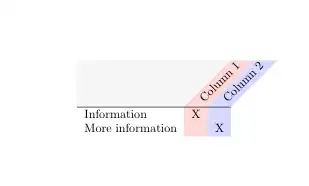


\rowcolor{}but it overrides the column colors; I tried using the Block syntax of nicematrix but it still leaves the white slice before the angled columns. Is there a way to set it up so the column colors override the row color? – Michael Clauss Feb 24 '23 at 15:04