I suggest to use tabularray:
\documentclass{article}
\usepackage[T1]{fontenc}
\usepackage[dvipsnames,table]{xcolor}
\definecolor{light-gray}{HTML}{FFFFFF}
\definecolor{light-blue}{HTML}{EBF5FB}
\usepackage{tabularray}
\title{}
\author{}
\begin{document}
    \maketitle
\begin{longtblr}[
    caption = {This is a caption.},
    ]{
        colspec={m{1.2cm} m{0.5cm} m{1cm} m{1.5cm} m{1.5cm} m{1.5cm} m{1.5cm}},
        row{1}={font=\itshape},
        cell{2-Z}{5-Z}={mode=math},
        row{2,5-7}={bg=light-blue},
        row{3-4}={bg=light-gray},
        hlines
    }
    & Day
    & Month
    & Hours
    & Feature 1
    & Feature 2
    & Feature 3\\
    %-------------------------------------------------
    Friday
    & 5
    & June
    &
    & A_1
    & A_2
    & A_3
    \\
    %-------------------------------------------------
    \SetCell[r=2]{l} Saturday
    & \SetCell[r=2]{l} 6
    & \SetCell[r=2]{l} June
    & 14 -- 21
    & B_1
    &
    & B_3
    \\
    &
    &
    &
    & C_1
    & C_2
    & C_3
    \\
    % -------------------------------------------------
    \SetCell[r=3]{l} Sunday
    & \SetCell[r=3]{l} 7
    & \SetCell[r=3]{l} June
    & 08 -- 10
    & D_1
    & D_2
    & D_3
    \\
    &
    &
    & 10 -- 17
    & E_1
    &
    & E_3
    \\
    &
    &
    &
    & F_1
    & F_2
    & F_3
    \\
    % -------------------------------------------------
\end{longtblr}


\end{document}
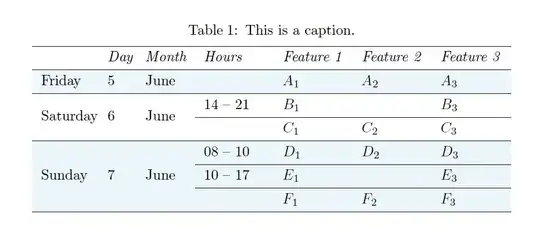
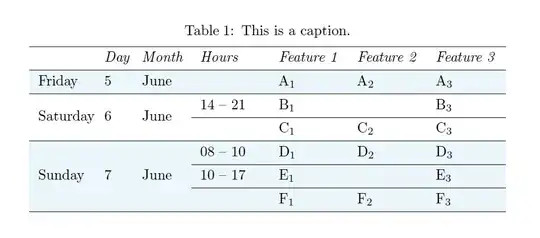
In case you used math mode only to have the subscripts, but your cells are actually only text:
\documentclass{article}
\usepackage[T1]{fontenc}
\usepackage[dvipsnames,table]{xcolor}
\definecolor{light-gray}{HTML}{FFFFFF}
\definecolor{light-blue}{HTML}{EBF5FB}
\usepackage{tabularray}
\title{}
\author{}
\begin{document}
    \maketitle
\begin{longtblr}[
    caption = {This is a caption.},
    ]{
        colspec={m{1.2cm} m{0.5cm} m{1cm} m{1.5cm} m{1.5cm} m{1.5cm} m{1.5cm}},
        row{1}={font=\itshape},
        row{2,5-7}={bg=light-blue},
        row{3-4}={bg=light-gray},
        hlines
    }
    & Day
    & Month
    & Hours
    & Feature 1
    & Feature 2
    & Feature 3\\
    %-------------------------------------------------
    Friday
    & 5
    & June
    &
    & A\textsubscript{1}
    & A\textsubscript{2}
    & A\textsubscript{3}
    \\
    %-------------------------------------------------
    \SetCell[r=2]{l} Saturday
    & \SetCell[r=2]{l} 6
    & \SetCell[r=2]{l} June
    & 14 -- 21
    & B\textsubscript{1}
    &
    & B\textsubscript{3}
    \\
    &
    &
    &
    & C\textsubscript{1}
    & C\textsubscript{2}
    & C\textsubscript{3}
    \\
    % -------------------------------------------------
    \SetCell[r=3]{l} Sunday
    & \SetCell[r=3]{l} 7
    & \SetCell[r=3]{l} June
    & 08 -- 10
    & D\textsubscript{1}
    & D\textsubscript{2}
    & D\textsubscript{3}
    \\
    &
    &
    & 10 -- 17
    & E\textsubscript{1}
    &
    & E\textsubscript{3}
    \\
    &
    &
    &
    & F\textsubscript{1}
    & F\textsubscript{2}
    & F\textsubscript{3}
    \\
    % -------------------------------------------------
\end{longtblr}


\end{document}


$...$) around the words in your first row. If you want to emphasis them you could use\emph{...}instead – samcarter_is_at_topanswers.xyz Feb 17 '23 at 11:49\multirows, and I did not deepen much more this aspect... never used\raiseboxso far.. :-). In general, what I would like to achieve is exactly what I have showed at the end of my question, that I called "My desired output".. that would be my final goal.. and I am open to new solutions :-) – Ommo Feb 17 '23 at 14:48