I don't know if I understood you correctly, but here \myfrac allows you to set both thickness and length and distance from the fractional line as you wish.
     \documentclass[12pt,addpoints]{exam}
        \usepackage{amsmath}
        \newcommand\myfrac[2]{\genfrac{}{}{2pt}{0}{#1}{\hspace*{10pt}#2\hspace*{10pt}}}
\begin{document}
        \Huge
        $A\genfrac{}{}{3pt}{0}{ a}{\hspace{1cm}40\hspace{1cm}}\cdot
        \myfrac{a}{b}\cdot
        \genfrac{}{}{3pt}{1}{ a}{40}$
        $\myfrac{a}{40}$

    \end{document}
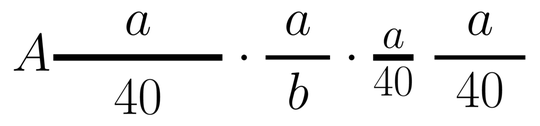
Addendum.
You might want to use tikz.
You can adjust the parameters as you see fit.
Note that the effects depend on the size of the font.
Also, a line that is too thick (>2pt) greatly increases the distance to the fractional line.
If you go in to see how tikz works in this case, you can replace the \path command with \draw.
\documentclass[12pt,addpoints]{exam}
        \usepackage{amsmath}
        \usepackage{tikz}
    \newcommand\myfrac[5]{%
        \genfrac{}{}{#1}{0}{%
        \begin{tikzpicture}[baseline=0pt]
            \path[line width=0pt] (0,0) -- (0,#3) -- (#2,#3) -- (#2,0) -- (0,0);%
            \node at (#2/2, #3/2) {$#4$};%
        \end{tikzpicture}}
        {%
        \begin{tikzpicture}[baseline=-#3-#1]
            \path[line width=0pt] (0,0) -- (0,#3) -- (#2,#3) -- (#2,0) -- (0,0);%
            \node at (#2/2, #3/2) {$#5$};%
        \end{tikzpicture}}
        }

    \begin{document}
    \Huge

    % the thickness of the fractional line
   $$\myfrac{0.2pt}{0pt}{0pt}{a}{b}\cdot
     \myfrac{1pt}{0pt}{0pt}{a}{b}\cdot
     \myfrac{2pt}{0pt}{0pt}{a}{b}\cdot
     \myfrac{4pt}{0pt}{0pt}{a}{b}$$

    % the length of the fractional line
   $$\myfrac{1pt}{20pt}{0pt}{a}{b}\cdot
     \myfrac{1pt}{40pt}{0pt}{a}{b}\cdot
     \myfrac{1pt}{60pt}{0pt}{a}{b}\cdot
     \myfrac{1pt}{80pt}{0pt}{a}{b}$$

    % the distance between the fractional line and the numbers
   $$\myfrac{1pt}{0pt}{0pt}{a}{b}\cdot
     \myfrac{1pt}{0pt}{40pt}{a}{b}\cdot
     \myfrac{1pt}{0pt}{60pt}{a}{b}\cdot
     \myfrac{1pt}{0pt}{90pt}{a}{b}$$

\end{document}
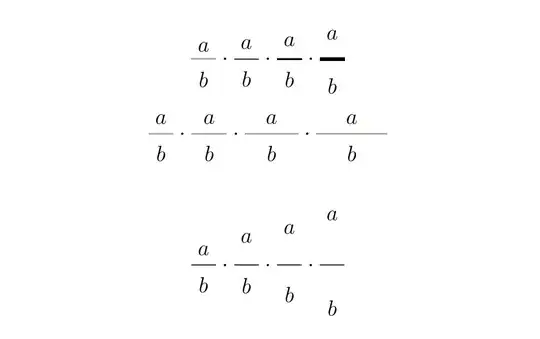
Note.
As for the distance from the fractional line according to @barbara beeton - this is a TeX error. See her comment to answer.


