3

I would like to develop a tabular table like this. enter image description here

However, when I use the reference code from https://www.overleaf.com/learn/latex/Tables#Creating_a_simple_table_in_LaTeX , with code:

\documentclass{article}
\usepackage{tabularx}
\begin{document}
\begin{tabularx}{0.8\textwidth} { 
  | >{\raggedright\arraybackslash}X 
  | >{\centering\arraybackslash}X 
  | >{\raggedleft\arraybackslash}X | }
 \hline
 Place/Transition & Explanation & Time  \\
 \hline
 T_1 and T_(2(n+1))  & Robot operation which relates to loadlocks. Transition T_1indicates that wafer unloading from the loadlocks and T_(2(n+1)) means that the robot loads the wafer to the loadlocks. & w \\
\hline
 item 31  & item 32  & item 33 \\

\hline \end{tabularx} \end{document}

The result is as follows.

enter image description here

Perhaps, does anyone have any other reference to create a tabular table that I want, please?

When I Replace \begin{tabularx}{0.8\textwidth} by \noindent\begin{tabularx}{\linewidth} , here is the result:

enter image description here Thank you in advance.

  • 1
    T_1 and T_(2(n+1)) are supposed to be in math mode, right? While you're at it, shouldn't T_(2(n+1)) be T_{2(n+1)}? – Mico Mar 01 '23 at 06:56
  • Yes, that's right. But my main concern right now is not on the math mode of T_1 etc. My question is on the tabular table format, thank you. – Nicholas TI Mar 01 '23 at 07:10
  • Once you fix the math-mode syntax errors, your table will compile. Incidentally, you may find the table to be more pleasing to the eye if you use l and c, respectively, as the column types for the first and third columns. – Mico Mar 01 '23 at 07:15
  • as your image shows the t_1 is your main concern if you get any error the pdf is not intented to be usable. – David Carlisle Mar 01 '23 at 07:21
  • Hi @Mico, do you mind explaining to me what is "l" and "c" and how to do so, please? Thank you. – Nicholas TI Mar 01 '23 at 07:28
  • @NicholasTI - The column types l and c stand for "left" and "center", respectively. – Mico Mar 01 '23 at 08:31

2 Answers2

4

The problem is, as stated in the comments, that you omit the necessary syntax for math mode. Because of this, TeX will at some point read a _ which is only a valid character in math mode. Hence, it will switch to math mode automatically, but since it does not know where the math mode should end, it keeps typesetting in math mode which results in this strange output.

It is very easy to solve this problem by using the correct syntax for math mode. Since you don't need pragraphs in columns one and three, you could also switch to another column defintion:

\documentclass{article}
\usepackage{tabularx}

\begin{document} \begin{tabularx}{0.8\textwidth} { | l | >{\raggedright\arraybackslash}X | c | } \hline Place/Transition & Explanation & Time \ \hline $T_1$ and $T_{2(n+1)}$ & Robot operation which relates to loadlocks. Transition $T_1$ indicates that wafer unloading from the loadlocks and $T_{2(n+1)}$ means that the robot loads the wafer to the loadlocks. & w \ \hline item 31 & item 32 & item 33 \ \hline \end{tabularx} \end{document}
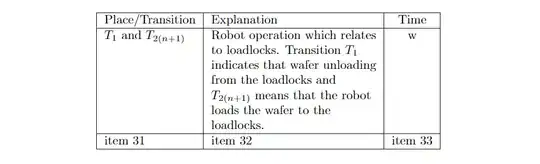
enter image description here

An alternative solution could be created with the help of the booktabs package, which can help you reduce the amount of borders between cells:

\documentclass{article}
\usepackage{tabularx}
\usepackage{booktabs}

\begin{document} \renewcommand{\arraystretch}{1.25} \begin{tabularx}{0.8\textwidth} { l >{\raggedright\arraybackslash}X c } \toprule Place/Transition & Explanation & Time \ \midrule $T_1$ and $T_{2(n+1)}$ & Robot operation which relates to loadlocks. Transition $T_1$ indicates that wafer unloading from the loadlocks and $T_{2(n+1)}$ means that the robot loads the wafer to the loadlocks. & w \ item 31 & item 32 & item 33 \ \bottomrule \end{tabularx} \end{document}
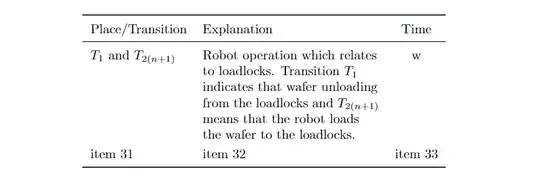
enter image description here


Note that you might want to replace 0.8\textwidth by \linewidth if you want to extend the table to the width of a text column in a two-column layout:

\documentclass[journal]{IEEEtran}
\usepackage{lipsum}
\usepackage{tabularx}

\begin{document}

\lipsum[1]

\noindent% \begin{tabularx}{\linewidth} { | l | >{\raggedright\arraybackslash}X | c | } \hline Place/Transition & Explanation & Time \ \hline $T_1$ and $T_{2(n+1)}$ & Robot operation which relates to loadlocks. Transition $T_1$ indicates that wafer unloading from the loadlocks and $T_{2(n+1)}$ means that the robot loads the wafer to the loadlocks. & w \ \hline item 31 & item 32 & item 33 \ \hline \end{tabularx}

\newpage

Right column

\end{document}
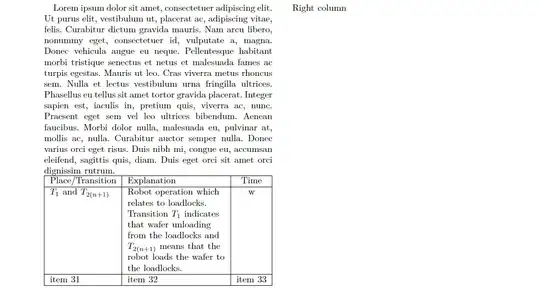
enter image description here

  • Dear @Jasper , the overleaf template that I use now is \documentclass[journal]{IEEEtran} with two columns. What should I add on the code that you provided so that the table could be fit into the template? thank you. – Nicholas TI Mar 01 '23 at 08:54
  • @NicholasTI Replace \begin{tabularx}{0.8\textwidth} by \noindent\begin{tabularx}{\linewidth}, and you could maybe use a smaller font for the tabulars, if you want to put larger amounts of text in there. – Jasper Habicht Mar 01 '23 at 08:57
  • Hi @jasper , I used \noindent\begin{tabularx}{\linewidth} , however the table does not change. I put the screenshot by updating the question above. thank you. – Nicholas TI Mar 01 '23 at 09:15
  • @NicholasTI This should rather be asked as a new question, I fear. I cannot see what you are doing in your code. I can just tell you what works for me (see my edit). Also, maybe have a look here: https://tex.stackexchange.com/q/332902/47927 – Jasper Habicht Mar 01 '23 at 09:18
  • Hi @jasper, I posted it as a new question here: https://tex.stackexchange.com/q/676901/288908 , thank you. – Nicholas TI Mar 01 '23 at 09:27
4

Here's an idea that's complementary to the second table in @JasperHabicht's answer: Get rid of the whitespace padding at either end, and allow line breaks in column 1.

enter image description here

\documentclass{article}
\usepackage{tabularx} % for 'tabularx' env. and 'X' column type
\usepackage{booktabs} % for well-spaced horizontal rules
\usepackage{ragged2e} % for '\RaggedRight' macro
\newlength\mylen

\begin{document}

\begin{center} \settowidth\mylen{Transition} % target width of column 1 \begin{tabularx}{0.8\textwidth} {@{} >{\RaggedRight}p{\mylen} >{\RaggedRight}X c @{}} \toprule Place\slash Transition & Explanation & Time \ \midrule $T_1$ and $T_{2(n+1)}$ & Robot operation which relates to loadlocks. Transition $T_1$ indicates that wafer unloading from the loadlocks, and $T_{2(n+1)}$ means that the robot loads the wafer to the loadlocks. & $w$ \ \addlinespace item 31 & item 32 & item 33 \ \bottomrule \end{tabularx} \end{center} \end{document}

Mico
  • 506,678