It's still not really clear, what you want. However, here an example how to use textpos to print images at the four corners of one page (in the example the first one):
\documentclass[14pt]{extarticle}
\usepackage{fontspec}
%\setmainfont{industry-blackitalic}% Removed, because not essential for the problem.
%\usepackage{lipsum}% Removed, because also loaded by mwe
\usepackage{mwe}
\usepackage[absolute]{textpos}
\usepackage{graphics}
\pagenumbering{gobble}
\begin{document}
\begin{textblock}{\paperwidth}(0mm,0mm)% Upper
  \raggedright% left edge of page
  \includegraphics[page=1,width=4cm]{example-image-a4-numbered}
\end{textblock}
\begin{textblock}{\paperwidth}(0mm,0mm)% Upper
  \raggedleft% right edge of page
  \includegraphics[page=2,width=4cm]{example-image-a4-numbered}
\end{textblock}
\begin{textblock}{\paperwidth}(0mm,\paperheight)% Lower
  \raggedright% left edge of page
  \raisebox{0pt}[0pt][0pt]{\includegraphics[page=3,width=4cm]{example-image-a4-numbered}}
\end{textblock}
\begin{textblock}{\paperwidth}(0mm,\paperheight)% Lower
  \raggedleft% right edge of page
  \raisebox{0pt}[0pt][0pt]{\includegraphics[page=4,width=4cm]{example-image-a4-numbered}}
\end{textblock}
\lipsum [1-1]%\\% You should never use \\ at the end of a paragraph!


\newpage %------ II pagina ------------
\lipsum [1-1]%\\% You should never use \\ at the end of a paragraph!


\newpage %-------- III pagina ------------
\lipsum [1-1]%\\% You should never use \\ at the end of a paragraph!


\newpage %--------IV pagina --------------
\lipsum[1-1]


\end{document}
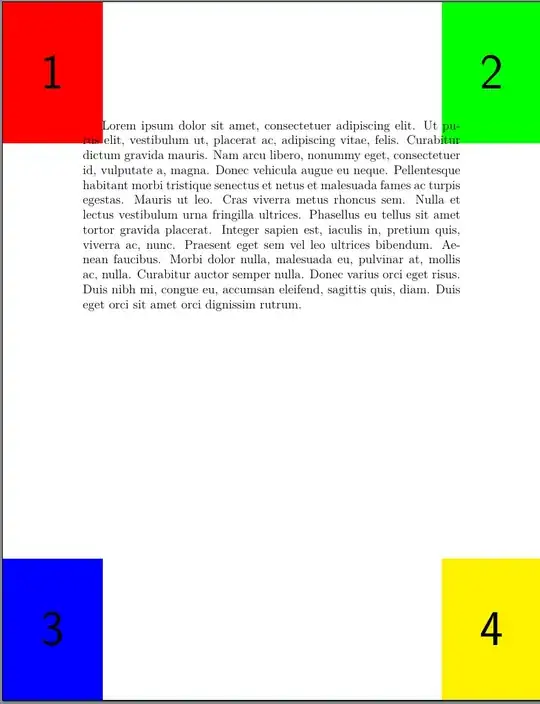
If you want the images instead at the corners of the text area just remove option absolute and replace \paperwidth by \textwidth and \paperheight by \textheight.
If you want the images at every page, using eso-pic would be easier:
\documentclass[14pt]{extarticle}
\usepackage{fontspec}
%\setmainfont{industry-blackitalic}% Removed, because not essential for the problem.
%\usepackage{lipsum}% Removed, because also loaded by mwe
\usepackage{mwe}
\usepackage{eso-pic}
\usepackage{adjustbox}
\usepackage{graphics}
\pagenumbering{gobble}
\AddToShipoutPictureBG{% put the images in the background of every page
  \AtPageUpperLeft{% upper left corner of the page
    \adjincludegraphics[page=1,width=4cm,valign=T]{example-image-a4-numbered}%
  }%
  \AtPageUpperLeft{% upper
    \makebox[\paperwidth][r]{% right corner of the page
      \adjincludegraphics[page=2,width=4cm,valign=T]{example-image-a4-numbered}%
    }%
  }%
  \AtPageLowerLeft{% lower left corner of the page
    \includegraphics[page=3,width=4cm]{example-image-a4-numbered}%
  }%
  \AtPageLowerLeft{% lower
    \makebox[\paperwidth][r]{% right corner of the page
      \includegraphics[page=3,width=4cm]{example-image-a4-numbered}%
    }%
  }%
}
\begin{document}
\lipsum [1-1]%\\% You should never use \\ at the end of a paragraph!


\newpage %------ II pagina ------------
\lipsum [1-1]%\\% You should never use \\ at the end of a paragraph!


\newpage %-------- III pagina ------------
\lipsum [1-1]%\\% You should never use \\ at the end of a paragraph!


\newpage %--------IV pagina --------------
\lipsum[1-1]

\end{document}

Once again, you can adapt these examples to put the images at the edges of the text area instead of the paper. To do so, once again replace \paperwidth by \textwidth and also replace \AtPageUpperLeft by \AtTextUpperLeft and \AtPageLowerLeft by \AtTextLowerLeft.
You can use this suggestion also to add the image(s) to only one page using the star-variant \AddToShipoutPictureBG*.
With an up-to-date LaTeX you can also use the shipout hooks:
\documentclass[14pt]{extarticle}
\usepackage{fontspec}
%\setmainfont{industry-blackitalic}% Removed, because not essential for the problem.
%\usepackage{lipsum}% Removed, because also loaded by mwe
\usepackage{mwe}
\usepackage{adjustbox}
\usepackage{graphics}
\pagenumbering{gobble}
\AddToHook{shipout/background}{% Put the images in the background of every page
  \put(0,0){% upper left corner
    \adjincludegraphics[page=1,width=4cm,valign=T]{example-image-a4-numbered}%
  }%
  \put(0,0){% upper
    \makebox[\paperwidth][r]{% right corner
      \adjincludegraphics[page=2,width=4cm,valign=T]{example-image-a4-numbered}%
    }%
  }%
  \put(0,-\pageheight){% lower left corner
    \includegraphics[page=3,width=4cm]{example-image-a4-numbered}%
  }%
  \put(0,-\pageheight){% lower
    \makebox[\paperwidth][r]{% right corner
      \includegraphics[page=4,width=4cm]{example-image-a4-numbered}%
    }%
  }%
}
\begin{document}
\lipsum [1-1]%\\% You should never use \\ at the end of a paragraph!


\newpage %------ II pagina ------------
\lipsum [1-1]%\\% You should never use \\ at the end of a paragraph!


\newpage %-------- III pagina ------------
\lipsum [1-1]%\\% You should never use \\ at the end of a paragraph!


\newpage %--------IV pagina --------------
\lipsum[1-1]

\end{document}
See the manuals of the used packages for more information about them. See the generic hook manual for information about using hooks.
Note: There are numerous other alternatives for placing images or other material in a fixed position on individual or all pages of a document. The ones shown here are probably the simplest and also the most commonly used. Another possibility, very popular with TikZ users, is shown in this answer to the already as comment linked question. As an example for rather unconventional solutions the use of package scrlayer-scrpage is shown here:
\documentclass[14pt]{extarticle}
\usepackage{fontspec}
%\setmainfont{industry-blackitalic}% Removed, because not essential for the problem.
%\usepackage{lipsum}% Removed, because also loaded by mwe
\usepackage{mwe}
\usepackage{adjustbox}
\usepackage{graphics}
\pagenumbering{gobble}
\usepackage{scrlayer-scrpage}
\pagestyle{plain}
\DeclareNewLayer[%
  background,%
  mode=picture,%
  page,
  contents={%
    \put(0,\paperheight){%
      \adjincludegraphics[page=1,width=4cm,valign=T]{example-image-a4-numbered}%
    }%
    \put(\paperwidth,\paperheight){%
      \makebox[0pt][r]{%
        \adjincludegraphics[page=2,width=4cm,valign=T]{example-image-a4-numbered}%
      }%
    }%
    \put(0,0){%
      \includegraphics[page=3,width=4cm]{example-image-a4-numbered}%
    }%
    \put(\paperwidth,0){%
      \makebox[0pt][r]{%
        \includegraphics[page=4,width=4cm]{example-image-a4-numbered}%
      }%
    }%
  }%
]
{cornerimages}
\AddLayersToPageStyle{plain.scrheadings}{cornerimages}
\begin{document}
\lipsum [1-1]%\\% You should never use \\ at the end of a paragraph!


\newpage %------ II pagina ------------
\lipsum [1-1]%\\% You should never use \\ at the end of a paragraph!


\newpage %-------- III pagina ------------
\lipsum [1-1]%\\% You should never use \\ at the end of a paragraph!


\newpage %--------IV pagina --------------
\lipsum[1-1]

\end{document}
A nice feature of this suggestion is, that you can add and remove the newly declared layer to and from every page style at every page you want. You even can declare new page styles with or without this layer. So something like \pagenumbering{gobble} wouldn't be necessary to have pages with the images only:
\documentclass[14pt]{extarticle}
\usepackage{fontspec}
%\setmainfont{industry-blackitalic}% Removed, because not essential for the problem.
%\usepackage{lipsum}% Removed, because also loaded by mwe
\usepackage{mwe}
\usepackage{adjustbox}
\usepackage{graphics}
\usepackage{scrlayer-scrpage}
\DeclareNewLayer[%
  background,%
  mode=picture,%
  page,
  contents={%
    \put(0,\paperheight){%
      \adjincludegraphics[page=1,width=4cm,valign=T]{example-image-a4-numbered}%
    }%
    \put(\paperwidth,\paperheight){%
      \makebox[0pt][r]{%
        \adjincludegraphics[page=2,width=4cm,valign=T]{example-image-a4-numbered}%
      }%
    }%
    \put(0,0){%
      \includegraphics[page=3,width=4cm]{example-image-a4-numbered}%
    }%
    \put(\paperwidth,0){%
      \makebox[0pt][r]{%
        \includegraphics[page=4,width=4cm]{example-image-a4-numbered}%
      }%
    }%
  }%
]
{cornerimages}
\DeclareNewPageStyleByLayers{imagepagestyle}{cornerimages}
\pagestyle{imagepagestyle}
\begin{document}
\pagestyle{empty}
\lipsum[1-3]
\thispagestyle{imagepagestyle}% Use the images only on this page
\lipsum[4-10]
\pagestyle{imagepagestyle}% And from this page.
\lipsum
\end{document}


minipage? It using aminipagerelevant for the question? Should the image be printed on the bottom right edge of the paper, the text area or theminipage? Please add a minimal working example and maybe additional information to make all this clear. – cabohah Mar 02 '23 at 16:25textpos,eso-pic, hookshipout/backgroundorshipout/foreground, TikZ. – cabohah Mar 02 '23 at 16:30