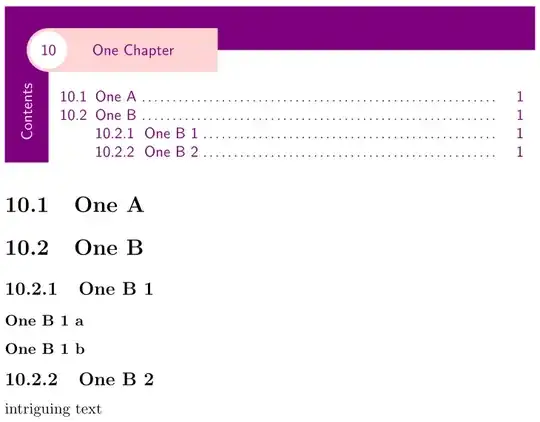
This might get you started, at least in a minimal example this works.
\documentclass{report}
\usepackage[explicit]{titlesec}
\usepackage{titletoc}
\usepackage{tikz}
\colorlet{chaptercolorA}{violet}
\colorlet{chaptercolorB}{pink!70}
\newlength\chapterrulewd\setlength\chapterrulewd{1cm}
\newlength\chapterruledist\setlength\chapterruledist{0.25cm}
\newlength\chapterruleover\setlength\chapterruleover{0.25cm}
\newlength\chapterbubblewd\setlength\chapterbubblewd{2pt}
\titleformat\chapter[block]
  {\sffamily\startcontents[chapter]}
  {}
  {0pt}
  {%
    \begin{tikzpicture}
      [
        titletext/.style=%
          {%
             text=chaptercolorA
            % to get nice spacing regardless of ascenders or descenders, if you
            % change the \chapterrulewd you'll need to adjust these
            ,text height=.615\chapterrulewd
            ,text depth=.385\chapterrulewd
          }
      ]
      \node
        [
           text width=\linewidth-\chapterruledist-\chapterrulewd-\chapterruleover
          ,text=chaptercolorA
          ,inner sep=0pt
        ]
        (toc)
        {%
          \printcontents[chapter]{}{1}[\value{secnumdepth}]
            {%
              % {level}[indent of entry text]{}{numwd}{dotspace}
              \dottedcontents{section}[2.3em]{}{2.3em}{4pt}%
              \dottedcontents{subsection}[5.5em]{}{3.2em}{4pt}%
              % add more formatting levels here if you need them
            }%
        };
      \path
        (toc.north west)
          ++(-\chapterruledist-.5\chapterrulewd,\chapterruledist+\chapterrulewd)
          coordinate (tl)
        (toc.south west-|tl) coordinate (bl)
        (toc.north east|-tl)++(\chapterruleover,0) coordinate (tr)
        (tl)++(.5\chapterrulewd,-.5\chapterrulewd) coordinate (bb)
        ;
      \draw[line width=\chapterrulewd,chaptercolorA] (bl) -- (tl) -- (tr);
      \node[rotate=90,anchor=east,text=white,inner sep=0]
        at (tl|-toc.north)
        {Contents};
      \node
        [
          anchor=west, fill=chaptercolorB, line width=0,
          inner ysep=0,inner xsep=1cm, titletext
        ]
        at (bb) {#1};
      \draw[chaptercolorB,line width=\chapterbubblewd,fill=white]
        (bb) circle[radius=0.5(\chapterrulewd-\chapterbubblewd)];
      \node[titletext] at (bb) {\thechapter};
    \end{tikzpicture}%
  }
% some spacing adjustments if you need them
\titlespacing\chapter{0pt}{0pt}{0pt}[0pt]
\begin{document}
\setcounter{chapter}{9}
\chapter{One Chapter}
\section{One A}
\section{One B}
\subsection{One B 1}
\subsubsection{One B 1 a}
\subsubsection{One B 1 b}
\subsection{One B 2}
intriguing text
\end{document}


articledoesn't have\chapters, wouldn't it make more sense to start off withreportorbook? – Skillmon Mar 04 '23 at 12:54\documentclass...to\end{document}} that we can compile that shows the problem and what you have done to solve it. This is not a "do it for me" site. – Peter Wilson Mar 04 '23 at 18:34tcolorbox(ortikz) andtitletoc. Look for example here and here. – alchemist Mar 04 '23 at 20:47