To link to an arbitrary piece of text you can use a combination of \hyperlink and \hypertarget. From the hyperref manual:
A simple internal link is created with \hypertarget, with two parameters of an anchor name, and anchor text. \hyperlink has two arguments, the name of a hypertext object defined somewhere by \hypertarget, and the text which be used as the link on the page.
If you want to link to a normal lbel, for example a section, then you can use \hyperref[label name]{link text}. Note that for some reason the label name is an optional argument with []. The brackets have special meaning to forest so if you want to put this into a node then it needs to be surrounded by curly brackets.
MWE:
\documentclass{article}
\usepackage[colorlinks]{hyperref}
\usepackage{forest}
\forestset{
    empty nodes/.style={
    for tree={calign=fixed edge angles},
    delay={where content={}{shape=coordinate,
           anchor=north}{}
           },
                            }
            }
\begin{document}
\begin{forest}
[{\hyperref[sec:omega]{$\Omega$}}, empty nodes
[\hyperlink{stm:G}{G}]
[[\hyperlink{stm:B}{B}][\hyperlink{stm:Z}{Z}[\hyperlink{stm:H}{H}][\hyperlink{stm:AR}{AR}]]]]
\end{forest}
\section{Abbreviations}
\hypertarget{stm:G}{G -- Goose}\\
\hypertarget{stm:B}{B -- Bear}\\
\hypertarget{stm:Z}{Z -- Zebra}\\
\hypertarget{stm:H}{H -- Horse}\\
\hypertarget{stm:AR}{AR -- Armadillo}
\section{Omega}
\label{sec:omega}
Omega is a big O.
\end{document}
Result:
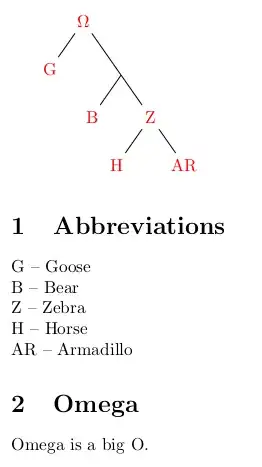
Note that in most pdf viewers the position of \hypertarget is not entirely correct, it links to the bottom of the line which means the link jumps past the line itself (i.e., the bottom of the line becomes the top of the view, which means the line itself is not visible). There are some workarounds in hypertarget seems to aim a line too low, but for this particular use case it might make sense to either put one link to the Abbreviations section somewhere (for example in the caption of the tree) or to have separate (sub)sections explaining each item.
Alternatively use a glossary. In that case the links are added automatically.
\documentclass{article}
\usepackage[colorlinks]{hyperref}
\usepackage[acronym,nomain,nonumberlist]{glossaries}
\makeglossaries
\newacronym{abG}{G}{Goose}
\newacronym{abB}{B}{Bear}
\newacronym{abZ}{Z}{Zebra}
\newacronym{abH}{H}{Horse}
\newacronym{abAR}{AR}{Armadillo}
\usepackage{forest}
\forestset{
    empty nodes/.style={
    for tree={calign=fixed edge angles},
    delay={where content={}{shape=coordinate,
           anchor=north}{}
           },
                            }
            }
\begin{document}
\begin{forest}
[$\Omega$, empty nodes
[\acrshort{abG}]
[[\acrshort{abB}][\acrshort{abZ}[\acrshort{abH}][\acrshort{abAR}]]]]
\end{forest}
\printglossary[type=\acronymtype,title=Stemma abbreviations]
\end{document}
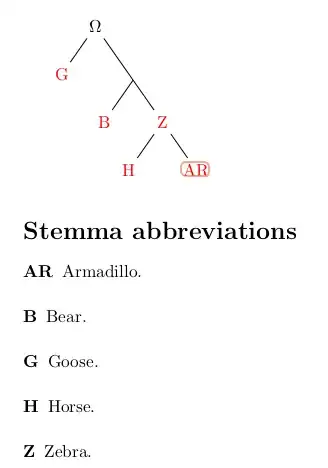
Note that this needs a run of the auxiliary program makeglossaries yourfile after the first compilation. Also note that this list is sorted.


\begin{document},\end{document}so cannot compile. The next issue is it is difficult to see what you are trying to achieve, could you make your code compile please and also add an example to your code that shows what you would like? – JamesT Mar 29 '23 at 02:19