Considering @DavidCarlisle comment:
\documentclass[12pt]{article}
%---------------- show page layout. don't use in a real document!
\usepackage{showframe}
\renewcommand\ShowFrameLinethickness{0.15pt}
\renewcommand*\ShowFrameColor{\color{red}}
%---------------------------------------------------------------%
%\usepackage[utf8]{inputenc}  % it is part of LaTeX, you not need to load anymore
%\usepackage{float}           % not used
%\usepackage{makecell}        % not used

\usepackage{array}            % needed for define m column type
\usepackage{multirow}
\begin{document}
\section{Introduction}
\begin{table}[!htbp]
\small
%\begin{center}             % table is nicer, if you replace it with \centering
\begin{tabular}{ |>{\centering\arraybackslash}m{2cm}||c|c|c|c|c| }
\hline
\multirow{2}{*}{} & \multicolumn{5}{c|}{Some text} \
\cline{2-6}
& 1 & 2 & 3 & 4 & 5 \
\hline
\hline
Row 1 & val1 & val2 & val2 & val3 & val4 \
\hline
Row 2 but this one is very long & val1 centered & val2 centered & val2 centered & val3 centered & val4 centered \
\hline
\end{tabular}
\end{center}
\caption{table} \label{lbl}
\end{table}
\end{document}
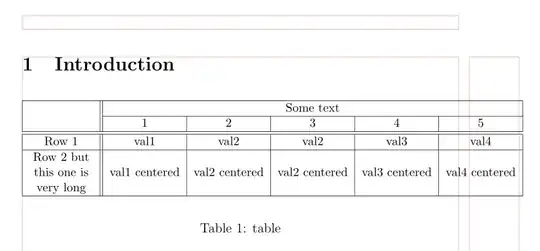
(red lines indicate page layout)
As you can see, your table is wider than available space for text in page. To correct this, you have two options:
- increase
\textwidth by use of geometry package
- enables automatic split cells contents in all cell in table. For this you should define
m column type or use tabularx table, where redefine X columns to
\renewcommand\tabularxcolumn[1]{m{#1}}
or use tabularraypackage.
An example for second options which use tabularray package:
\documentclass[12pt]{article}
\usepackage{tabularray}
\begin{document}
\section{Introduction}
    \begin{table}[!htbp]
    \small
\begin{tblr}{hlines, vlines,
             colspec = {Q[c, m, wd=20mm] *{5}{X[c, m]}}
             }
\SetCell[r=2]{c}
    &   \SetCell[c=5]{c}    Some text
        &   &   &   &   \
    & 1 & 2 & 3 & 4 & 5 \
Row 1 & val1 & val2 & val2 & val3 & val4 \
Row 2 but this one is very long
    & val 1 centered & val 2 centered & val 2 centered & val 3 centered & val 4 centered \
\end{tblr}
\caption{table} \label{lbl}
    \end{table}
\end{document}
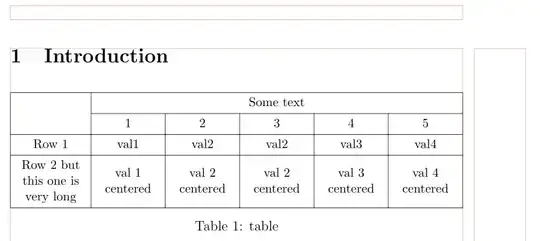


mnotp– David Carlisle Mar 31 '23 at 18:07\multirow{2}{*}{}does nothing useful; omit it. – Mico Mar 31 '23 at 19:01