Here an example using KOMA-Script package scrlayer-scrpage:
\documentclass{book}
\usepackage[automark,pagestyleset=KOMA-Script,headsepline]{scrlayer-scrpage}
\newlength{\outermarkoffset}
\setlength{\outermarkoffset}{\dimexpr 1in+\topmargin+\headheight+\headsep\relax}
\DeclareNewLayer[%
  background,
  oddpage,
  outermargin,
  addvoffset=\dimexpr \outermarkoffset+\baselineskip\value{chapter}2\relax,
  contents={%
    \raggedleft\pagemark\hspace*{1em}\par
  },
]{oddpagenumber}
\DeclareNewLayer[%
  background,
  evenpage,
  outermargin,
  addvoffset=\dimexpr \outermarkoffset+\baselineskip\value{chapter}2\relax,
  contents={%
    \raggedright\hspace*{1em}\pagemark\par
  },
]{evenpagenumber}
\AddLayersToPageStyle{scrheadings}{oddpagenumber,evenpagenumber}
\AddLayersToPageStyle{plain.scrheadings}{oddpagenumber,evenpagenumber}
\AddToHook{cmd/appendix/before}{%
  \cleardoublepage
  \addtolength{\outermarkoffset}{\dimexpr\baselineskip\value{chapter}2\relax}%
}
\usepackage{mwe}
\begin{document}
\tableofcontents
\blinddocument
\blinddocument
\blinddocument
\blinddocument
\blinddocument
\blinddocument
\appendix
\blinddocument
\end{document}
If you are already using package fancyhdr, you can use scrlayer-fancyhdr instead:
\documentclass{book}
\usepackage{scrlayer-fancyhdr}
\pagestyle{fancy}
\fancypagestyle{plain}{%
  \fancyhf{}%
  \fancyfoot[C]{\pagemark}%
  \renewcommand*{\headrulewidth}{0pt}%
}
\newlength{\outermarkoffset}
\setlength{\outermarkoffset}{\dimexpr 1in+\topmargin+\headheight+\headsep\relax}
\DeclareNewLayer[%
  background,
  oddpage,
  outermargin,
  addvoffset=\dimexpr \outermarkoffset+\baselineskip\value{chapter}2\relax,
  contents={%
    \raggedleft\pagemark\hspace*{1em}\par
  },
]{oddpagenumber}
\DeclareNewLayer[%
  background,
  evenpage,
  outermargin,
  addvoffset=\dimexpr \outermarkoffset+\baselineskip\value{chapter}2\relax,
  contents={%
    \raggedright\hspace*{1em}\pagemark\par
  },
]{evenpagenumber}
\AddLayersToPageStyle{@everystyle@}{oddpagenumber,evenpagenumber}
\AddToHook{cmd/appendix/before}{%
  \cleardoublepage
  \addtolength{\outermarkoffset}{\dimexpr\baselineskip\value{chapter}2\relax}%
}
\usepackage{mwe}
\begin{document}
\tableofcontents
\blinddocument
\blinddocument
\blinddocument
\blinddocument
\blinddocument
\blinddocument
\appendix
\blinddocument
\end{document}
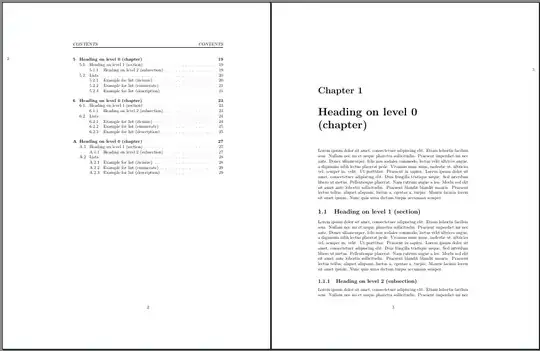
For more information about scrlayer-fancyhdr see the manual of that package.
For more information about \DeclareNewLayer and \AddLayersToPageStyle see the KOMA-Script manuals.
For more information about \AddToHook see lthooks-doc.pdf, which is part of every LaTeX distribution.


