I found the solution after a hard day with google myself:
I added the line:
\glssetcategoryattribute{general}{glossdescfont}{emph}
before the \printglossary - command.
So the working code is:
% ---------------------------------------------
% - Änderung des Headers und Erzeugen des Abkürzungsverzeichnisses
% - Fomatierung des Eintrages in kursiv
% ---------------------------------------------
\renewcommand\entryname{Abk.} % Änderung des Namens der 1. Spalte
\renewcommand\descriptionname{Bedeutung} % Änderung des Namens der 2. Spalte
\renewcommand\pagelistname{Seite\} % Änderung des Namens der 3. Spalte
\renewcommand{\glsnamefont}[1]{\textbf{#1}}
\glssetcategoryattribute{general}{glossdescfont}{emph}  % Formatierung der Spalte 'Bedeutung' in kursiv in beiden Verzeichnissen.
\printglossary[style=long3colheader, type=\acronymtype,title={Abkürzungen}] % Erstellen des Abkürzungsverzeichnisses  3 Spalten und Änderung des Titels.
% ---------------------------------------------
\newpage % \newpage just to demonstrate that links are correct
% ---------------------------------------------
% ---------------------------------------------
% - Änderung des Headers und Erzeugen des Glossars
% ---------------------------------------------
\renewcommand\entryname{Begriff} % Änderung des Namens der 1. Spalte
\renewcommand\descriptionname{Bedeutung} % Änderung des Namens der 2. Spalte
\renewcommand*\pagelistname{Seite\} % Änderung des Namens der 3. Spalte
\renewcommand{\glsnamefont}[1]{\textbf{#1}} % Einträge der ersten Spalte werden fett
\printglossary[style=long3colheader, type=main, title={Glossar}] % Erstellen des Glossars mit 3 Spalten und Änderung des Titels.
% ---------------------------------------------
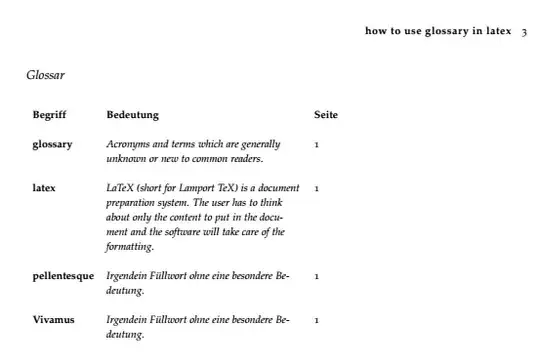
Thanks to all who tried to help me.


\printglossary[style=long3colheader, type=main, title={Glossar}]
– Isegrimm Apr 09 '23 at 07:22