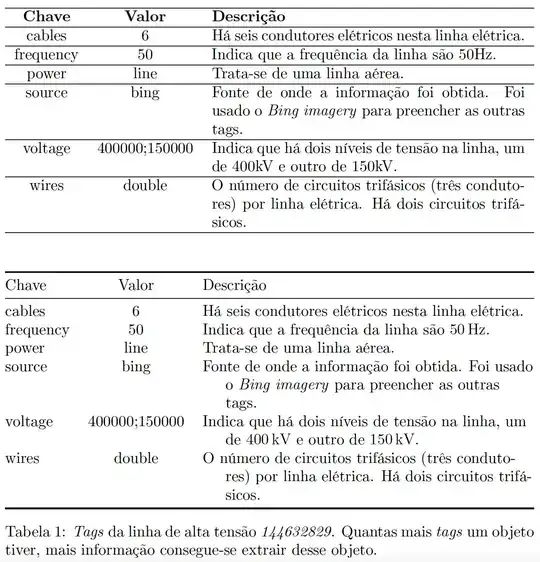
The link that @barbarabeeton has provided in a comment should give you a good overview of the options available to you. To pursue one of these options: I suggest you load the tabularx package, employ its tabularx environment, set the table's target width to \textwidth, and use the X column type for the third column; line breaking will occur in the 3 final rows. The result of making these changes, which fix the most urgent formatting problem, is shown in the first table below.
In addition, I'd suggest you give the table a more open and inviting "look" by getting rid of most lines drawn with \hline and by using the macros of the booktabs package for the three remaining three lines; see the code below for an implementation of the idea. Next, do you really need bold-facing of the material in the header row? Employing the \qty macro (provided by the siunitx package) to typeset quantities and associated scientific units would add a nice touch, as would providing for automatic hanging indentation of continuation lines in the third column. The result of making these additional changes is shown in the second table below.
\documentclass{article}
\usepackage[T1]{fontenc}
\usepackage[portuguese]{babel} % or 'brazilian'?
%\usepackage{newpxtext,newpxmath} % optional
\usepackage{tabularx} % for 'tabularx' env. and 'X' column type
\usepackage{ragged2e} % for '\RaggedRight' macro
%% 'X' column type with automatic hanging indentation and no
%% full justification:
\newcolumntype{L}{>{\RaggedRight\hangindent=1.5em\hangafter=1}X}
\usepackage{booktabs} % for well-spaced horizontal rules
\usepackage{siunitx}  % for '\qty' macro; see https://ctan.org/pkg/siunitx
\begin{document}
\begin{table}[h!]
%% first (minimalist) version: employ a 'tabularx' environment
\begin{tabularx}{\textwidth}{c c X}
    \hline
    \textbf{Chave} & \textbf{Valor} & \textbf{Descrição} \
    \hline
    cables & 6 &  Há seis condutores elétricos nesta linha elétrica.\
    \hline
    frequency & 50 & Indica que a frequência da linha são 50Hz. \
    \hline
    power & line & Trata-se de uma linha aérea. \
    \hline
    source & bing & Fonte de onde a informação foi obtida. Foi usado o \emph{Bing imagery} para preencher as outras tags. \
    \hline
    voltage & 400000;150000 & Indica que há dois níveis de tensão na linha, um de 400kV e outro de 150kV. \
    \hline
    wires & double & O número de circuitos trifásicos (três condutores) por linha elétrica. Há dois circuitos trifásicos.  \
    \hline
\end{tabularx}
\bigskip\bigskip
%% second version: apply further tweaks
\begin{tabularx}{\textwidth}{@{} l l L @{}}
\toprule
Chave & Valor & Descrição \
\midrule
cables & 6 &  Há seis condutores elétricos nesta linha elétrica.\
frequency & 50 & Indica que a frequência da linha são \qty{50}{\hertz}. \
power & line & Trata-se de uma linha aérea. \
source & bing & Fonte de onde a informação foi obtida. Foi usado o \emph{Bing imagery} para preencher as outras tags. \
voltage & 400000;150000 & Indica que há dois níveis de tensão na linha, um de \qty{400}{\kilo\volt} e outro de \qty{150}{\kilo\volt}. \
wires & double & O número de circuitos trifásicos (três condutores) por linha elétrica. Há dois circuitos trifásicos.  \
\bottomrule
\end{tabularx}
\caption{\emph{Tags} da linha de alta tensão \emph{144632829}. Quantas mais \emph{tags} um objeto tiver, mais informação consegue-se extrair desse objeto.}
\label{tabela_2}
\end{table}
\end{document}


