Like this?
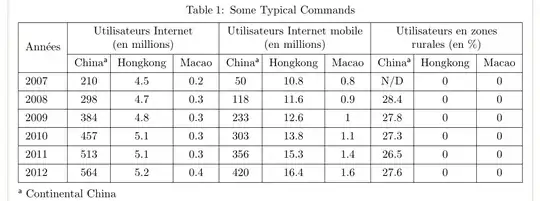
One option with simple code is to use talltblr of tabularray package and at table footnote explain that with "China" is considered Continental China:
\documentclass[twocolumn]{article}
%---------------- show page layout. don't use in a real document!
\usepackage{showframe}
\renewcommand\ShowFrameLinethickness{0.15pt}
\renewcommand*\ShowFrameColor{\color{red}}
%---------------------------------------------------------------%
\usepackage{tabularray}
\begin{document}
    \begin{table}
    \centering
\begin{talltblr}[
caption = {Some Typical Commands},
  label = {tab:?},
note{a} = {Continental China}
                ]{hlines, vlines,
                  colspec = { l {9}{c}}
                  }
\SetCell[r=2]{c}    Années
    &   \SetCell[c=3]{c}    {Utilisateurs Internet\(en millions)}
        &   &   &   \SetCell[c=3]{c}    {Utilisateurs Internet mobile\(en millions)}
                    &   &   &   \SetCell[c=3]{c}    {Utilisateurs en zones\rurales (en %)}
                                &   &           \
        & China\TblrNote{a} & Hongkong  & Macao
        & China\TblrNote{a} & Hongkong  & Macao
        & China\TblrNote{a} & Hongkong  & Macao \
2007    & 210   &  4.5  & 0.2
        & 50    & 10.8  & 0.8
        & N/D   &  0    & 0                     \
2008    & 298   & 4.7   & 0.3
        & 118   & 11.6  & 0.9
        & 28.4  &  0    & 0                     \
2009    & 384   &  4.8  & 0.3
        & 233   & 12.6  & 1
        & 27.8  &  0    & 0                     \
2010    & 457   &  5.1  & 0.3
        & 303   & 13.8  & 1.1
        & 27.3  & 0     & 0                     \
2011    & 513   & 5.1   & 0.3
        & 356   & 15.3  & 1.4
        & 26.5  &  0    & 0                     \
2012    & 564   &  5.2  & 0.4
        & 420   & 16.4  & 1.6
        & 27.6  &  0    & 0                     \
\end{talltblr}
    \end{table*}
\end{document}
Edit:
Regarding to you comment, you can abbreviate "Hongkong" to HK too. With this the width of table further shrink and make a space to make all last nine columns equal width by use of X[c] column type insead c:
\documentclass[twocolumn]{article}
%---------------- show page layout. don't use in a real document!
\usepackage{showframe}
\renewcommand\ShowFrameLinethickness{0.15pt}
\renewcommand*\ShowFrameColor{\color{red}}
%---------------------------------------------------------------%
\usepackage{tabularray}
\begin{document}
    \begin{table}
    \centering
\begin{talltblr}[
caption = {Some Typical Commands},
  label = {tab:?},
note{a} = {Continental China},
note{b} = {Hongkong}
                ]{hlines, vlines,
                  colspec = { l {9}{X[c]}}
                  }
\SetCell[r=2]{c}    Années
    &   \SetCell[c=3]{c}    {Utilisateurs Internet\(en millions)}
        &   &   &   \SetCell[c=3]{c}    {Utilisateurs Internet mobile\(en millions)}
                    &   &   &   \SetCell[c=3]{c}    {Utilisateurs en zones\rurales (en %)}
                                &   &           \
        & China\TblrNote{a} & HK\TblrNote{b}  & Macao
        & China\TblrNote{a} & HK\TblrNote{b}  & Macao
        & China\TblrNote{a} & HK\TblrNote{b}  & Macao \
2007    & 210   &  4.5  & 0.2
        & 50    & 10.8  & 0.8
        & N/D   &  0    & 0                     \
2008    & 298   & 4.7   & 0.3
        & 118   & 11.6  & 0.9
        & 28.4  &  0    & 0                     \
2009    & 384   &  4.8  & 0.3
        & 233   & 12.6  & 1
        & 27.8  &  0    & 0                     \
2010    & 457   &  5.1  & 0.3
        & 303   & 13.8  & 1.1
        & 27.3  & 0     & 0                     \
2011    & 513   & 5.1   & 0.3
        & 356   & 15.3  & 1.4
        & 26.5  &  0    & 0                     \
2012    & 564   &  5.2  & 0.4
        & 420   & 16.4  & 1.6
        & 27.6  &  0    & 0                     \
\end{talltblr}
    \end{table*}
\end{document}
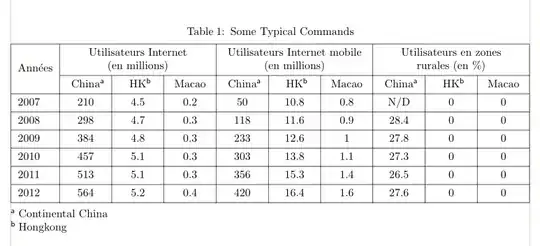


landscapeenviroment, of thepdflscapepackage to put the table in a landscape page. – Mane32 Apr 20 '23 at 18:20