Adjusting the cramped* style from another answer of mine to be even tighter and adding a supercramped style with even smaller distances.
(You don't need to use the width function measuring the size of element in math-mode, you can just use any dimension directly, even those dependent on the font size (em and ex).)
The \mtikzcd macro makes it so that you can keep using & inside the macro. amsmath's \text macro is used to provide somewhat of a scaling according to the surrounding math-style.
Code
\documentclass{article}
\usepackage{amsmath, tikz-cd}
\tikzcdset{
  /tikz/bullet/.style={shape=circle, fill, inner sep=+.13em, yshift=axis_height},
  cramped*/.style={
    arrows=overlay, /tikz/arrows={[scale=.6]}, line cap=round,
    every matrix/.append style={
      every outer matrix/.append style={inner sep=+0pt}},
    every cell/.append style={inner sep=+0pt, outer sep=.5*width("$\;$")},
    column sep/.evaluated=.75*width("${}\to{}$"),
    row sep/.evaluated=.75*width("${}\to{}$")},
  supercramped/.style={
    cramped*,  cells={outer sep=.25*width("$\;$")},
    column sep/.evaluated=.5*width("${}\to{}$"),
    row sep/.evaluated   =.5*width("${}\to{}$")}}
\newcommand*\mtikzcd[1][]{%
  \begingroup
    \let\texbullet\bullet % store old definition
    \def\bullet{|[bullet]|}% overwriting
    \catcode`\&=\active\mmtikzcd{#1}}
\newcommand*\mmtikzcd[2]{%
  \text{\begin{tikzcd}[cramped*,#1]#2\end{tikzcd}}\endgroup}
\begin{document}
\[
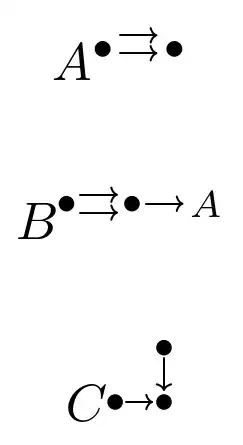
  A^{\mtikzcd{\texbullet \rar[shift left] \rar[shift right] & \texbullet}}
\]
[
  B^{\mtikzcd{\bullet \rar[shift left] \rar[shift right] & \bullet \rar & A}}
]
[
  C^{\mtikzcd[supercramped]{ & \bullet \dar \ \bullet \rar & \bullet}}
]
\end{document}
Output


tikz-cdwould be a way to draw it. It also has acrampedstyle but it might be wort to look into an alternative definition of it. – Qrrbrbirlbel May 22 '23 at 14:55