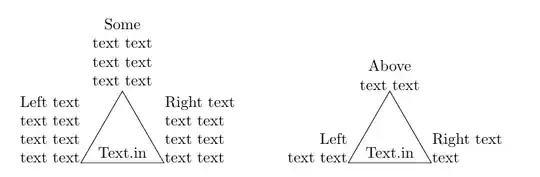
Here you have two solutions. One places text nodes after the triangle and second uses three labels to place the text.
\documentclass[border=5mm]{standalone}
\usepackage{tikz}
\usetikzlibrary{shapes.geometric, positioning}
\tikzset{
    buffer/.style={
        draw,
        shape border rotate=90,
        isosceles triangle,
        isosceles triangle apex angle=60,
        node distance=2cm,
        minimum height=2em
    },
    textblock/.style={text width=2cm, inner sep=0pt, align=#1},
}
\begin{document}
\begin{tikzpicture}
\node[buffer] (a) {Text.in};
\node[textblock=center, above= 1mm of a]{Some text text text text text text};
\node[textblock=left, above right= 0mm and 0mm of a.right corner]{Right text text text text text text text};
\node[textblock=right, above left= 0mm and 0mm of a.left corner]{Left text text text text text text text};
\end{tikzpicture}
\begin{tikzpicture}
\node[buffer, label={[textblock=center]above:Above text text},
label={[textblock=left, anchor=south west]right corner:Right text text},
label={[textblock=right, anchor=south east]left corner:Left text text},
] (a) {Text.in};
\end{tikzpicture}
\end{document}


\draw[align=center] (0,0) node[left]{x} --+(right:4) node[right]{y} --+(60:4) node[above]{z} --cycle;You just need to fill the node with content. – Qrrbrbirlbel Jun 19 '23 at 20:06labelkey but it makes the input a bit weird. – Qrrbrbirlbel Jun 19 '23 at 20:08