Done (thanks for the references to similar problems in the comments).
This is a rather basic example and can probably be adjusted to fit a broader set of applications. For now, it's a good start, though.
\documentclass{beamer}
\usetheme{metropolis}
\usepackage{adjustbox}
\usepackage{tikz}
\usetikzlibrary{positioning,arrows.meta}
% Base color for diagrams
\definecolor{diagrambasecolor}{HTML}{65a0b0}
\begin{document}
\begin{frame}{Demo}
    \begin{adjustbox}{max width=\textwidth}
        \begin{tikzpicture}[
                bigcircle/.style={ % style for the circles
                        node distance=22pt,
                        text width=1.6cm, % diameter
                        align=center, % center align
                        line width=1.5mm, % thickness of border
                        draw, % draw the border
                        circle, % shape
                        font=\bfseries\large % font type and size
                    },
                description/.style={
                        node distance=40pt
                    }
            ]
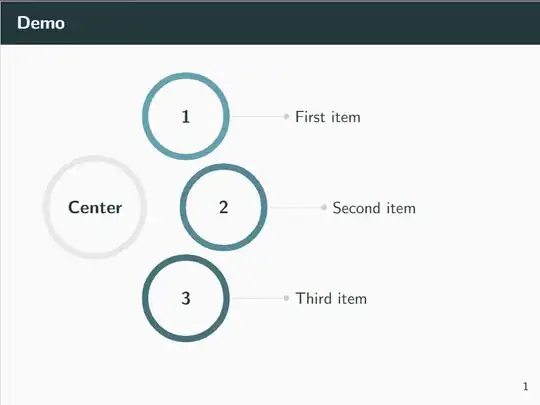
            \node [bigcircle,text width=2cm,draw=black!10] (center) {Center};
        \node [bigcircle,draw=diagrambasecolor,above right=of center] (subcircle1) {1};
        \node [description,right=of subcircle1] (description1) {First item};

        \node [bigcircle,draw=diagrambasecolor!85!black,right=of center] (subcircle2) {2};
        \node [description,right=of subcircle2] (description2) {Second item};

        \node [bigcircle,draw=diagrambasecolor!70!black,below right=of center] (subcircle3) {3};
        \node [description,right=of subcircle3] (description3) {Third item};

        % Draw lines towards the item descriptions
        \draw [-Circle,black!20,shorten <=2pt]
        (subcircle1) edge (description1)
        (subcircle2) edge (description2)
        (subcircle3) edge (description3);
    \end{tikzpicture}
\end{adjustbox}

\end{frame}
\end{document}
Result:


smartdiagrampackage, before. Seems to be rather bound to certain diagrams, so I don't see how I could easily create such a graphic with it. That's why I mentioned TikZ as the most likely way to go. – clel Jun 27 '23 at 15:51mindmapslibrary for TikZ. Of course, the default style of such mindmaps would need adjustments. – Jasper Habicht Jun 27 '23 at 17:55mindmapmakes circular arrangements pretty easy, so could have been the best starting point. For now, I came up with a simpler (and less powerful) solution. Possibly I (or somebody else) will revisit this and build a solution based on themindmaplibrary that is more versatile. – clel Jun 27 '23 at 18:01