The displaycquote environment includes a \cite to the entry key given in the first mandatory argument. So your display quote essentially automatically does \cite{bibid}. If you don't have a citation setup, where bibid is a valid key, you get the output for a missing citation.
If you don't want the citation here, use displayquote (without the c) without a mandatory argument for an entry key.
\documentclass[a4paper, 12pt]{report}
\usepackage{fontspec}
\usepackage[english, provide=*, bidi=basic, layout=counters.tabular]{babel}
\babelprovide{arabic}
\babelfont[arabic]{rm}{Traditional Arabic}
\babelfont{rm}[Renderer=Harfbuzz]{Times New Roman}
\usepackage[autostyle]{csquotes}
\begin{document}
\chapter{Temp}
\begin{displayquote}
«This is a temporary chapter. Number 256.»
\end{displayquote}
\end{document}
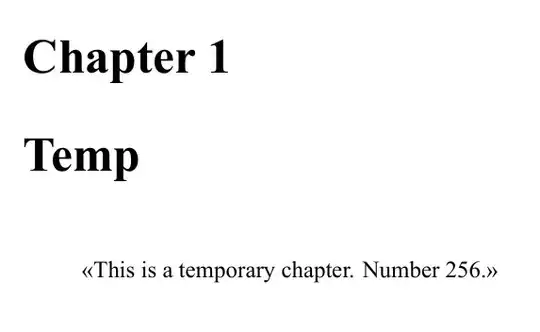
Note that you can make csquotes generate quotation marks in displayquote automatically. You won't have to type them yourself.
You could use the approach from How to force csquotes to show the quotations marks in block quotes?
\documentclass[a4paper, 12pt]{report}
\usepackage{fontspec}
\usepackage[english, provide=*, bidi=basic, layout=counters.tabular]{babel}
\babelprovide{arabic}
\babelfont[arabic]{rm}{Traditional Arabic}
\babelfont{rm}[Renderer=Harfbuzz]{Times New Roman}
\usepackage[autostyle]{csquotes}
\renewcommand{\mkblockquote}[4]{\openautoquote#1\closeautoquote#2#4#3}
\renewcommand{\mkbegdispquote}[2]{\openautoquote}
\renewcommand{\mkenddispquote}[2]{\closeautoquote#1#2}
\usepackage{kantlipsum}
\begin{document}
\chapter{Temp}
\begin{displayquote}
This is a temporary chapter. Number 256.
\end{displayquote}
\chapter{Other}
\kant[1]
\noindent\hrulefill
\blockquote{%
% extract from \kant[2]%
Let us suppose that the noumena have nothing to do with necessity,
since knowledge of the Categories is \enquote{\textbf{a posteriori}}.
Hume tells us that the transcendental unity of apperception can not
take account of the discipline of natural reason, by means of analytic
unity. As is proven in the ontological manuals, it is obvious that the
transcendental unity of apperception proves the validity of the
Antinomies.%
}
\noindent\hrulefill
\begin{displayquote}
% extract from \kant[3]%
As is shown in the writings of Aristotle, the things in themselves
(and it remains a mystery why this is the case) are a representation
of time. Our concepts have lying before them the paralogisms of
natural reason, but our \enquote{\textbf{a posteriori}} concepts have
lying before them the practical employment of our experience.
\end{displayquote}
\end{document}
With english this will give double quotes and not guillemets as in your example, though. (This could be changed.)


