Oh, we should not write a new library for such trivial task!
There is a simple way with plain TikZ, that is, using suitable pics (small picture on paths). The option sloped is necessary, and
pic[sloped,pos=0]{tipL} pic[sloped,pos=1]{tipR}
works as desired.
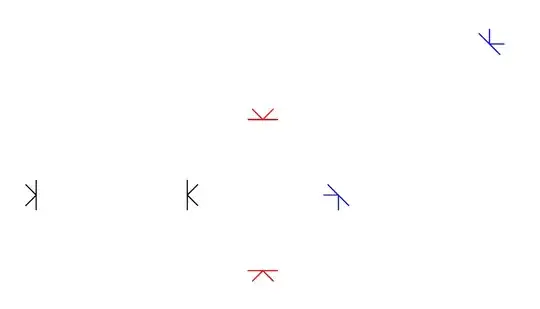
\documentclass[tikz,border=5mm]{standalone}
\begin{document}
\begin{tikzpicture}
[tipR/.pic={\draw (45:.2)--(0,0)--(-45:.2) (0,.2)--(0,-.2);},
 tipL/.pic={\draw (135:.2)--(0,0)--(-135:.2) (0,.2)--(0,-.2);}
]
\path       (0,0)--(2,0)  pic[sloped,pos=0]{tipL} pic[sloped,pos=1]{tipR};
\path[red]  (3,-1)--(3,1) pic[sloped,pos=0]{tipL} pic[sloped,pos=1]{tipR};
\path[blue] (4,0)--+(2,2) pic[sloped,pos=0]{tipL} pic[sloped,pos=1]{tipR};
\end{tikzpicture}
\end{document}
PS: To make the tip of arrows just touching the bars, we may use xshift=-\pgflinewidth
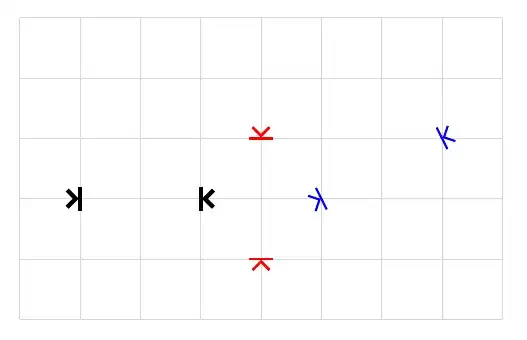
\documentclass[tikz,border=5mm]{standalone}
\begin{document}
\begin{tikzpicture}
\tikzset{
tipR/.pic={\draw[xshift={\pgflinewidth}] (45:.2)--(0,0)--(-45:.2);
           \draw (0,.2)--(0,-.2);},
tipL/.pic={\draw[xshift={-\pgflinewidth}] (135:.2)--(0,0)--(-135:.2);
           \draw (0,.2)--(0,-.2);}
}
\draw[gray!30] (-1,-2) grid (7,3);
\def\mypictip{pic[sloped,pos=0]{tipL} pic[sloped,pos=1]{tipR}}
\path[line width=2pt] (0,0)--(2,0) \mypictip;
\path[red,very thick] (3,-1)--(3,1) \mypictip;
\path[blue,line width=1pt] (4,0)--+(2,1) \mypictip;
\end{tikzpicture}
\end{document}


\draw[>|-|<] (0, -2)--(0, 2); \draw[white,shorten <=2.1pt,shorten >=2.1pt] (0, -2)--(0, 2);– Black Mild Jun 29 '23 at 21:30|<->|to>|-|<displaces the vertical bars slightly. – Maximal Ideal Jun 29 '23 at 21:34