You may consider the following simple MWE:
\documentclass[11pt, aspectratio=169]{beamer}
\usepackage{tikz}
\usetikzlibrary{positioning}
\usetikzlibrary{arrows.meta,
                chains,
                positioning}
\begin{document}
\begin{frame}{}
    \begin{center}
\begin{tikzpicture}[
node distance = 25pt,
  start chain = going right,
   arr/.style = {-Straight Barb, thick, shorten <=2pt, shorten >=2pt},
     N/.style = {draw, thick, minimum width=0.25*\linewidth,
              on chain, join=by arr}
                    ]
\node (A) [N]   {Some text};
\node (B) [N]   {Some text};
\node (B) [N]   {Some text};
\end{tikzpicture}
    \end{center}
\end{frame}
\end{document}
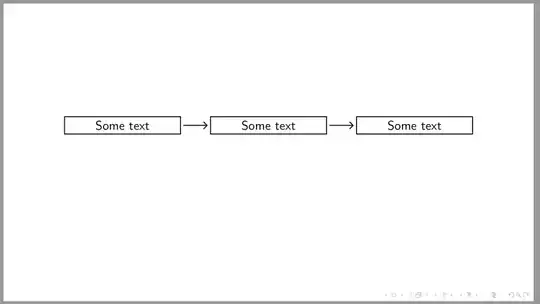
- As you can see, in MWE are employed
chains library for positioning oh nodes, for nodes are defined common style N, arrows between them are drawn by macro join.
- I don't see any reason to use
tcolorbox (at least this is not evident from your question).
Addendum 1:
if you like to have nodes with title, you can do this by use of shapes.multipart library. In the following MWE is shown "emulation" of the tcolorbox by using it:
\documentclass[11pt, aspectratio=169]{beamer}
\usepackage{tikz}
\usetikzlibrary{arrows.meta,
                chains,
                positioning,
                shadows, shapes.multipart}
% for emulation tcolorbox with title
% unfortunately it is still not part of shapes.multipart library :-(
\pgfdeclarelayer{foreground}
\pgfdeclarelayer{background}
\pgfsetlayers{background,main,foreground}
\makeatletter
\def\tikz@extra@preaction#1{% hackery which enable preactions
                            % in multi-part node on a different layer
                            % suggested by Mark Wibrow on c.t.t. (2010)
  {%
    \pgfsys@beginscope%
      \setbox\tikz@figbox=\box\voidb@x%
      \begingroup\tikzset{#1}\expandafter\endgroup%
      \expandafter\def\expandafter\tikz@preaction@layer
\expandafter{\tikz@preaction@layer}%
      \ifx\tikz@preaction@layer\pgfutil@empty%
      \path[#1];% do extra path
      \else%
      \begin{pgfonlayer}{\tikz@preaction@layer}%
      \path[#1];%
      \end{pgfonlayer}
      \fi%
      \pgfsyssoftpath@setcurrentpath\tikz@actions@path% restore
      \tikz@restorepathsize%
    \pgfsys@endscope%
  }%
}
\let\tikz@preaction@layer=\pgfutil@empty
\tikzset{preaction layer/.store in=\tikz@preaction@layer}
\makeatother
\begin{document}
\begin{frame}[fragile]  % <--- needed for style definition with #
\frametitle{test with of the TikZ library \texttt{shapes.multipart}
    \begin{center}
\begin{tikzpicture}[
    node distance = 25pt,
      start chain = going right,
       arr/.style = {-Straight Barb, thick, shorten <=4pt, shorten >=2pt},
 mpnv/.style args = {#1/#2}{% multi part node horisontal % <---
        rectangle split, rectangle split parts=2,
        rectangle split part fill={blue!70!black, white},
        preaction layer=background,       % <-- prepare layer for drop shadow
        drop shadow,
        text width = 0.25*\linewidth, align=center,
        draw, thick, rounded corners,
        node contents = {\nodepart[font=\bfseries, text=yellow]{one}  #1  % for title
                         \nodepart[align=left]{two}  #2},  % for main text
        on chain, join=by arr
                            }
                    ]
\node (A) [mpnv=title/some longer text in wo lines];
\node (B) [mpnv=title/some short text];
\node (B) [mpnv=title/some text];
\end{tikzpicture}
    \end{center}
\end{frame}
\end{document}
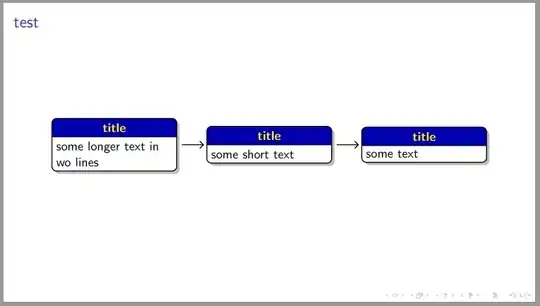
Addendum 2:
If you more prefer to use of the tcolorboxses, than try solution proposed in answer add-arrow-between-two-tcolorboxes, to which your question is actually duplicate. Adopting it to your case, the MWE can be:
\documentclass[11pt, aspectratio=169]{beamer}
\usepackage[many]{tcolorbox}
\usetikzlibrary{arrows.meta,
                chains,
                positioning}
\tcbset{%
    boxrule=2pt,
    colback=white, % background color
    colframe=cyan, % frame colour
        halign=left,
        valign=center,
    sharp corners=all,
    center title,
    lower separated=false,
    fonttitle=\sffamily\bfseries\large,
    adjusted title=center,
    width=0.25\linewidth % added
    }
\begin{document}


\begin{frame}
\frametitle{test with \texttt{tcolorbox}}
    \begin{center}
\begin{tikzpicture}[
node distance = 25pt,
  start chain = going right,
   arr/.style = {draw=cyan, -{Straight Barb[scale=0.8]}, line width=2pt,
                 shorten <=2pt, shorten >=2pt},
     N/.style = {on chain, join=by arr}
                    ]
    \node(A) [N] {
        \begin{tcolorbox}[title= Title 1]
        some longer text in three lines
        \end{tcolorbox}
    };
\node(B) [N] {  % added position of second box
    \begin{tcolorbox}[title=Title 2]
       some short text
        \end{tcolorbox}
        };
\node(C) [N] {  % added position of second box
    \begin{tcolorbox}[title=Title 3]
       some text
        \end{tcolorbox}
        };
\end{tikzpicture}
    \end{center}
\end{frame}
\end{document}
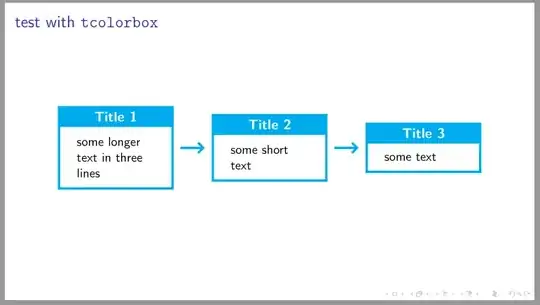


tcolorboxes inside\nodes is not a good idea. Could you explain why this is needed? Why don't you use simple\nodes? If you really need to usetcolorboxes, it is probably better to place them first and then use an overlay to draw the arrows. – Jasper Habicht Jul 08 '23 at 18:20tcolorboxinside a\node, you are essentially nesting twotikzpictureswhich should be avoided, because this is not supported and can lead to strange results. – Jasper Habicht Jul 08 '23 at 18:32