4

I have the following latex code.

\documentclass{article}
\usepackage[utf8]{inputenc}

\begin{document}

\begin{verbatim} █ [1:0x561b3f574358] <list> ├─[2:0x561b3e9cd938] <dbl> ├─[3:0x561b3e9cd900] <dbl> └─[4:0x561b3e9cd8c8] <dbl> \end{verbatim} \end{document}
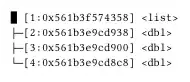
The rendering result is as follows. The symbols on the left are not displayed.

enter image description here

  • 1
    https://tex.stackexchange.com/questions/679166/unicode-character-not-set-up-for-use-with-latex-error/679171#679171 – David Carlisle Jul 12 '23 at 07:50
  • 1
    You probably additionally want \tracinglostchars=3, so a missing character is considered an error, instead of failing silently and hoping you notice. – Davislor Jul 12 '23 at 23:36

3 Answers3

8

I would recommend to use either XeLaTeX or LuaLaTeX and a font, that provides the used symbols, e.g.

% Use this with XeLaTeX or LuaLaTeX not PDFLaTeX.
\documentclass{article}
\usepackage{libertinus}

\begin{document}

\begin{verbatim} █ [1:0x561b3f574358] <list> ├─[2:0x561b3e9cd938] <dbl> ├─[3:0x561b3e9cd900] <dbl> └─[4:0x561b3e9cd8c8] <dbl> \end{verbatim} \end{document}
using LuaLaTeX or XeLaTeX

If you want to use PDFLaTeX, you can declare the missing unicode characters, e.g., using \rule commands:

% Use this with PDFLaTeX, not XeLaTeX or LuaLaTeX!
\documentclass{article}
\DeclareUnicodeCharacter{2588}{\rule{1ex}{\ht\strutbox}}
\DeclareUnicodeCharacter{251C}{\rule[-\dp\strutbox]{.4pt}{\baselineskip}%
  \rule[.2\baselineskip]{1ex}{.4pt}}
\DeclareUnicodeCharacter{2500}{\rule[.2\baselineskip]{1ex}{.4pt}}
\DeclareUnicodeCharacter{2514}{\rule[.2\baselineskip]{.4pt}{.5\baselineskip}%
  \rule[.2\baselineskip]{1ex}{.4pt}}
\begin{document}

\begin{verbatim} █ [1:0x561b3f574358] <list> ├─[2:0x561b3e9cd938] <dbl> ├─[3:0x561b3e9cd900] <dbl> └─[4:0x561b3e9cd8c8] <dbl> \end{verbatim} \end{document}

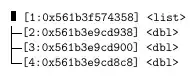
using PDFLaTeX

cabohah
  • 11,455
7

You can use pmboxdraw, but blocks are too wide, so I replace \textblock (corresponding to U+2588) with \textlfblock (corresponding to U+258C) with the width limited to 0.5em.

\documentclass{article}
\usepackage{pmboxdraw}

\DeclareUnicodeCharacter{2588}{\makebox[0.5em][l]{\textlfblock}}

\begin{document}

\begin{verbatim} █ [1:0x561b3f574358] <list> ├─[2:0x561b3e9cd938] <dbl> ├─[3:0x561b3e9cd900] <dbl> └─[4:0x561b3e9cd8c8] <dbl> \end{verbatim}

\end{document}

enter image description here

egreg
  • 1,121,712
5

Beside the main issue (render some symbols) that is already solved, may be you want to explore other alternatives to render directory trees that verbatim. Here just a comparison with a similar result using the old dirtree and the much more versatil forest:

mwe

% Use this with XeLaTeX or LuaLaTeX not PDFLaTeX.
\documentclass{article}
\usepackage{libertinus}
\usepackage[margin=1cm]{geometry}
\usepackage{dirtree}
\usepackage[edges]{forest}
\usepackage{multicol}

\begin{document} \begin{multicols}{3} \section{verbatim} \begin{minipage}{\linewidth} \begin{verbatim} █ [1:0x561b3f574358] <list> ├─[2:0x561b3e9cd938] <dbl> ├─[3:0x561b3e9cd900] <dbl> └─[4:0x561b3e9cd8c8] <dbl> \end{verbatim} \end{minipage} \newcolumn

\section{dirtree} \begin{minipage}{\linewidth} \setlength{\DTbaselineskip}{12pt} % optional \DTsetlength{1pt}{6pt}{5pt}{.4pt}{.4pt} % optional \ttfamily \dirtree{% .1 \rule[-.35em]{11.6pt}{1.5em} [1:0x561b3f574358] <list>. .2 [2:0x561b3e9cd938] <dbl>. .2 [3:0x561b3e9cd900] <dbl>. .2 [4:0x561b3e9cd8c8] <dbl>. } \end{minipage} \newcolumn

\section{forest} \begin{minipage}{\linewidth} \begin{forest} forked edges, for tree={ grow'=0, folder, font=\ttfamily, s sep=1pt } [\mbox{[1:0x561b3f574358] <list>}, fill=gray!10, draw [\mbox{[2:0x561b3e9cd938] <dbl>}] [\mbox{[3:0x561b3e9cd900] <dbl>}] [\mbox{[4:0x561b3e9cd8c8] <dbl>}] ] \end{forest} \end{minipage} \end{multicols} \end{document}

Fran
  • 80,769