I am not sure what you intend to do exactly and I also don't know what should happen in a subequations environment where you don't use \StepSubequations ... maybe it would be a good idea to create a new environment (as a copy of the oroginal one) that handles things as you want, so you can keep the original behaviour.
Anyways, something like this could work as starting point (but it won't suppress a single "A" as this would require to look ahead):
\documentclass{article}
\usepackage{amsmath}
\usepackage{etoolbox}
\newcounter{equationgroup}
\makeatletter
\patchcmd\subequations
    {\def\theequation{\theparentequation\alph{equation}}}
    {\def\theequation{\theparentequation\Alph{equation}}\ifmeasuring@\else\setcounter{equationgroup}{1}\fi}
    {}{}
\makeatother
\newcommand\StepSubequations{
    \stepcounter{equationgroup}
    \stepcounter{equation}
    \gdef\theparentequation{\arabic{parentequation}\alph{equationgroup}}
    \setcounter{equation}{0}
}
\begin{document}
    \begin{subequations}
        \begin{align}
            1   &=  1\
            2   &=  2\
            \StepSubequations
            3   &=  3\% from here a new equation number
            4   &=  4\
            5   &=  5\
            6   &=  6\
            \StepSubequations
            7   &=  7\
            8   &=  8\
            \StepSubequations
            9   &=  9
        \end{align}
    \end{subequations}
\begin{subequations}
    \begin{align}
        1   &=  1\\
        2   &=  2\\
        \StepSubequations
        3   &=  3\\% from here a new equation number
        4   &=  4\\
        5   &=  5\\
        6   &=  6\\
        \StepSubequations
        7   &=  7\\
        8   &=  8\\
        \StepSubequations
        9   &=  9
    \end{align}
\end{subequations}

\end{document}
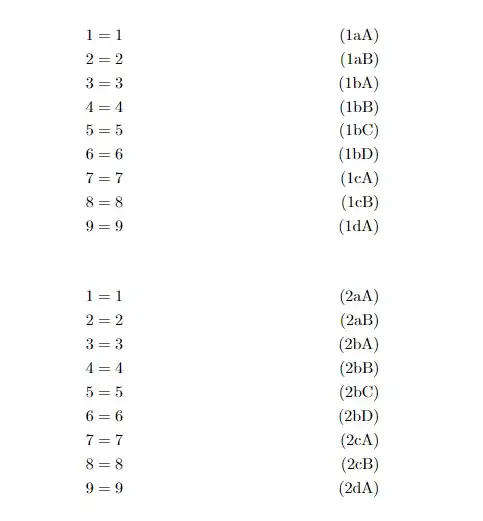
You could also place the redefinition into a command that you then need to execute (which would allow you to change between the original and the adjusted behaviour of the subequations environment more easily). So, maybe something like this:
\documentclass{article}
\usepackage{amsmath}
\newcounter{subequationsgroup}
\makeatletter
\AddToHook{env/subequations/after}{%
    \stepcounter{parentequation}%
    \gdef\theequation{\theparentequation}%
}
\newcommand{\InitializeSubequationsGroups}{%
    \ifmeasuring@\else%
        \setcounter{subequationsgroup}{\value{equation}}%
    \fi%
}
\newcommand{\StepSubequationsGroup}{%
    \ifmeasuring@\else%
        \stepcounter{subequationsgroup}%
        \setcounter{equation}{0}%
        \gdef\theequation{\theparentequation\alph{subequationsgroup}\Alph{equation}}%
    \fi%
}
\newcommand{\StepSubequationsSingle}{%
    \ifmeasuring@\else%
        \stepcounter{subequationsgroup}%
        \setcounter{equation}{0}%
        \gdef\theequation{\theparentequation\alph{subequationsgroup}}%
    \fi%
}
\makeatother
\begin{document}
    \begin{subequations}
        \begin{align}
            1   &=  1\
            2   &=  2
        \end{align}
    \end{subequations}
\begin{subequations}
    \begin{align}
        \InitializeSubequationsGroups
        \StepSubequationsGroup
        1   &=  1\\
        2   &=  2\\
        \StepSubequationsGroup
        3   &=  3\\% from here a new equation number
        4   &=  4\\
        5   &=  5\\
        \StepSubequationsSingle
        6   &=  6\\
        \StepSubequationsGroup
        7   &=  7\\
        8   &=  8\\
        1   &=  1\\
        2   &=  2
    \end{align}
\end{subequations}

\begin{subequations}
    \begin{align}
        1   &=  1\\
        2   &=  2
    \end{align}
\end{subequations}

\end{document}
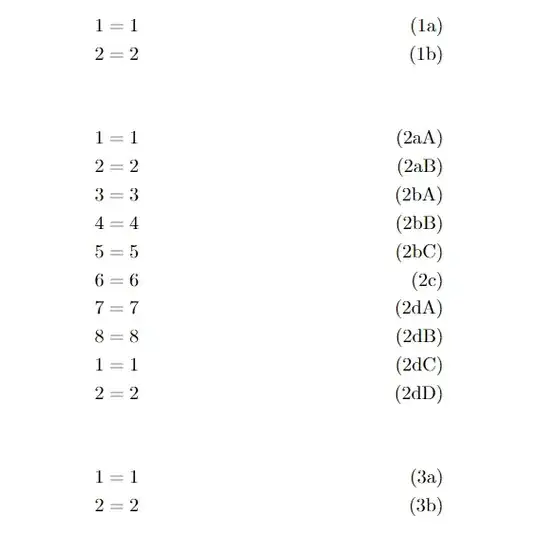
My last try which should allow you to place more than one align inside of a subequations environment. You only need to take care where to place the \EndSubequationsGroup command if it comes last in the subequations environment:
\documentclass{article}
\usepackage{amsmath}
\newcounter{subequationsgroup}
\makeatletter
\AddToHook{env/subequations/before}{%
    \gdef\theequation{\arabic{equation}}%
}
\newcommand{\BeginSubequationsGroup}{%
    \ifmeasuring@\else%
        \setcounter{subequationsgroup}{\value{equation}}%
        \setcounter{equation}{0}%
        \stepcounter{subequationsgroup}%
        \gdef\theequation{\theparentequation\alph{subequationsgroup}\Alph{equation}}%
    \fi%
}
\newcommand{\EndSubequationsGroup}{%
    \ifmeasuring@\else%
        \setcounter{equation}{\value{subequationsgroup}}%
        \gdef\theequation{\theparentequation\alph{equation}}%
    \fi%
}
\makeatother
\begin{document}
    \begin{subequations}
        \begin{align}
            1   &=  1\
            2   &=  2
        \end{align}
    \end{subequations}
\begin{subequations}
    \begin{align}
        \BeginSubequationsGroup
        1   &=  1\\
        2   &=  2\\
        \EndSubequationsGroup
        3   &=  3\\
        \BeginSubequationsGroup
        4   &=  4\\
        5   &=  5\\
        \EndSubequationsGroup
        6   &=  6
    \end{align}
\end{subequations}

\begin{subequations}
    \begin{align}
        1   &=  1\\
        2   &=  2
    \end{align}

    \begin{align}
        \BeginSubequationsGroup
        1   &=  1\\
        2   &=  2
        %\EndSubequationsGroup
    \end{align}
\end{subequations}

\begin{subequations}
    \begin{align}
        1   &=  1\\
        \BeginSubequationsGroup
        2   &=  2\\
        3   &=  3\\
        \EndSubequationsGroup
        4   &=  4\\
        5   &=  5\\
        \BeginSubequationsGroup
        6   &=  6\\
        7   &=  7\\
        8   &=  8
    \end{align}

    \begin{align}
        \EndSubequationsGroup
        1   &=  1\\
        2   &=  2
    \end{align}
\end{subequations}

\end{document}
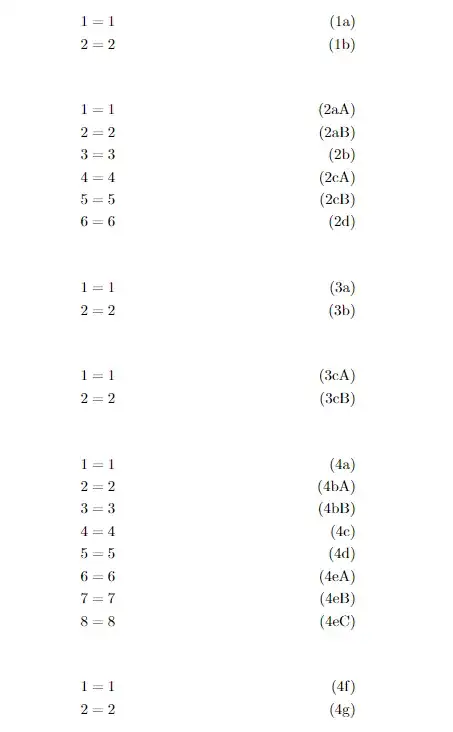


\StepSubequationsto do? – daleif Aug 07 '23 at 10:48\tag{\theequation...}for the oddball numbers. – John Kormylo Aug 07 '23 at 12:44