5

I am curious as to whether a multidominance tree such as the one below may be drawn with \Forest:

multi-dominance tree (target)

I have found evidence of this using qtree (Adding trees or terminal words to multi-dominance structures), but I would like to be able to do this in Forest if possible.

I have ascertained how to get a syntactic terminal higher in the tree to attach to a lower constituent such as the following:

\documentclass{article}
\usepackage[linguistics]{forest}
\forestset{
  nice nodes/.style={
    for tree={
      inner sep=0pt,
      fit=band,
    },
  },
  default preamble=nice nodes,
}
\begin{document}
\begin{forest}
sn edges
[L,name=L 
    [,name=D] 
        [ 
            [$\beta$] 
            [K 
                [$\gamma$,name=G] 
                [$\alpha$]
            ]
        ]

] \begin{pgfinterruptboundingbox} \draw[-,looseness=1] (G) to [out=west,in=south] (D); \end{pgfinterruptboundingbox} \end{forest} \end{document}

... which gives the following:

multi-dominance tree (attempt)

However, these trees are clearly very different. I am fairly new to LaTeX, so I'm unsure even where to begin as far as trying this out.

cfr
  • 198,882
Dr.B
  • 51
  • 1
    Welcome! Please provide a minimal working example people can begin from. It doesn't have to be a multi-dominance attempt. You could just provide the code for the tree without the multi-dominance and ask how to turn it into a mulit-dominance tree. – cfr Sep 09 '23 at 16:31
  • Please don't vote to close questions without even leaving feedback on how they may be improved. Please don't vote to close the questions of new contributors before the community has engaged them in efforts to improve their questions. – cfr Sep 09 '23 at 16:32
  • 1
    In the sense of tree Forest uses, a multi-dominance tree isn't really a tree because it involves at least one node with two or more parents. Forest can't draw such trees, but you can fake the effect and we can show you how if you give us code for a tree to work with. – cfr Sep 09 '23 at 16:34
  • Does https://tex.stackexchange.com/questions/451026/how-to-get-limited-multidominance-in-a-forest-tree?rq=1 help? That involves centring, too, but could be adapted. – cfr Sep 09 '23 at 16:37
  • 1
    You can do with forest exactly what the linked question shows with tikz-qtree, but somewhat easier, since forest makes every node in the tree a TikZ node to, so you just have to give names to them. – Alan Munn Sep 09 '23 at 16:37
  • @cfr I don't think that approach is really going to work for this kind of tree. (This is why my question specified "limited" multidominance. :) I don't see any really sensible way to do this other than the method in the linked question. – Alan Munn Sep 09 '23 at 16:38
  • @cfr I have updated the post with a minimal working example to show as far as I've gotten and what I know how to do with \Forest regarding multi-dominance. – Dr.B Sep 09 '23 at 16:45
  • @AlanMunn You're probably right. I don't really know what the requirements are. That is, I don't know what the tree needs to look like (whether this is just one example of how it might look or something else). But obviously the different levels would be a complication and I think a tikz or tikz+ approach is probably right. – cfr Sep 09 '23 at 16:45
  • @AlanMunn Just to make sure I follow you: Would I need both the \begin{tikzpicture} and \begin{scope} commands? And I assume I would simply need a \Forest command within another \Forest command as seen with \Tree? – Dr.B Sep 09 '23 at 16:50
  • You don't want to put one forest in another. You don't need a tikzpicture around a forest either. – cfr Sep 09 '23 at 16:52
  • Your code doesn't compile, by the way. – cfr Sep 09 '23 at 16:52

2 Answers2

7

I don't think anyone has spent any time to figure out a way to make generalized multidominance structures. So they're always going to require some sort of manual intervention, unless they are very restricted, as in the examples of phonological multidominance described here. But forest does make things a bit easier to do, since it makes every node in the tree a TikZ node, and so connecting arbitrary bits together isn't that hard. Here's an example of a typical multidominance structure from the coordination literature. I've chosen to use straight line connections between the nodes, but that can be adjusted using curves as you prefer.

The main trick here is that the multidominant node(s) ideally should be connected to the tree itself (in this case I've connected it to the \& node) because you can't embed a tree inside a tree. So all the nodes you want to connect have to be part of the same tree if possible.

\documentclass{article}
\usepackage[linguistics]{forest}
\newcommand*\1{$'$}
\begin{document}
\begin{forest}
[\&P 
    [TP [DP\\Sam ] [T\1 [T ] [VP,name=VP1 [V\\caught ] [DP,phantom] ]]]
    [\&\1
        [\&\\and, [DP,no edge,l=1.25in,name=shared [D\\a ][NP\\fish ]]]
        [TP [DP\\Alex ] [T\1 [T] [VP,name=VP2 [V\\cooked ] ][DP,phantom ] ]]
    ]
]
\draw (VP1.south) -- (shared.north);
\draw (VP2.south) -- (shared.north);
\end{forest}

\end{document}

output of code

For curved lines, the idea is the same, just use the to[...] syntax:

\documentclass{article}
\usepackage[linguistics]{forest}
\newcommand*\1{$'$}
\begin{document}
\begin{forest}
[TP,name=TP [DP,phantom] 
    [T\1 [T [DP\\Alex,name=shared,l=.5in,no edge  ][XP,phantom]]
        [VP,name=VP [DP,phantom] [V\1  [V\\smokes ]  ]]]]
\draw (shared.north) to[out=80] (TP.south);
\draw (shared.north) to[out=-40] (VP.south);
\end{forest}

\end{document}

output of second code

Adapting cfr's code to something that is a bit more flexible, we can define a multidom style which takes 6 arguments:

multidom={<x-shift>}{<y-shift}{<out1>}{<node1>}{<out2>}{<node2>}

This makes a node of this style shifted in the x and y directions, and sets the out-locations of the lines connecting the node to its parent nodes. This style reduces the number of hacks needed in the previous examples. In particular, the multidominated node itself is actually a daughter of one of its parents rather than being attached to some arbitrary node in the tree. You still need to add a phantom node in the position of the second parent, so that the parent's branch angle looks right.

Here's a full example:

\documentclass{article}
\usepackage[linguistics]{forest}
\forestset{multidom/.style n args=6{%
    no edge,
    before drawing tree={%
      for tree={x'+=#1,y'+=#2},
      tikz+={%
        \draw [-] (.#3) to [out=#3,looseness=.5] (#4.south);
        \draw [-] (.#5) to [out=#5,looseness=.5] (#6.south);
      }
    },
  }
}
\newcommand*\1{$'$}
\begin{document}
\begin{forest}
[TP,name=TP [DP,multidom={-.5cm}{-2cm}{north}{TP}{east}{VP} [D\\the ][NP\\chimney ]] 
    [T\1 [T ]
        [VP,name=VP [DP,phantom] [V\1  [V\\smokes ]  ]]]]
\end{forest}
\end{document}

output of third code

Alan Munn
  • 218,180
  • So the curves aren't necessary and neither is the shift? So much for my answer! Should I delete it, do you think? – cfr Sep 09 '23 at 17:14
  • Thank you, @AlanMunn! – Dr.B Sep 09 '23 at 17:25
  • 1
    @cfr No, don't delete your answer. I'll add my more clunky than yours curved version too. I'll have to think about the dominated=... code which I didn't know about. – Alan Munn Sep 09 '23 at 17:37
  • I've posted a modification of your modification which doesn't require naming the actual parent or adding the phantom manually. However, I'm not sure if the position will always be correct or if append might sometimes be needed. Could you tell me whether it is and, if so, which of the two options I describe would be preferable? – cfr Sep 10 '23 at 05:04
  • @AlanMunn dominated is (was) just a minimal style. I just took the qtree curves and parametised them? – cfr Sep 10 '23 at 05:08
5

Updated Updated answer

This version supports append and 3+ parents. However, if the shift is negative and would be a fraction of a centimetre, you must specify millimetres instead. (Even with the direct '+ assignment.) If anybody knows why, please let me know.
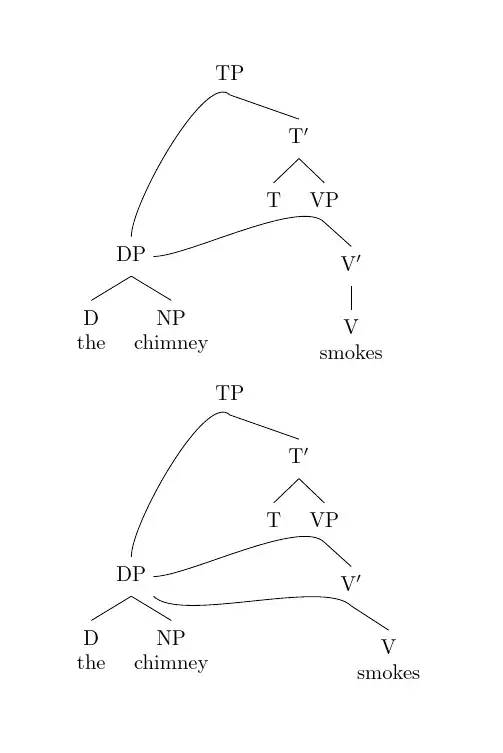
multi-dominance and multi-multi-dominance

\documentclass{article}
\usepackage[linguistics]{forest}
\forestset{% addaswyd o ateb Alan Munn: https://tex.stackexchange.com/a/695600/ (addaswyd o fy ateb gwreiddiol)
  declare keylist={other parents}{},
  declare boolean register={inc multidom},
  not inc multidom,
  declare toks register={multidom toksa},
  multidom toksa={},
  declare toks register={multidom toksb},
  multidom toksb={},
  declare toks register={multidom toksc},
  multidom toksc={},
  declare toks register={multidom toksd},
  multidom toksd={},
  declare dimen register={multidom dimx},
  multidom dimx'=0pt,
  declare dimen register={multidom dimy},
  multidom dimy'=0pt,
  includes multidom/.style={%
    where={>{O_=!}{other parents}{}}{%
      split option={other parents}{,}{multidom aux},
    }{},
  },
  multidom aux/.style={%
    multidom toksa={},
    multidom toksb={},
    multidom toksc={},
    multidom toksd={},
    multidom dimx'=0pt,
    multidom dimy'=0pt,
    split={#1}{:}{multidom toksa,temptoksa,temptoksb,multidom toksb,multidom toksc,multidom toksd},
    if={>{R_=}{multidom toksd}{}}{% no sixth arg -> resplit -> multidoms
      split={#1}{:}{multidom toksa,multidom toksb,multidom toksc},
      multidoms/.process={RRR{multidom toksa}{multidom toksb}{multidom toksc}},      
    }{% sixth arg -> (first) multicom
      split={#1}{:}{multidom toksa,multidom dimx,multidom dimy,multidom toksb,multidom toksc,multidom toksd},
      typeout/.register=multidom dimx,
      multidom/.process={RRRRRR{multidom toksa}{multidom dimx}{multidom dimy}{multidom toksb}{multidom toksc}{multidom toksd}},
    },
  },
  multidoms/.style n args=3{%
    before typesetting nodes={%
      temptoksa/.option=content,
      for nodewalk={fake=current,name=#3}{#1/.expanded={[\foresteregister{temptoksa},phantom]}},
    },
    before drawing tree={% parametised from https://tex.stackexchange.com/a/249615/
      tikz+={%
        \draw [-] (.#2) to [out=#2,looseness=.5] (#3.south);
      },
    },
  },
  multidom/.style n args=6{%
    no edge,
    before typesetting nodes={%
      temptoksa/.option=content,
      for nodewalk={fake=current,name=#6}{#1/.expanded={[\foresteregister{temptoksa},phantom]}},
    },
    before drawing tree={% parametised from https://tex.stackexchange.com/a/249615/
      for tree={x'+=#2,y'+=#3},
      tikz+={%
        \draw [-] (.#4) to [out=#4,looseness=.5] (!u.south);
        \draw [-] (.#5) to [out=#5,looseness=.5] (#6.south);
      },
    },
  },
  multidom prepend/.style n args=5{multidom={prepend}{#1}{#2}{#3}{#4}{#5}},
  multidom append/.style n args=5{multidom={append}{#1}{#2}{#3}{#4}{#5}},
  default preamble+={%
    delay={%
      for tree={%
        if={>{O_=!}{other parents}{}}{inc multidom}{},
      },
    },
    before typesetting nodes={if inc multidom={includes multidom}{}},
  },
}
\newcommand*\1{$'$}
\begin{document}
\begin{forest}
  [TP,name=TP 
  [DP,multidom prepend={-.5cm}{-2cm}{north}{east}{VP} 
    [D\\the ]
    [NP\\chimney ]
    ] 
    [T\1
      [T ]
      [VP,name=VP  
        [V\1  
          [V\\smokes ] 
        ]
      ]
    ]
  ]
\end{forest}

\begin{forest} [TP,name=TP [DP,other parents={prepend:-5mm:-2cm:north:east:VP,prepend:south east:V} [D\the ] [NP\chimney ] ] [T\1 [T ] [VP,name=VP
[V\1,name=V [V\smokes ] ] ] ] ] \end{forest} \end{document}

Updated answer

This is a modification of Alan's modification of my original answer below. This version eliminates one of the arguments and the need to add a phantom node to the other parent. Currently, the code assumes the phantom should always be prepended to the other parent. If that's not the case, appending could be enabled either with a sixth argument or a second style. I haven't done that here because I don't know if it is required or, if it is, what approach might be most convenient.

\documentclass{article}
\usepackage[linguistics]{forest}
\forestset{% addaswyd o ateb Alan Munn: https://tex.stackexchange.com/a/695600/ (addaswyd o fy ateb gwreiddiol)
  multidom/.style n args=5{%
    no edge,
    before typesetting nodes={%
      temptoksa/.option=content,
      for nodewalk={fake=current,name=#5}{prepend/.expanded={[\foresteregister{temptoksa},phantom]}},
    },
    before drawing tree={% parametised from https://tex.stackexchange.com/a/249615/
      for tree={x'+=#1,y'+=#2},
      tikz+={%
        \draw [-] (.#3) to [out=#3,looseness=.5] (!u.south);
        \draw [-] (.#4) to [out=#4,looseness=.5] (#5.south);
      },
    },
  }
}
\newcommand*\1{$'$}
\begin{document}
\begin{forest}
  [TP,name=TP 
  [DP,multidom={-.5cm}{-2cm}{north}{east}{VP} 
    [D\\the ]
    [NP\\chimney ]
    ] 
    [T\1
      [T ]
      [VP,name=VP  
        [V\1  
          [V\\smokes ] 
        ]
      ]
    ]
  ]
\end{forest}
\end{document}

The output is (should be) no different from Alan's.
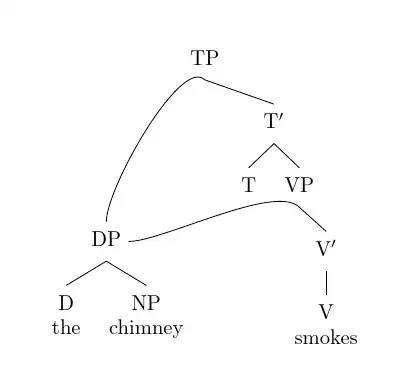
multidom style

Original proof-of-concept

Here's a quickish proof-of-concept which needs improvement but gets the general structure right. I may fiddle with this later if anybody is interested. I use relative node names (!r) but you can use names (G) if preferred.

\documentclass{standalone}
\usepackage[linguistics]{forest}
\forestset{
  nice nodes/.style={
    for tree={
      inner sep=0pt,
      fit=band,
    },
  },
  default preamble=nice nodes,
  dominated/.style n args=4{%
    no edge,
    before drawing tree={% parametised from https://tex.stackexchange.com/a/249615/
      for tree={x+=#1},
      tikz+={%
        \draw [-,looseness=1] (.#2) to [out=#2] (#3);
        \draw [-,looseness=1] (.#2) to [out=#2] (#4);
      }
    },
  },
}
\begin{document}
\begin{forest}
sn edges
[L,name=L 
    [,name=D,no edge] 
        [ 
            [$\beta$] 
            [K 
            [$\gamma$,name=G,dominated={-20mm}{east}{!r.south west}{!u.south},no edge[smoke]] 
                [$\alpha$[smoke]]
            ]
        ] 
]
\end{forest}
\end{document}
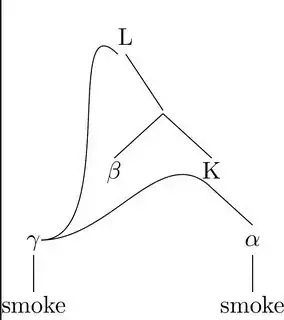
non-tree proof of concept

Alan Munn
  • 218,180
cfr
  • 198,882
  • 1
    Thanks a lot for this answer! I've adapted your code to be a bit more flexible and added it to my answer. – Alan Munn Sep 10 '23 at 02:36
  • The new solution is great! In principle both prepending and appending the phantom node might be possible, but I think prepending would be more likely for most cases, so I think two styles might be preferable if the goal is to avoid an argument. The trickier case is that theoretically the number of parents could be more than two. But this is already a great step forward. – Alan Munn Sep 10 '23 at 11:37
  • @AlanMunn You could save the other parents as a key list and then cycle through them, but what should the interface look like in that case? You could have something like multidom other parents={<dimen>:<angle>:<other parent 2>,<dimen>:<angle>:<other parent 3>,...} but then maybe the syntax of multidom should change for consistency? Or do you want something like other parent={dimen}{angle}{node} and the code adds them to an internal list? – cfr Sep 10 '23 at 20:02
  • Yeah, it's not obvious what the best case would be. There's only one dimension needed, since that simply places the node; the question would be whether you could get away with simply a list of nodes without specifying an angle for each. – Alan Munn Sep 10 '23 at 20:20
  • @AlanMunn Yes, sorry. Wrote that too quickly. And you might want to prepend in some cases and append in others, I suppose? – cfr Sep 10 '23 at 22:36
  • Ah, yes, maybe so. So just having a separate style wouldn't actually work for that. I'm not a big fan of multidominance analyses of syntax, so I don't know the range of things people might need. But I think that for ease of use having some basic styles plus one much more complex version might be the way to go. We can chat more in the main chat if you like. – Alan Munn Sep 10 '23 at 22:38
  • @AlanMunn See edit. Requires millimetres, though. – cfr Sep 11 '23 at 22:58
  • Wow again. :) This is amazing. – Alan Munn Sep 11 '23 at 23:50
  • @AlanMunn Wish I knew why -0.5cm doesn't work, though. And why doesn't even the '+ version work in the latest version? I tried to figure it out in forest's code, but didn't get very far. – cfr Sep 12 '23 at 00:33
  • @AlanMunn I used a colon because otherwise the curly brackets proliferate and I find the code gets confusing, but if colons get used in the content, the style could use something else. It has to be a single token. The same goes for the comma. I use colons in prooftrees because they're easy to type and not generally part of logical systems' syntax (whereas a full stop or prime would be problematic, for example), but that's obviously discipline dependent. (And I'm sure there's a logical system somewhere using colons ....) – cfr Sep 12 '23 at 00:38
  • @AlanMunn Diolch yn fawr for the bounty. (But you've still written the top answer. ;)) – cfr Sep 13 '23 at 01:53