The \MeasureVarwidth[<maximum width of varwidth>]{<text>} command will measure the natural width of a text and save the content for later use.
If the measured content of text is greater than the optional <maximum width of varwidth> (default= 0.5\linewidth), the width of the varwidth part will be set to that value.
The width of the minipage will then be set to fill the entire line.
The minipages were enclosed in a \fbox for better visualization.
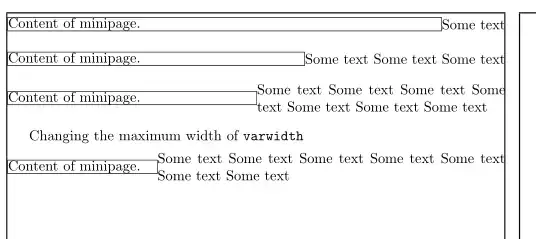
\documentclass{article}
\usepackage{showframe} % show the margins
\usepackage{calc}% needed
\usepackage{varwidth}
\newsavebox{\ToVarwidth}
\newlength{\WidthofVarwidth}
\newlength{\miniwidth}
% save box and measure its width
\newcommand{\MeasureVarwidth}[2][0.5\linewidth]{% #1 optional max width of varwidth, #2 varwidth text
    \savebox{\ToVarwidth}{#2}%

    \settowidth{\WidthofVarwidth}{\usebox{\ToVarwidth}}%
    \setlength{\miniwidth}{\linewidth-\WidthofVarwidth}%
    \ifdim\WidthofVarwidth>#1%
    \savebox{\ToVarwidth}{\parbox{#1}{#2}}%

    \setlength{\miniwidth}{\linewidth-#1}%
    \fi
}
\begin{document}
\setlength{\fboxsep}{0pt}% only for \fbox
\MeasureVarwidth{Some text}
\noindent\fbox{%% \fbox only to visualize
    \begin{minipage}{\miniwidth}
        Content of minipage.
    \end{minipage}%
            }\hfill
    \begin{varwidth}{\linewidth}
    \usebox{\ToVarwidth}
    \end{varwidth}
\bigskip
\MeasureVarwidth{Some text Some text Some text}
\noindent\fbox{%
    \begin{minipage}{\miniwidth}
        Content of minipage.
    \end{minipage}%
    }\hfill
    \begin{varwidth}{\linewidth}
        \usebox{\ToVarwidth}
    \end{varwidth}
\bigskip
\MeasureVarwidth{Some text   Some text  Some text Some text  Some text Some text Some text }
\noindent\fbox{%
    \begin{minipage}{\miniwidth}
        Content of minipage.
    \end{minipage}%
}\hfill
\begin{varwidth}{\linewidth}
    \usebox{\ToVarwidth}
\end{varwidth}
\bigskip
Changing the maximum width of \verb|varwidth| \medskip
\MeasureVarwidth[0.7\linewidth]{Some text    Some text  Some text Some text  Some text Some text Some text }
\noindent\fbox{%
    \begin{minipage}{\miniwidth}
        Content of minipage.
    \end{minipage}%
}\hfill
\begin{varwidth}{\linewidth}
    \usebox{\ToVarwidth}
\end{varwidth}
\end{document}


\begin{tcolorbox}[hbox] x \end{tcolorbox}environments on the right side, but not with something like\begin{tcblisting}{hbox,listing only} x \end{tcblisting}or just\begin{verbatim} x \end{verbatim}. Is there a way to use verbatim content in the right side ? I had tried before and it is possible to put verbatim content in the varwidth environment. – MB4E Sep 11 '23 at 07:42