Here's an expansion of my comment, showing proof of concept. We create a command to place an answer box a given horizontal distance from where the command is placed. You'll need to allow for vertical height yourself, although that could also be added to the command if it was required. This doesn't actually need the tikzmark library that I mentioned in the comment; it just places the box directly. You can pass explicit xshift and yshift parameters to the \tikz command to position the box pretty much anywhere you like if needed.
\documentclass{article}
\usepackage{tikz}
\tikzset{answer box/.style={draw,rounded corners,minimum size=1cm,text width=1cm}}
\NewDocumentCommand{\answerbox}{O{1cm}m}{\hspace*{#1}\tikz[overlay]{\node[answer box,#2,] {}}}
\usepackage{enumitem}
\begin{document}
\begin{enumerate}[label=\bfseries{Q}\arabic*,itemsep=2\baselineskip]
\item What is the velocity of an unladen swallow?\answerbox[\fill]{text width=3cm,label={Answer}}
\item Who expects the Spanish Inquisition?\answerbox[1cm]{label=Answer}
\item Calculate the answer to life, the universe, and everything.\\[2\baselineskip]\answerbox[2.5cm]{text width=5cm,label=Final Answer}
\item Do I really need to use \texttt{tikzmark}? See red box!\answerbox{text width=3cm,label={Arbitrary Position},xshift=3.5cm,yshift=3.5cm,red, align=center,node contents={No!}}
\end{enumerate}
\end{document}
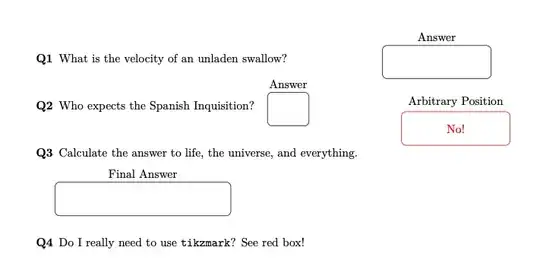
But I want absolute positioning!
If you really do want absolute positioning, here's a version of the command that positions the node at a location set by the \tikzmark command. The syntax of this version of the command is the same as the previous one, but allows you to add an optional node location in parentheses.
\answerbox[hspace](coordinate){further tikz keys}
Here's a full example:
\documentclass{article}
\usepackage{tikz}
\usetikzlibrary{tikzmark}
\tikzset{answer box/.style={draw,rounded corners,minimum size=1cm,text width=1cm}}
\NewDocumentCommand{\answerbox}{O{1cm}d()m}{
\IfNoValueTF{#2}
    {\hspace*{#1}\tikz[overlay]{\node[answer box,#3,]  {}}}
    {\hspace*{#1}\tikz[overlay,remember picture]{\node[answer box,#3] at (pic cs:#2) {}}}
    }
\usepackage{enumitem}
\begin{document}
\begin{enumerate}[label=\bfseries{Q}\arabic*,itemsep=2\baselineskip]
\item What is the velocity of an unladen swallow?\answerbox[\fill]{text width=3cm,label={Answer}}
\item Who expects the Spanish Inquisition?\answerbox[1cm]{label=Answer}
\item Calculate the answer to life, the universe, and everything.\\[2\baselineskip]\answerbox[2.5cm]{text width=5cm,label=Final Answer}\hfill\tikzmark{S}
\item Do I really need to use \texttt{tikzmark}? See red box!\answerbox{text width=3cm,label={Arbitrary Position},xshift=3.5cm,yshift=3.5cm,red, align=center,node contents={No!}}
\item But I want absolute positioning, not relative! See purple box!\answerbox(S){text width=3cm,label={Absolute},violet,align=center,font={OK!}}
\end{enumerate}
\end{document}
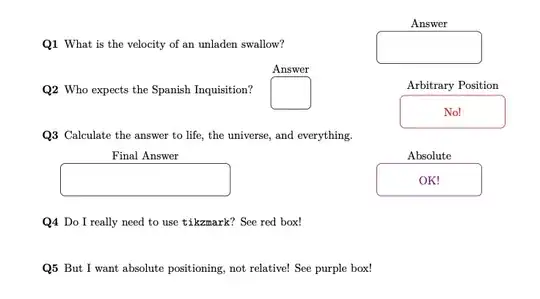
Warning
In these code examples I've used node contents and font to place text inside the boxes. This is not how text should be placed in practice. If you want to supply boxes with content, you should make the content an argument of the command and pass it to the \node command {} argument directly.


tikzand thetikzmarklibrary. You can mark arbitrary points in the text and then place boxes at those points. – Alan Munn Oct 08 '23 at 18:19