3

I'd like to create a macro that creates a table from a list, with the first column merged. I still have 2 problems, the first being to obtain the size of my list, for the moment I'm getting size + 1 ;(, the second being to use the result in the first argument of \multirow. I was thinking of something like \multirow{\sizeList}{*}{some data} ... but it doesn't work.


\documentclass{article}
\usepackage{float}
\usepackage{etoolbox}
\usepackage{multirow}

\usepackage{expl3} \usepackage{xparse}

\ExplSyntaxOn

\NewDocumentCommand \countItems {m}{\clist_count:N #1} \newcommand\mylist{} \newcommand{\addRow}[2]{ \def\delim{&} \listadd{\mylist}{ \delim#1,#2} } \newcommand{\makerow}[1]{% \def\delim{ & }% \renewcommand{\do}[1]{##1 \delim}% \docsvlist{#1}% } \newcommand{\dorow}[1]{\makerow{#1} \ \cline{2-3}} \newcommand{\makeTable}{ \begin{table}[H] \begin{tabular}{|c|c|c|} \hline Uppercase & Number & Lowercase \ \hline \multirow{4}{}{some item} \forlistloop{\dorow}{\mylist} %\multirow{\countItems{\mylist}-1{*}{some item} \hline \end{tabular} \end{table} } \ExplSyntaxOff

\begin{document} \addRow{A}{1} \addRow{B}{2} \addRow{C}{3} \addRow{D}{4}

\makeTable  
This list has \countItems{\mylist} elements. %>>>> does not get the right length 

\end{document}

The result: enter image description here

  • Welcome! Could you say what 'doesn't work' means? Do you get an error? If so, what's the error? Or does it compile but not give the output you want? Or is it just the miscounting? – cfr Oct 11 '23 at 23:54

3 Answers3

2

I added \show\mylist to your code. (Just before the statement saying how many items there are.) This shows the following on my terminal:

> \mylist=macro:
->\delim A,1|\delim B,2|\delim C,3|\delim D,4|

You can see that there are, indeed, 5 items in this list. There are 4 commas and 5 items because each \addRow adds <content before>,<content after>. So after you add the first item, the list contains 2, after you add the second, 3, and so on.

You are also using something of a hodgepodge of expl3, LaTeX 2e and TeX. While it's difficult (impossible?) to work entirely in expl3 right now, this could be somewhat cleaner.

For the counting, as I see it you have at least two choices. You could just deduct 1 since your code adds n+1 items by design. Alternatively, you could keep a separate count. Or you could restructure things. Which is most sensible likely depends on further features of your context.

In the following I take the restructuring route. I store the two arguments given to \addRow in two sequences and then simply feed them into a function two-by-two to create the rows. Then the count of either sequence gives the number of rows. We can feed this directly to \mutlirow by using a expl3 function variant so that the counting gets done before the function sees it.

Since tables with vertical rules and little spacing are generally considered sub-optimal, I've also thrown in a booktabs version. This version doesn't use H because H is not a great idea. Non-floating floats are best avoided. Instead, I use center to give some spacing and \captionof from the caption package, since the need for a caption often motivates people's desire for non-floating floats.
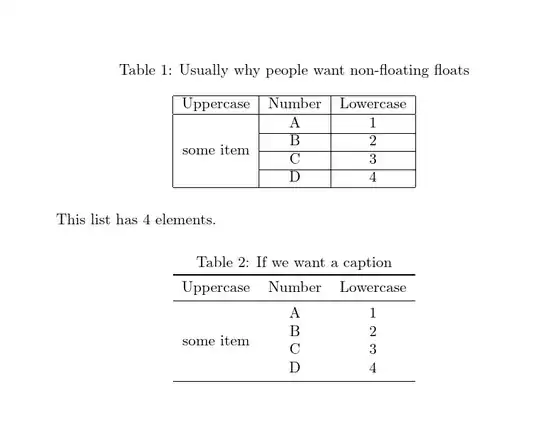
two tables for comparison

\documentclass{article}
\usepackage{float}
\usepackage{multirow}
\usepackage{booktabs}
\usepackage{caption}

% not needed with recent LaTeX kernels % uncomment one or both if you have an older install % \usepackage{expl3} % \usepackage{xparse}

\ExplSyntaxOn % use two sequences and forget storing commas \seq_new:N \l_francoisfem_itemsa_seq \seq_new:N \l_francoisfem_itemsb_seq \NewDocumentCommand \countItems {m} { \seq_count:c { l_francoisfem_#1_seq } } \NewDocumentCommand {\addRow} {mm}{ % just store the arguments pairwise \seq_put_right:Nn \l_francoisfem_itemsa_seq { #1 } \seq_put_right:Nn \l_francoisfem_itemsb_seq { #2 } } \cs_new_protected_nopar:Nn \francoisfem_make_row:nn { % we add the alignment and row endings etc. here & #1 & #2 \ \cline{2-3} } \cs_new_protected_nopar:Nn \francoisfem_makenicer_row:nn { % for booktabs version & #1 & #2 \ } \cs_new_protected_nopar:Nn \francoisfem_multirow:nnn { % make expansion easy for multirow \multirow {#1} {#2} {#3} } % generate a version of multirow which expands its first argument once, so we get the result of the count \cs_generate_variant:Nn \francoisfem_multirow:nnn { onn } \NewDocumentCommand{\makeTable}{ O {} D () { some ~ item } } { % two optional arguments: square brackets (defaults to ); parentheses (defaults to 'some item'') \begin{table}[H] % note that H is Really Not A Good Idea \centering \caption{Usually ~ why ~ people ~ want ~ non-floating ~ floats} \begin{tabular}{|c|c|c|} % note that vertical rules and standard spacing don't make for professional-looking results (see e.g. booktabs) \hline Uppercase & Number & Lowercase \ \hline \francoisfem_multirow:onn % the o means the first argument gets expanded before multirow sees it { \seq_count:N \l_francoisfem_itemsa_seq }{#1}{#2}
% Noah's ark : we feed the contents of the sequences in two-by-two to our row-maker function \seq_map_pairwise_function:NNN \l_francoisfem_itemsa_seq \l_francoisfem_itemsb_seq \francoisfem_make_row:nn \hline \end{tabular} \end{table} } \NewDocumentCommand \makenicerTable { O {*} D () { some ~ item } } { % booktabs version \begin{center} % don't use a float if we don't want it to move \captionof{table}{If ~ we ~ want ~ a ~ caption} \begin{tabular}{ccc} % no vertical rules \toprule Uppercase & Number & Lowercase \ \midrule \francoisfem_multirow:onn { \seq_count:N \l_francoisfem_itemsa_seq }{#1}{#2}
\seq_map_pairwise_function:NNN \l_francoisfem_itemsa_seq \l_francoisfem_itemsb_seq \francoisfem_makenicer_row:nn \bottomrule \end{tabular} \end{center} } \ExplSyntaxOff

\begin{document} \addRow{A}{1} \addRow{B}{2} \addRow{C}{3} \addRow{D}{4}

\makeTable

This list has \countItems {itemsa} elements.

\makenicerTable \end{document}

cfr
  • 198,882
0

After a good night's sleep, a possible solution :) :

\documentclass{article}
\usepackage{float}
\usepackage{etoolbox}
\usepackage{multirow}

\usepackage{expl3} \usepackage{xparse}

\ExplSyntaxOn

\NewDocumentCommand \countItems {m}{\clist_count:N #1} \newcommand\mylist{} \newcounter{lenList} %<<<<<< creating a counter \newcommand{\addRow}[2]{ \addtocounter{lenList}{1} %<<<<<< when add a row add 1 to the counter \def\delim{&} \listadd{\mylist}{ \delim#1,#2} } \newcommand{\makerow}[1]{% \def\delim{ & }% \renewcommand{\do}[1]{##1 \delim}% \docsvlist{#1}% } \newcommand{\dorow}[1]{\makerow{#1} \ \cline{2-3}} \newcommand{\makeTable}{ \begin{table}[H] \begin{tabular}{|c|c|c|} \hline Uppercase & Number & Lowercase \ \hline \multirow{\thelenList}{}{some item} \forlistloop{\dorow}{\mylist} %<<<< using the counter ... \hline \end{tabular} \end{table} } \ExplSyntaxOff

\begin{document} \addRow{A}{1} \addRow{B}{2} \addRow{C}{3} \addRow{D}{4}

\makeTable  
This list has \countItems{\mylist} elements.

\end{document}

0

Don't mix expl3 and etoolbox. You just need to set up two sets of data that you can use in coordination.

If you need more than two columns of data it's slightly more complicated.

\documentclass{article}

\usepackage{etoolbox} \usepackage{multirow}

\ExplSyntaxOn

\seq_new:N \l__francois_table_a_seq \seq_new:N \l__francois_table_b_seq \tl_new:N \l__francois_table_alast_tl \tl_new:N \l__francois_table_blast_tl

\NewDocumentCommand{\clearRows}{} { \seq_clear:N \l__francois_table_a_seq \seq_clear:N \l__francois_table_b_seq }

\NewDocumentCommand{\addRow}{mm} { \seq_put_right:Nn \l__francois_table_a_seq { #1 } \seq_put_right:Nn \l__francois_table_b_seq { #2 } }

\NewDocumentCommand{\makeTable}{} { % last row is special \seq_pop_right:NN \l__francois_table_a_seq \l__francois_table_alast_tl \seq_pop_right:NN \l__francois_table_b_seq \l__francois_table_blast_tl % make the tabular \begin{tabular}{|c|c|c|} \hline % headers Uppercase & Number & Lowercase \ \hline % start with \multirow \multirow{\int_eval:n { \seq_count:N \l__francois_table_a_seq + 1 }}{*}{some~item} \seq_map_pairwise_function:NNN \l__francois_table_a_seq % first sequence \l__francois_table_b_seq % second sequence __francois_table_make:nn % what to do % last row, no \cline & \l__francois_table_alast_tl & \l__francois_table_blast_tl \ \hline \end{tabular} }

\cs_new_protected:Nn __francois_table_make:nn { & #1 & #2 \ \cline{2-3} }

\ExplSyntaxOff

\begin{document}

\clearRows \addRow{A}{1} \addRow{B}{2} \addRow{C}{3} \addRow{D}{4}

\begin{table}[htp] \centering

\makeTable

\caption{A table with some data}

\end{table}

\end{document}

  1. Never use [H]

  2. If you don't need a caption, there's no point in using a table environment.

  3. Look closely at the result: do you really think that \multirow is helpful? The “some item” part isn't actually part of the table, is it?

  4. Vertical rules are unhelpful either.

enter image description here

egreg
  • 1,121,712
  • Hello, thank you for your reply, unfortunately I couldn't run it, I found a } missing on line 17, and even then I got an error on the makeTable line: Use of \ ???? doesn't match its definition. I don't understand your code, so it's impossible for me to try and debug it ;(. – FrancoisFEM Oct 16 '23 at 11:45
  • @FrancoisFEM Sorry for the missing }. You may need to update your TeX distribution: what are you using? – egreg Oct 16 '23 at 12:09
  • I am using the lastest version 3.141592653 (Tex Live 2022). – FrancoisFEM Oct 17 '23 at 13:24
  • @FrancoisFEM We're well into 2023. – egreg Oct 17 '23 at 13:44