As Cicada pointed out in a comment, this is because the font shaper transforms the sequence of Unicode characters 0x05D1 (bet) and 0x05BC (dages) to 0xFB31, so the color attribute of the dagesh is gone, and you cannot color partially a glyph by simple pdf color specification, you need some clipping or redraw part of the glyph (say only the base letter).
One idea is the have two ב, such that the first one will be colored yellow and will form the ligature, and the second one will be blue and will overlap the first one.
To my knowledge, the ligatures involving diacritics don't change the positioning nor the width of the character, so it should work.
Here is a simple example (I've reduced some of the preamble, babel can take care of things).
\documentclass{article}
\usepackage{luacolor}
\usepackage[provide=*,bidi=basic,hebrew]{babel}
\babelfont{rm}[Renderer=Harfbuzz]{Times New Roman}
\newcommand*\dagesh[1]{\leavevmode\rlap{\textcolor{yellow}{#1^^^^05bc}}\textcolor{blue}{#1}}
\begin{document}
\dagesh ב\textcolor{red}{ָ}\textcolor{green}{֢}
\end{document}

If we will compare that to a glyph with no colors, we will see that they overlap perfectly
\documentclass{article}
\usepackage{luacolor}
\usepackage[provide=*,bidi=basic,hebrew]{babel}
\babelfont{rm}[Renderer=Harfbuzz]{Times New Roman}
\newcommand*\dagesh[1]{\leavevmode\rlap{\textcolor{yellow}{#1^^^^05bc}}\textcolor{blue}{#1}}
\begin{document}
\dagesh ב\textcolor{red}{ָ}\textcolor{green}{֢}\llap{בָּ֢}
\end{document}

There are two main problems with this approach. First of all, the horizontal box we are using can break correct kerning, and secondly, the source is mostly unreadable, So let's try to improve both.
Instead of manually color each glyph, we can use lua callbacks to assign color attributes for the characters we will choose. For this example, my aim is to color all base letters in blue, all nikud, maqaf and sof passuq in red, teamim in green and finally dagesh, shin dot and sin dot in yellow.
To do that we will color base letters in blue, ligatures will be colored according to the diacritic involving that ligature, teamim in green and nikud in red.
The following function will insert after each ligature a negative kern equal to its width and the base letter of that ligature, and assign an appropriate color attribute so that luacolor will later color it.
the \pagecolor and the twocolumn option are just for a better picture
\documentclass[twocolumn]{article}
\usepackage{luacolor}
\usepackage[provide=*,bidi=basic,hebrew]{babel}
\babelfont{rm}[Renderer=Harfbuzz]{Times New Roman}
\directlua{
local traverse = node.traverse
local glyph = node.id('glyph')
local set_attribute = node.set_attribute
local has_attribute = node.has_attribute
local insert_after = node.insert_after
local node_new = node.new
local getvalue = oberdiek.luacolor.getvalue
local red = "1 0 0 rg 1 0 0 RG"
local green = "0 1 0 rg 0 1 0 RG"
local blue = "0 0 1 rg 0 0 1 RG"
local yellow = "1 1 0 rg 1 1 0 RG"

local chars = { }

for char = 0x5d0, 0x05f2 do % base letters
    chars[char] = {color = blue}
end
for char = 0x0591, 0x05af do % teamim
    chars[char] = {color = green}
end
for char = 0x05b0, 0x05c7 do % nikud
    chars[char] = {color = red}
end
for char = 0xfb30, 0xfb4a do % dagesh ligatures
    chars[char] = {color = yellow, base = char - 0xf560}
end
for char = 0xfb2a, 0xfb2d do % shin dot ligatures
    chars[char] = {color = yellow, base = 0x05e9}
end

chars[0x05bc] = {color = yellow} % dagesh
chars[0x05f3] = {color = blue} % geresh
chars[0x05f4] = {color = blue} % gershyim
chars[0xfb1d] = {color = red, base = 0x05d9} % yod + hiriq
chars[0xfb1d] = {color = red, base = 0x05f2} % yod yod + patah
chars[0xfb20] = {color = blue} % alt ayin
chars[0xfb2e] = {color = red, base = 0x05d0} % alef patah
chars[0xfb2f] = {color = red, base = 0x05d0} % alef qamats
chars[0xfb4b] = {color = red, base = 0x05d5} % vav holam
chars[0xfb4c] = {color = red, base = 0x05d1} % bet rafa
chars[0xfb4d] = {color = red, base = 0x05db} % kaf rafa
chars[0xfb4e] = {color = red, base = 0x05e4} % pe rafa
chars[0xfb4f] = {color = blue} % alef + lamed

chars[1180354] = {color = red, base = 0x05da} % ???
chars[1180355] = {color = red, base = 0x05da} % ???
chars[1180356] = {color = red, base = 0x05dc} % ???

local function color_char(hlist)
    for n in traverse(hlist) do
        local id = n.id
        if id == glyph then
            local char =  n.char
            local data = chars[char]
            if data then
                local color = data.color
                if color then
                    local color_val = getvalue(color)
                    local color_attr = luatexbase.attributes["LuaCol@Attribute"]
                    set_attribute(n, color_attr, color_val)
                end
                local base = data.base
                if base then
                    local newn = node_new("glyph")
                    newn.font = font.current()
                    newn.char = base
                    %
                    local startactual = node_new("whatsit", "pdf_literal")
                    startactual.data = "/Span<</ActualText<>>>BDC"
                    startactual.mode = 1
                    %
                    local endactual = node_new("whatsit", "pdf_literal")
                    endactual.data = "EMC"
                    endactual.mode = 1
                    %
                    local newk = node_new("kern")
                    newk.kern = -newn.width
                    %
                    insert_after(hlist,n,newk)
                    insert_after(hlist,newk,startactual)
                    insert_after(hlist,startactual,newn)
                    insert_after(hlist,newn,endactual)
                end
            end
        end
    end
end

luatexbase.add_to_callback('pre_linebreak_filter',
    function(h)
        color_char(h)
        return true
    end,
'color_char')
luatexbase.add_to_callback('hpack_filter',
    function(h)
        color_char(h)
        return true
    end,
'color_char')
}

\begin{document}
\pagecolor{black}\noindent
וּֽבְקֻצְרְכֶם֙ אֶת־קְצִ֣יר אַרְצְכֶ֔ם לֹ֧א תְכַלֶּ֛ה פְּאַ֥ת שָׂדְךָ֖ לִקְצֹ֑ר וְלֶ֥קֶט קְצִֽירְךָ֖ לֹ֥א תְלַקֵּֽט׃
וְכַרְמְךָ֙ לֹ֣א תְעוֹלֵ֔ל וּפֶ֥רֶט כַּרְמְךָ֖ לֹ֣א תְלַקֵּ֑ט לֶֽעָנִ֤י וְלַגֵּר֙ תַּעֲזֹ֣ב אֹתָ֔ם אֲנִ֖י יְהֹוָ֥ה אֱלֹהֵיכֶֽם׃
וְלֹֽא־תִשָּׁבְע֥וּ בִשְׁמִ֖י לַשָּׁ֑קֶר וְחִלַּלְתָּ֛ אֶת־שֵׁ֥ם אֱלֹהֶ֖יךָ אֲנִ֥י יְהֹוָֽה׃
לֹֽא־תַעֲשֹׁ֥ק אֶת־רֵֽעֲךָ֖ וְלֹ֣א תִגְזֹ֑ל לֹֽא־תָלִ֞ין פְּעֻלַּ֥ת שָׂכִ֛יר אִתְּךָ֖ עַד־בֹּֽקֶר׃
לֹא־תְקַלֵּ֣ל חֵרֵ֔שׁ וְלִפְנֵ֣י עִוֵּ֔ר לֹ֥א תִתֵּ֖ן מִכְשֹׁ֑ל וְיָרֵ֥אתָ מֵּאֱלֹהֶ֖יךָ אֲנִ֥י יְהֹוָֽה׃
לֹא־תַעֲשׂ֥וּ עָ֙וֶל֙ בַּמִּשְׁפָּ֔ט לֹא־תִשָּׂ֣א פְנֵי־דָ֔ל וְלֹ֥א תֶהְדַּ֖ר פְּנֵ֣י גָד֑וֹל בְּצֶ֖דֶק תִּשְׁפֹּ֥ט עֲמִיתֶֽךָ׃
לֹא־תֵלֵ֤ךְ רָכִיל֙ בְּעַמֶּ֔יךָ לֹ֥א תַעֲמֹ֖ד עַל־דַּ֣ם רֵעֶ֑ךָ אֲנִ֖י יְהֹוָֽה׃
לֹֽא־תִשְׂנָ֥א אֶת־אָחִ֖יךָ בִּלְבָבֶ֑ךָ הוֹכֵ֤חַ תּוֹכִ֙יחַ֙ אֶת־עֲמִיתֶ֔ךָ וְלֹא־תִשָּׂ֥א עָלָ֖יו חֵֽטְא׃
לֹֽא־תִקֹּ֤ם וְלֹֽא־תִטֹּר֙ אֶת־בְּנֵ֣י עַמֶּ֔ךָ וְאָֽהַבְתָּ֥ לְרֵעֲךָ֖ כָּמ֑וֹךָ אֲנִ֖י יְהֹוָֽה׃
\end{document}
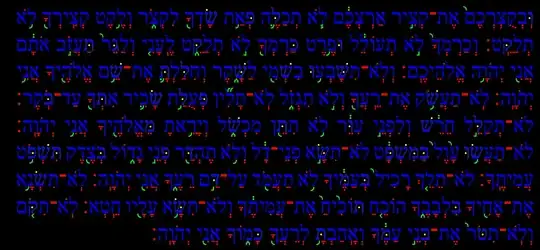
A few notes.
The function is called after the font shaper, which is something usually not recommended, but in this case we need to assign colors to the ligatures, which exists only after that stage.
each base letter inserted after a ligature is wrapped with /ActualText span so that it will not be accounted when extracting text from the PDF.
Some glyphs at that stage are not unicode characters anymore. I'm not sure what their character code mean.
The example text was taken from this answer, which is on the same topic.
if you will want shin dot and dagesh in different colors, you will have to overlap three glyphs. A glyph for each color.


\displayfonttable{Times New Roman}withunicodefonttablepackage, look under Alphabetic Presentation Forms in the output. – Cicada Oct 18 '23 at 06:05