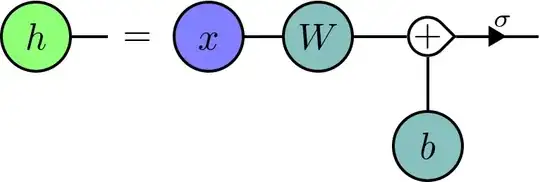
The teardrop in your image, luckily, doesn't look like a true teardrop but just a right angled corner on the side of a circle.
Instead of defining a new shape which would be the preferred way but will not be trivial for the anchor border – though, we can simply define a specific anchor for that teardrop corner and use that explicitly when drawing edges – we can reuse the circle shape by replacing its background path with a custom path.
Unless you need to connect this node on the straight parts of the teardrop tip and are okay with having to specify the anchor teardrop separately when connecting edges to the teardrop tip, this is much easier than defining your own shape.
Note though, that with this implementation you can't use the teardrop anchor when placing the node and it will also not be available for the aliases. If this is needed, a few adjustments have to be made.
Code
\documentclass[tikz]{standalone}
\usepackage{tikz}
\usetikzlibrary{arrows.meta, cd}
\makeatletter
%%% Adding anchors to node after it has been created
%%% does not apply to the aliases
\tikzset{% https://tex.stackexchange.com/a/676090
  add anchor to node/.code n args={3}{%
    \edef\tikz@temp##1{% \tikz@pp@name/\tikzlastnode needs to be expanded
      \noexpand\pgfutil@g@addto@macro\expandafter\noexpand\csname pgf@sh@ma@\tikz@pp@name{#1}\endcsname{%
        \def\expandafter\noexpand\csname pgf@anchor@\csname pgf@sh@ns@\tikz@pp@name{#1}\endcsname @#2\endcsname{##1}}}%
    \tikz@temp{#3}}}
\tikzset{% an “arrow” pic for putting arrow tips along edges
  pics/arrow/.default=>,
  pics/arrow/.style={
    /tikz/sloped, /tikz/allow upside down, foreground code=, background code=,
    setup code=\pgfarrowtotallength{#1}\pgftransformxshift{+.5\pgf@x},
    code=\pgfarrowdraw{#1}},
  replace bg path/.code=\tikz@addoption % https://tex.stackexchange.com/a/697638
    {\pgfutil@namedef{pgf@sh@bg@\tikz@shape}{#1}}}
\makeatother
\newcommand\tikzinsertpath[1]{\pgfkeysvalueof{/tikz/insert path/.@cmd}#1\pgfeov}
\tikzset{replace bg path tikz/.style={replace bg path=\tikzinsertpath{#1}}}
%%%
%%% the teardrop “shape” based on a circle
%%% with a custom path and an extra anchor which is only accessible
%%% after the node has been created and not with the node's aliases
\tikzset{
  xy/.code=\pgfmathparse{#1}%
    \tikzset{style/.expanded={x=+\pgfmathresult pt, y=+\pgfmathresult pt}},
  teardrop shape/.style={
    shape=circle,
    append after command={[add anchor to node={\tikzlastnode}{teardrop}
      {\pgfpointadd{\centerpoint}{\pgfpointpolar{#1}{1.414\radius}}}]},
    replace bg path tikz={
      \bgroup % keep the shift local
        \pgfextra{\pgftransformshift{\centerpoint}}
        [xy={\radius-max(\pgfkeysvalueof{/pgf/outer xsep},%
                         \pgfkeysvalueof{/pgf/outer ysep})}]
        ({#1+45}:1) arc[start angle={#1+45}, delta angle=270, radius=1]
        -- ({#1}:sqrt 2) -- cycle
      \egroup}}}
%%%
%%% TikZ-CD settings
\tikzcdset{
  tensor/.style={
    /tikz//.style={path only, shape=asymmetrical rectangle}, % for the =
    /tikz/c/.style={shape=coordinate},                 % placeholder/empty node
    arrows={thick, /tikz/arrows=-}, arrow style=tikz, >=Triangle,
    row sep=1em, column sep=1em,
    Tri/.style={/tikz/every to/.append style={edge node={pic[{#1}]{arrow}}}},
    /tikz/teardrop/.style={% to be used inside |[…]|
      teardrop shape={##1}, inner sep=+0pt,
      text height=, text width=, text depth=, align=none},
    from teardrop/.style={% to be used when edge is straight out of teardrop tip
      start anchor=teardrop,
      /utils/exec=\pgfsetarrowsstart{Triangle Cap[cap angle=90, reversed]},
      shorten <=+-.5\pgflinewidth},
    to   teardrop/.style={%  to be used when edge is straight into teardrop tip
      end anchor=teardrop,
      /utils/exec=\pgfsetarrowsend{Triangle Cap[cap angle=90, reversed]},
      shorten >=+-.5\pgflinewidth},
    cells={nodes={
        draw, thick, inner sep=+.2em, anchor=center, shape=circle,
        text width=width("$W$"),  align=center,
        text height=+.7em, text depth=+0pt}}},
  color shortcuts/.style args={#1#2}{/tikz/#1/.style={fill=#1#2!50}},
  color shortcuts'/.style args={#1:#2}{/tikz/#1/.style={fill=#2!50}}}
\begin{document}
\begin{tikzcd}[tensor, color shortcuts/.list={green, blue, teal}]
|[g]| h \rar
  & |[]| =
    &[-.8em] |[b]| x \rar
      & |[t]| W \rar
        & |[teardrop=0]| + \ar[from teardrop, rr, Tri, "\sigma" xshift=.3ex] \dar
          & & |[c]| \
  & & & & |[t]| b
\end{tikzcd}
\end{document}
Output


fill=whitecovering the edges. We can even use acirclenode with the+first to measure the needed circumference. – Qrrbrbirlbel Oct 20 '23 at 13:57