EDIT: Edited to use phantom key, which is designed to support this kind of style. Requires chronos no earlier than svn rev 9903.
Note that chronos is experimental and rather buggy. The linked version is the result of a rewrite of code previously posted here, together with some other code.
Caveat emptor
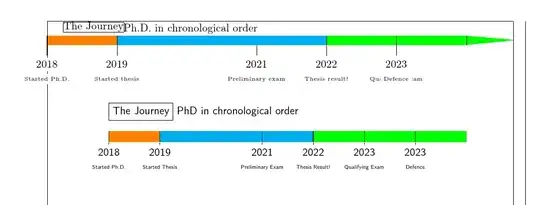
You could try chronos, though it is not on CTAN (yet?). The code below includes your original MWE for comparison followed by a chronos version. showframe is used to show that chronosys produces a timeline which protrudes into the margin, though no warning seems to be produced on the terminal.
\documentclass{article}
% ateb: https://tex.stackexchange.com/a/701743/ i gwestiwn Node.JS: https://tex.stackexchange.com/q/699881/
% https://codeberg.org/cfr/chronos
\usepackage{chronos}
\usepackage{chronosys}
\usepackage[showframe]{geometry}
\begin{document}
\begin{frame}{The Journey}{Ph.D. in chronological order}
  \chronoperiodecoloralternation{orange, cyan, green, green}
  \startchronology[startyear=2018, stopyear=2024, dates=false,arrowcolor=green,stopdate=false]
  \chronoevent[textstyle=\tiny]{2018}{Started Ph.D.}
  \chronoevent[textstyle=\tiny]{2019}{Started thesis}
  \chronoevent[textstyle=\tiny]{2021}{Preliminary exam}
  \chronoevent[textstyle=\tiny]{2022}{Thesis result!}
  \chronoevent[textstyle=\tiny]{2023}{Qualifying exam} % this was done at the beginning of the 2023
  \chronoevent[textstyle=\tiny]{2023}{Defence}  % I want this to be at the end of 2023
  \chronoperiode[startdate=false, stopdate=false]{2018}{2019}{}
  \chronoperiode[startdate=false, stopdate=false]{2019}{2022}{}
  \chronoperiode[startdate=false, stopdate=false]{2022}{2023}{}
  \chronoperiode[startdate=false, stopdate=false]{2023}{2024}{}
  \stopchronology
\end{frame}
\centering
\begin{chronos}
  % ateb: https://tex.stackexchange.com/a/701743/ i gwestiwn Node.JS: https://tex.stackexchange.com/q/699881/
  % https://codeberg.org/cfr/chronos min svn rev 9903
  [
    lines on line=10pt,% line height
    timeline={%
      dates=2018:2024,
      width=.9\linewidth,
      timeline line={-,shorten >=0pt},% because lines on line has an arrow
      timeline margin'=0pt,
    },
    outer border'=0pt,
    without eras,
    text tags+={font=\sffamily},
    every event below,
    event={%
      only years,
      colour=black,
      text font=\tiny,

    },
    period={%
      colours below={orange,cyan,green,green},
      phantom,
      only years,
    },
  ]
  % these must be named, even though they are invisible and detached
  \chronosperiod{dates=2018:2019,name={n1}}
  \chronosperiod{dates=2019:2022,name={n2}}
  \chronosperiod{dates=2022:2023,name={n3}}
  \chronosperiod{dates=2023:2024,name={n4}}
  \chronosevent{date=2018,name={Started Ph.D.},}
  \chronosevent{date=2019,name={Started thesis},}
  \chronosevent{date=2021,name={Preliminary exam},}
  \chronosevent{date=2022,name={Thesis result!},}
  \chronosevent{date=2023-01-01,name={Qualifying exam},} % this was done at the beginning of the 2023
  \chronosevent{date=2023-12-31,name={Defence},}  % I want this to be at the end of 2023
  \chronosmaintitle{name content=The Journey,label={[font=\sffamily]right:PhD in chronological order},at=Started PhD |- chronos head,anchor=south west,yshift=10pt,font=\sffamily,draw }
\end{chronos}
\end{document}
chronos has no problem putting two events at different points in the year and readily supports either an arrow or no arrow. While the original answer used a version in which creating periods (or events or lives) which didn't have text boxes required a bit of trickery, the current version provides phantom. Unlike my original answer, which involved creating invisible text boxes and not connecting them to anything, phantom means they are not constructed at all. This is more efficient, should be more reliable and is (hopefully) more straightforward to use.


chronosys. – cfr Oct 30 '23 at 03:50