Here is one way to do it. Basic idea:
- write your own documentclass
tmplt.cls
- use it inside your main document
main.tex
- ignore some minor adjustment hickups for now
- ignoring all font issues, focus on pdflatex
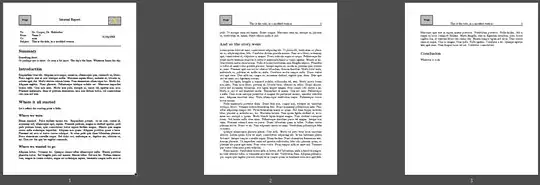
Addressing your major problems
- pagebreak after
\maketitle: use \tmplttitle{} instead (in tmplt.cls)
- however, there certainly is a solution to handle the extra pagebreak from the
titlepage environment
- header-problems: adapted this solution from 2013
To stimulate your ideas about typesetting I used two minipages, while your table will work fine as well. Kindly watch (and use yourself) all those % at the end of lines inside \newcommand: This keeps unwanted insertion of spaces away, hence unwanted layout shifts.
% ~~~ create your own title page ~~~~~~~~~~~~~
\newcommand\tmplttitle[0]{%
{{\parindent0pt% localized: disabling indenting of first line
    % ~~~ you could use your tabularx approach as well ~~~
...
    \bigskip%
    \hrule%
}}}
Very straightforward the content of some fancy-fields depend on the page (number), using \ifthenelse{cond}{if-case}{else-case}, see link above.
\fancyhead[C]{\ifthenelse{\value{page}=1}%
                {\raisebox{.25in}{\large{Internal Report}}}%
                {\subj{}}}
Handling .cls files
During development it's ok to have the .cls in the same directory as your main.tex.
To test my solution, just copy the code from the very end into a main.tex and a tmplt.cls inside a fresh directory.
Once done you may want to move the class to the TEXMF root, AND update your Latex-distribution about this, e.g. via your MikTex console. After that you can use \documentclass{tmplt} from anywhere as usual with other classes. (And don't forget to provide a documentation there, too. You'll need it yourself, sooner or later.)
What this tmplt.cls provides
Default names:
% ~~~ default names, subject, date ~~~~~~~~~~~~~~
\newcommand\nameto[0]{Name 1}
...
Default images, which you'd change as needed for your standard:
% ~~~ default for images ~~~~~~~~~~~~~~~~~~~~~~~
\newcommand\imleft[0]{example-image}
\newcommand\imright[0]{example-image-duck}
Shortcuts to relevant structures, just for convenience:
% ~~~ shortcuts to relevant sections ~~~~~~~~~~~~
\newcommand\concl[1]{\section*{Conclusion}#1}
\newcommand\intro[1]{\section*{Introduction}#1}
\newcommand\summ[1]{\section*{Summary}#1}
Said replacement for \maktitle and page-dependent handling of your headers.
Using tmplt.cls in main.tex
- specify this class
- overwrite defaults using
\renewcommand
- put summary, intro, conclusion
- use standard Latex in between
Here's a basic scheme, which you might save for reuse ...
\documentclass{tmplt}
\renewcommand\mydate{11/04/2023}
\begin{document}
 \tmplttitle{}
 \summ{enter here}
 \intro{enter here}
...
 \concl{ener here}
\end{document}
So if you have a dedicated /img directory, you might overwrite like this:
\renewcommand\imleft{img/logo}
Code
tmplt.cls:
% see e.g. "The Latex Companion", Mittelbach et. al.
% ~~~ 1) identification ~~~~~~~~~~
  \NeedsTeXFormat{LaTeX2e}
  \ProvidesClass{tmplt}[2023/11/11]
% ~~~ 2) initial code ~~~~~~~~~~
%        instead of \usepackage call
  \RequirePackage{ifthen}
  \RequirePackage{fancyhdr}
  \RequirePackage{graphicx}
% ~~~ 3) declaration of options ~~~~~~~~~~
% ~~~ 4) execution of options ~~~~~~~~~~
% ~~~ 5) package loading ~~~~~~~~~~
  \LoadClass[12pt, letterpaper]{article}%       use as base class
  \RequirePackage[%showframe,% uncomment showframe to check layout settings
    margin=1in,top=1.8in,headheight=1.5in]{geometry}
% ~~~ 6)  main code ~~~~~~~~~~
% ~~~ these ones can be useful for horizontal and vertical alignment ~~
\newcommand\hs[1]{\hspace{\stretch{#1}}}
%\newcommand\vs[1]{\vspace{\stretch{#1}}}
% ~~~ default names, subject, date ~~~~~~~~~~~~~~
\newcommand\nameto[0]{Name 1}
\newcommand\namefrom[0]{Name 2}
\newcommand\namecc[0]{none}
\newcommand\subj[0]{This is the title}
\newcommand\mydate[0]{\today{}}
% ~~~ default for images ~~~~~~~~~~~~~~~~~~~~~~~
\newcommand\imleft[0]{example-image}
\newcommand\imright[0]{example-image-duck}
% ~~~ shortcuts to relevant sections ~~~~~~~~~~~~
\newcommand\concl[1]{\section{Conclusion}#1}
\newcommand\intro[1]{\section{Introduction}#1}
\newcommand\summ[1]{\section*{Summary}#1}
% ~~~ create your own title page ~~~~~~~~~~~~~
\newcommand\tmplttitle[0]{%
{{\parindent0pt% localized: disabling indenting of first line
    % ~~~ you could use your tabularx approach as well ~~~
%   \hrule%
    \bigskip%
  % ~~~ typesetting left column ~~~~~
  \begin{minipage}{8cm}%
    \begin{tabular}{ll}%
        To:     & \nameto{}\%
        From:   & \namefrom{}\%
        Cc:     & \namecc{}\%
        Subject:& \subj{}\%
    \end{tabular}%
  \end{minipage}%

  \hs{1}%
  % ~~~ typesetting right entry ~~~~~~~~
  \begin{minipage}{3cm}%
    \mydate{}%
  \end{minipage}%
    \bigskip%
    \hrule%
}}}
% ~~~ taking care of headers and footers ~~~~~~~~~~
\pagestyle{fancy}
\fancyhf{}
\fancyhead[L]{\includegraphics[width=2cm]{\imleft}}
% ~~~ adapted from https://tex.stackexchange.com/a/122379/245790 ~~~
\fancyhead[C]{\ifthenelse{\value{page}=1}%
                {\raisebox{.25in}{\large{Internal Report}}}%
                {\subj{}}}
\fancyhead[R]{\ifthenelse{\value{page}=1}{%
        \includegraphics[width=2cm]{\imright}%
    }%
    {\thepage}}
main.tex:
\documentclass{tmplt}%  <<< work with your template
\usepackage{lipsum}
% ~~~ overwrite tmplt variables as needed ~~~~~
\renewcommand\nameto{Dr. Cooper, Dr. Hofstadter}
\renewcommand\subj{This is the title, in a modified version}
\renewcommand\mydate{11/04/2023}
% ~~~~~~~~~~~~~~~~~~~~~~~~~~~~~~~~~~
\begin{document}
% ~~~ 1) show the title pages as defined in tmplt ~~~
 \tmplttitle{}
% ~~~ 2) put your summary, from tmplt ~~~
 \summ{Something short.\%
    Or perhaps not so short. Or even a bit more. The sky's the limit. Whatever limits the sky.%
 }
% ~~~ 3) put your introduction, from tmplt ~~~
 \intro{\lipsum[10]}
% ~~~ 4) use standards here ~~~
     \section*{Where it all started}
     Let's reflect the starting point a little.
 \subsection*{Where we were}
 \lipsum[12]

 \subsection*{Where we wanted to go}
 \lipsum[13]

 \section*{And so the story went}
 \lipsum[1-5]


% ~~~ 5) put your conlcusion here, from tmplt ~~~
 \concl{Whatever it took.}
\end{document}


{titlepage}is causing a page break where I think you don't want it. But I'm not sure if that's the problem, or something else, or if there are multiple problems. – Teepeemm Nov 03 '23 at 22:51example-imageinstead to reproduce the issue. – cfr Nov 04 '23 at 01:18