This is achieved by my humble trying. Feel free to improve it.
This method is only working when you have numbered chapters and sections. Because the temporary macro '\tempsn\alph{chapter}\alph{section}' ,which store the section name, are named based on the counter of chapter and section. And total number of chapter and number of section inside one chapter are not exceed 26.
Using etoolbox patch the \@sect command to define a macro to store the section name. The macro's name is based on the current counter of chapter and section (e.g. when in chapter 2 section 3, the macro name is \tampsnbc).
Then \renewcommand{\imki@wrindexentrysplit}, replace the page number with the defined macro using \csname tampsn\alph{chapter}\alph{section}\endcsname. I also change the section number in form of "chapter.section". I think this is easier to locate which section is this index in. Now the index looks like this:
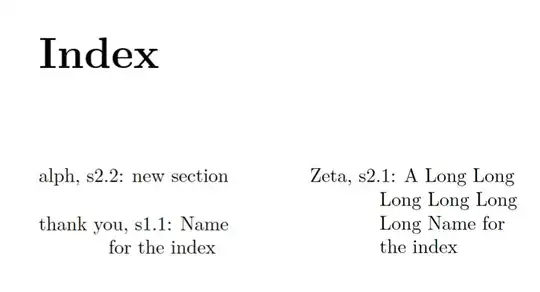
The code:
\documentclass[a5paper,11pt]{book}
\usepackage{etoolbox}
\usepackage{imakeidx}
\makeatletter
\patchcmd{@sect}{\csname #1mark\endcsname{#7}}{\csname #1mark\endcsname{#7}\expandafter\expandafter\def\csname tempsn\alph{chapter}\alph{#1}\endcsname{#7}}{}{}
\renewcommand{\imki@wrindexentrysplit}[3]{%
\expandafter\protected@write\csname#1@idxfile\endcsname{}%
{\string\indexentry{#2}%
{s\thesection:\string\kern1ex\expandafter\string\csname tempsn\alph{chapter}\alph{section}\endcsname}}%
}
\makeatother
\makeindex
\begin{document}
\tableofcontents
\chapter{Example one}
\section{Name for the index}
Thanks\index{thank you}
\clearpage
\chapter{Example two}
\section{A Long Long Long Long Long Long Name for the index}
Test\index{Zeta}
\section{new section}
New Test\index{alph}
\clearpage
\printindex
\end{document}


