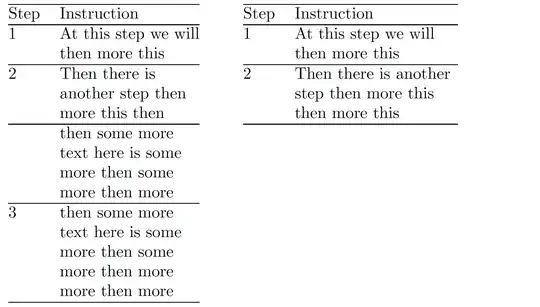
If I understand your formatting objective correctly, you wish to create a tabular environment with two columns; the left-hand column should display an automatically incremented row number, and the right-hand column will contain text and should allow automatic line wrapping. Moreover, there should be a mechanism to override the automatic display of a row number in the left-hand column, say, because you need to be able to typeset the word "Step" in the header row.
The following code achieves these goals. Observe that the utility macro called \ZZ -- feel free to choose a different name ... -- lets you override the automatic row numbering. \ZZ{Step} shows the word "Step"; \ZZ{} leaves the cell blank, and it doesn't increment the counter called rownum.
\documentclass{article}
\newcounter{rownum}
\usepackage{array} % for \newcolumntype macro
\newcolumntype{N}{% increment and display the value of 'rownum' counter
   >{\refstepcounter{rownum}\therownum}l}
\newcolumntype{P}[1]{% suppress full justification
   >{\raggedright\arraybackslash}p{#1}}
\newcommand\ZZ[1]{\multicolumn{1}{@{}l}{#1}} % macro to override action of 'N' col. type
\begin{document}
\begin{tabular}[t]{@{} N P{3cm} @{}} % choose width of 2nd column as needed
\hline
\ZZ{Step} & Instruction \
\hline
& At this step we will then more this \
\hline
& Then there is another step then more this then \
\hline
\ZZ{} & then some more text here is some more then some more then more  \
\hline
& then some more text here is some more then some more then more more then more \
\hline
\end{tabular}
\qquad
\setcounter{rownum}{0} % reset 'rownum' counter to 0
\begin{tabular}[t]{@{} N P{3.5cm} @{}} % choose width of 2nd column as needed
\hline
\ZZ{Step} & Instruction \
\hline
& At this step we will then more this \
\hline
& Then there is another step then more this then more this \
\hline
\end{tabular}
\end{document}


pcolumn for the last column, so you can use linebreaks in the cell and indeed can automatically number each table row. – cabohah Nov 09 '23 at 07:23\newcounter,\setpcounter(or\refstepcounterif you want to refer to) and\the<counter>. Or maybe is shouldn't really be a table but simething likealignwith only some lines tagged? Even usingenumerateand some items without numbering could be a suggestion. Sorry but it is unclear. – cabohah Nov 09 '23 at 07:28