Make use of a \pic:
\documentclass[border=10pt]{standalone}
\usepackage{tikz}
\tikzset{
    pics/photo diode/.style={
        code={
            \tikzset{photo diode/.cd, #1}
            \path[photo diode/bulb]
                ({-sqrt(3)*0.225},0)
                arc[start angle=210, end angle=-30, radius=0.45]
                -- cycle;
            \path[photo diode/base] (-0.5,0) -- (0.5,0);
            \coordinate (-north) at (0,0.675);
            \coordinate (-south) at (0,0);
        }
    },
    photo diode/base/.style={
        draw,
        line width=4pt
    },
    photo diode/bulb/.style={
        draw,
        ball color=orange
    }
}
\begin{document}
\begin{tikzpicture}
\pic (P) at (0,0) {photo diode};
\pic[red] (Q) at (2,0) {photo diode={
    bulb/.append style={ball color=green}
}};
\draw (P-south) -- ++(0,-0.5) -| (Q-south);
\end{tikzpicture}
\end{document}
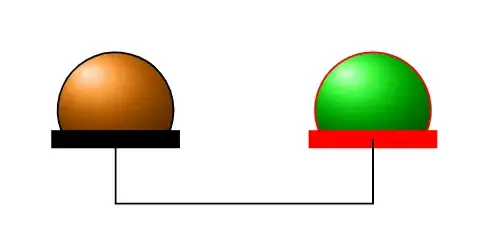
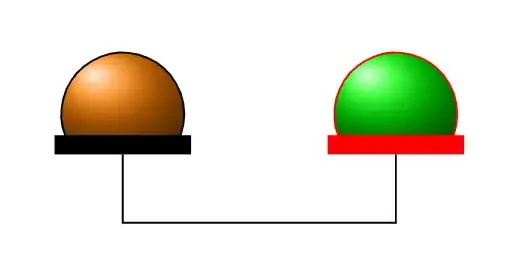
Edit to exactly position the anchor coordinates (thanks to Sebastiano):
\documentclass[border=10pt]{standalone}
\usepackage{tikz}
\tikzset{
    pics/photo diode/.style={
        code={
            \tikzset{photo diode/.cd, #1}
            \path[photo diode/bulb]
                ({-sqrt(3)0.225},0)
                arc[start angle=210, end angle=-30, radius=0.45]
                coordinate[midway, yshift={0.5\pgflinewidth}] (-north);
            \path[photo diode/base] (-0.5,0) -- (0.5,0)
                coordinate[midway, yshift={-0.5*\pgflinewidth}] (-south);
        }
    },
    photo diode/base/.style={
        draw,
        line width=4pt
    },
    photo diode/bulb/.style={
        draw,
        ball color=orange
    }
}
\begin{document}
\begin{tikzpicture}
\pic (P) at (0,0) {photo diode};
\pic[red] (Q) at (2,0) {photo diode={
    bulb/.append style={ball color=green}
}};
\draw (P-south) -- ++(0,-0.5) -| (Q-south);
\end{tikzpicture}
\end{document}


circuitikz, manual ,pp 239:-) – Zarko Nov 22 '23 at 11:59circleandrectangle, but I am not able to "cut" the circle such that part of it is hidden (i.e., to avoid relying on just placing the rectangle on top of the circle). – Mike D. Nov 22 '23 at 12:35arcinstead of acircle, but clipping is much easier. – samcarter_is_at_topanswers.xyz Nov 22 '23 at 13:08arc! By the way, is it possible to shift the position of the center of the radial gradient inside the circle? – Mike D. Nov 22 '23 at 13:12\draw[ball color=orange, shading angle=-45, draw, very thick] (2.5mm,5mm) circle (4mm);– samcarter_is_at_topanswers.xyz Nov 22 '23 at 13:19double, for example. – cfr Nov 22 '23 at 16:28