5

I want to draw an arrow with a striped arrowhead using tikz. I can't find anything in the tikz docs to do this.

\documentclass{standalone}
\usepackage{tikz}
\usetikzlibrary{arrows.meta}
\begin{document}
\begin{tikzpicture}[very thick,font=\sffamily\Large]
\draw[-{Latex[length=30mm,angle'=10]}] (0,-2) -- (0,3);
\end{tikzpicture}
\end{document}

I want to make something like the below figure. Black line with arrowhead that has evenly spaced orange/white stripes:

arrowhead

3 Answers3

10

Here is an option using decorations.markings, although they can be improved to adapt to curves, in this case it does not, but you can look for examples with coils, however it is best to declare it as a style or pic so that you can do a lot with little code.

RESULT: enter image description here
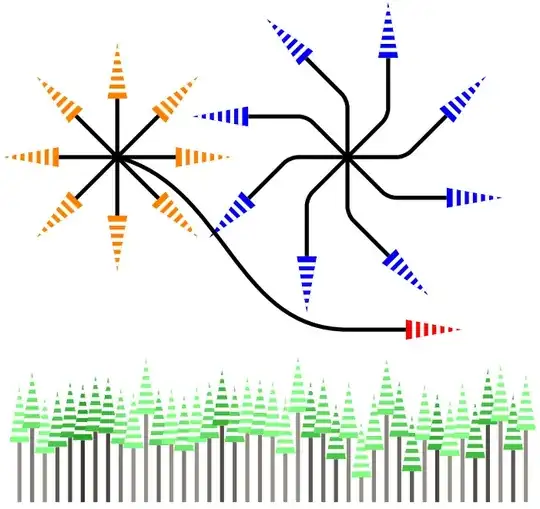
MWE:

\documentclass{standalone}
\usepackage{tikz}
\usetikzlibrary{arrows.meta,decorations.markings,calc}
\definecolor{brown}{HTML}{2E2111}
\begin{document}
    \begin{tikzpicture}[
        %Environment Styles
        MyArrow/.style={
            draw,
            shorten >=28pt,
            line width=2pt,
            preaction={
                decorate,
                shorten >=0pt,
                line width=1pt,
                rounded corners=0,
                decoration={
                    markings,
                    mark=at position 1
                    with {
                        \clip[](0,0) -- ++(-28pt,-5pt) -- ++(0,10pt) -- cycle;
                        \fill[#1](0,0) -- ++(-28pt,-5pt) -- ++(0,10pt) -- cycle;
                        \foreach \k in {1,...,6}{\draw[white, line width=2pt] (-4pt*\k,-5pt) -- ++(0,10pt);}
                    }
                }
            }
        }
    ]
        \foreach \i in {0,45,...,315} {\draw[MyArrow=orange] (0,0) -- ++(\i:2);}
        \foreach \i in {0,45,...,315} {\draw[MyArrow=blue, rounded corners] (4,0) --++(\i:1) -- ++(45+\i:2);}
        \draw[MyArrow=red](0,0) [out=-15,in=180] to ++(4,-3)[out=0,in=180] -- ++(2,0);
        \foreach \distance in {0,1,...,40}{
            \pgfmathparse{0.9*rnd+0.3}
            \definecolor{Rcolor}{rgb}{\pgfmathresult,\pgfmathresult,\pgfmathresult} % from https://tex.stackexchange.com/a/37279/154390
            \draw[MyArrow=green!50!Rcolor,brown!50!Rcolor] (-1.7,-6)++(\distance*0.22,0) -- ++(0,2+0.7*rand*rand););
        }
    \end{tikzpicture}
\end{document}
J Leon V.
  • 11,533
  • 16
  • 47
4

The inset is misused, it denoted the number of stripes (including the white/transparent ones). An even number will lead to the line ending at a white stripe.

Code

\documentclass[tikz]{standalone}
\usetikzlibrary{arrows.meta, bending}
\pgfdeclarearrow{
  name = Striped Triangle,
  defaults = {
    length  = +3pt 4.5 .8,
    width'  = +0pt .75,
    inset'  = +13pt,
    angle=+60:+2.7pt +3.6,
  },
  setup code={%
    \pgfarrowssettipend{0pt}%
    \pgfarrowssetbackend{-\pgfarrowlength}%
    \pgfarrowssetlineend{\dimexpr-\pgfarrowlength+.001pt}% visual things
    \pgfarrowsupperhullpoint{0pt}{0pt}%
    \pgfarrowsupperhullpoint{-\pgfarrowlength}{.5\pgfarrowwidth}%
    \pgfarrowssavethe\pgfarrowlength
    \pgfarrowssavethe\pgfarrowwidth
    \pgfarrowssavethe\pgfarrowinset
    \pgfmathreciprocal{\pgfarrowinset}%
    \let\pgfarrowstripedtrianglefrac\pgfmathresult
    \pgfarrowssave\pgfarrowstripedtrianglefrac
  },
  drawing code={%
    \pgfmathloop % could use qicker \pgfmathmultiply@ here
      \pgfmathmultiply{\pgfmathcounter-1}{\pgfarrowstripedtrianglefrac}\let\near\pgfmathresult
      \ifdim\pgfmathcounter pt=\pgfarrowinset \def\far{1}% just use 1 instead of n*1/n
      \else
        \pgfmathmultiply{\pgfmathcounter}{\pgfarrowstripedtrianglefrac}\let\far\pgfmathresult
      \fi
      \pgfpathmoveto{\pgfqpointscale{\near}{\pgfqpoint{-\pgfarrowlength}{+.5\pgfarrowwidth}}}%
      \pgfpathlineto{\pgfqpointscale{\far }{\pgfqpoint{-\pgfarrowlength}{+.5\pgfarrowwidth}}}%
      \pgfpathlineto{\pgfqpointscale{\far }{\pgfqpoint{-\pgfarrowlength}{-.5\pgfarrowwidth}}}%
      \pgfpathlineto{\pgfqpointscale{\near}{\pgfqpoint{-\pgfarrowlength}{-.5\pgfarrowwidth}}}%
      \pgfpathclose
      \ifdim\pgfinteval{1+\pgfmathcounter}pt<\pgfarrowinset\relax
      \edef\pgfmathcounter{\pgfinteval{\pgfmathcounter+1}}%
    \repeatpgfmathloop
    \pgfusepathqfill
  },
  parameters={\the\pgfarrowlength,\the\pgfarrowwidth,\the\pgfarrowinset}
}
\tikzset{>={Striped Triangle[fill=orange, angle'=30]}}
\begin{document}
\begin{tikzpicture}[ultra thick]
\foreach[count=\i] \ang in {0, 30, ..., 359}
  \draw[-{>[inset=2*\i-1]}] (0,0) -- (\ang:.7);
\end{tikzpicture}
\begin{tikzpicture}
\foreach[count=\i] \bendmode in {quick, flex, bend}{
\tikzset{yshift=-\i cm}
\draw [red!25,line width=1mm] (-1,0) -- (1,0);
\draw [red,line width=1mm,-{[\bendmode]>.>>}]
  (-1,-.5) node[right, black] {\bendmode}
  .. controls (0,-.5) and (0,0) .. (1,0);
}
\end{tikzpicture}
\end{document}

Output

star

enter image description here

Qrrbrbirlbel
  • 119,821
3

Somewhat kludgy. It would be easier to simply draw the shape, but if you especially want an arrow tip:

\documentclass{standalone}
\usepackage{tikz}
% ateb: https://tex.stackexchange.com/a/702116/
% cwestiwn Medulla Oblongata: https://tex.stackexchange.com/q/702111/
\usetikzlibrary{arrows.meta}
\usetikzlibrary{patterns.meta}
\begin{document}
\begin{tikzpicture}[very thick,font=\sffamily\Large]
  \draw[-{Latex[length=30mm,angle'=10]},line width=0pt,postaction={draw,-,shorten >=30mm-1.2pt,black,very thick},white,pattern={Lines[line width=2.5pt,distance=5pt]},pattern color=orange] (0,-2) -- (0,3);
\end{tikzpicture}
\end{document}

orange-striped tip on black line

If it doesn't have to be an arrow tip, you can simply fill a triangular path. This doesn't rely on the background being white.

orange-striped arrow and orange-striped triangle on black lines

\documentclass{standalone}
% ateb: https://tex.stackexchange.com/a/702116/
% cwestiwn Medulla Oblongata: https://tex.stackexchange.com/q/702111/
\usepackage{tikz}
\usetikzlibrary{arrows.meta}
\usetikzlibrary{patterns.meta}
\begin{document}
\begin{tikzpicture}[very thick,font=\sffamily\Large]
  \draw[-{Latex[length=30mm,angle'=10]},line width=0pt,postaction={draw,-,shorten >=30mm-1.2pt,black,very thick},white,pattern={Lines[line width=2.5pt,distance=5pt]},pattern color=orange] (0,-2) -- (0,3);
  \begin{scope}[xshift=10mm]
    \draw[shorten >=30mm-1.2pt,black,very thick] (0,-2) -- (0,3);
    \path [pattern color=orange,pattern={Lines[line width=2.5pt,distance=5pt]}] (-.5,0) -- (0,3) -- (.5,0) -- cycle;
  \end{scope}
\end{tikzpicture}
\end{document}
cfr
  • 198,882
  • thanks @cfr, I want to use this arrow as part of a bigger figure which requires me to rotate the arrows. I can rotate the arrows but the stripes are always horizontal eg. \draw[-{Latex[length=30mm,angle'=10]},line width=0pt,postaction={draw,-,shorten >=30mm-1.2pt,black,very thick},white,pattern={Lines[line width=2.5pt,distance=5pt]},pattern color=orange] (0,-2) -- (1,2.8);. Is there a way to rotate the arrowhead AND stripes? – Medulla Oblongata Nov 23 '23 at 18:15
  • 1
    @MedullaOblongata You didn't mention that in the question. As it happens, these patterns are designed to be rotatable. So that bit's just a matter of adding angle=<value> in the appropriate place. However, I'm not sure how you're rotating the arrows (or what you mean by rotating the arrows), so I don't know whether that will work in your case or how to figure out whether it will. – cfr Nov 24 '23 at 02:30
  • @MedullaOblongata If I draw the path at an angle, the pattern rotates, too. If I put the arrow on a curve and use bend, it also works fine (though the black line does less well). So presumably you're rotating them in some other way, but you don't say what. – cfr Nov 24 '23 at 02:42