A new version
The OP also wanted to remove and balance the spaces before and after the environment. Normally this is hard with minipages, but in our case we know exactly how tall the minipage is going to be and where the various baselines ought to be, so we can cheat.
While doing this, I also discovered a bug with my original answer: it doesn't correctly factor in when the first line and the bottom line are not generic. (For example, you can see what happens if you replace the content of the rightbody with \item aaa \item aaa. The minipage used will be too large to get the correct alignment.)
What we need to do:
- Set
\topsep and \partopsep to 0pt so that \trivlist doesn't add extra space.
- Correctly compute the space required by measuring for each box: the height of the first line, the depth of the last line, and the "body" height (everything below the baseline of the first line and above the baseline of the bottom line).
- Convince TeX to not use the minipage to compute the line spacings. To do this I will
\smash the minipages. I will insert a rule where the first line is (with height given by the larger of the top-line-heights of the top boxes), then \vskip an appropriate amount (the "body height" minus one \baselineskip), and insert another rule (descending below the baseline the larger of the bottom-depths of the two boxes). This way the interline spacing before and after the minipages will be computed exactly as if the content were showing up "in line".
- Additional cosmetic change: I placed an
\hfill between the two minipages to spread them out if the specified widths do not add up to full width.
% Note: if using the lua-visual-debug package, build with lualatex
% If comment out the package, you can build with pdflatex
\documentclass{article}
\usepackage{lua-visual-debug} % used to show the boxes so that the proper alignment is clear
\usepackage{lipsum}
\usepackage{enumitem}
\usepackage{environ}
%%%%
\makeatletter
\newlength@LBwd
\newlength@RBwd
\newlength@LBtopht
\newlength@LBtopdp
\newlength@LBbodht
\newlength@LBbotdp
\newlength@RBtopht
\newlength@RBtopdp
\newlength@RBbodht
\newlength@RBbotdp
\NewEnviron{leftbody}{%
        \expandafter\gdef\expandafter@leftbodycontent\expandafter{\BODY}%
        \sbox0{%
                \begin{minipage}[t]{@LBwd}
                        \BODY
                \end{minipage}%
        }%
        \global@LBtopht=\ht0\relax%
        \global@LBtopdp=\dp0\relax%
        \sbox0{%
                \begin{minipage}[b]{@LBwd}
                        \BODY
                \end{minipage}%
        }
        \global@LBbotdp=\dp0\relax%
        \global@LBbodht=\dimexpr@LBtopdp-@LBbotdp\relax%
}
\NewEnviron{rightbody}{%
        \expandafter\gdef\expandafter@rightbodycontent\expandafter{\BODY}%
        \sbox0{%
                \begin{minipage}[t]{@RBwd}
                        \BODY
                \end{minipage}%
        }%
        \global@RBtopht=\ht0\relax%
        \global@RBtopdp=\dp0\relax%
        \sbox0{%
                \begin{minipage}[b]{@RBwd}
                        \BODY
                \end{minipage}%
        }
        \global@RBbotdp=\dp0\relax%
        \global@RBbodht=\dimexpr@RBtopdp-@RBbotdp\relax%
}
\newlength@pokeabove
\newlength@pokebelow
\newenvironment{unevencols}[2]{% args: width of the two columns
        \setlength{@LBwd}{#1}%
        \setlength{@RBwd}{#2}%
}{%
        \ifdim@LBbodht<@RBbodht\relax%
                @LBbodht=@RBbodht\relax%
        \else
                @RBbodht=@LBbodht\relax%
        \fi
        \ifdim@LBtopht<@RBtopht\relax%
                @pokeabove=@RBtopht%
        \else
                @pokeabove=@LBtopht%
        \fi
        \ifdim@LBbotdp<@RBbotdp\relax%
                @pokebelow=@RBbotdp%
        \else
                @pokebelow=@LBbotdp
        \fi
        \topsep=0pt \partopsep=0pt
        \begin{trivlist}
        \item\rule{0pt}{@pokeabove}\smash{\begin{minipage}[t][\dimexpr@LBbodht+@LBtopht+@LBbotdp\relax]{@LBwd}
                \setlist{itemsep=\fill}%
                @leftbodycontent%
\end{minipage}}\hfill\smash{\begin{minipage}[t][\dimexpr@RBbodht+@RBtopht+@RBbotdp\relax]{@RBwd}
                \setlist{itemsep=\fill}%
                @rightbodycontent%
\end{minipage}}\vskip\dimexpr@RBbodht-\baselineskip\relax
\item \rule[-@pokebelow]{0pt}{@pokebelow}
        \end{trivlist}
}
\makeatother
\begin{document}
\lipsum[2]
\begin{unevencols}{0.6\textwidth}{0.4\textwidth}
        \begin{leftbody}
                \begin{description}
                        \item \lipsum[1][1]
                        \item \lipsum[1][2]
                        \item \lipsum[1][3]
                        \item \lipsum[1][4]
                \end{description}
        \end{leftbody}%
        \begin{rightbody}
                \begin{description}
                        \item \lipsum[1][5-6]
                        \item \lipsum[1][7-9]
                \end{description}
        \end{rightbody}
\end{unevencols}
\lipsum[3]
\begin{unevencols}{0.59\textwidth}{0.2\textwidth}
        \begin{leftbody}
                \begin{description}
                        \item \lipsum[1][1]
                        \item \lipsum[1][2]
                        \item \lipsum[1][3]
                        \item \lipsum[1][4]
                \end{description}
        \end{leftbody}%
        \begin{rightbody}
                \begin{description}
                        \item aaa
                        \item aaa
                \end{description}
        \end{rightbody}
\end{unevencols}
\lipsum[4]
\end{document}
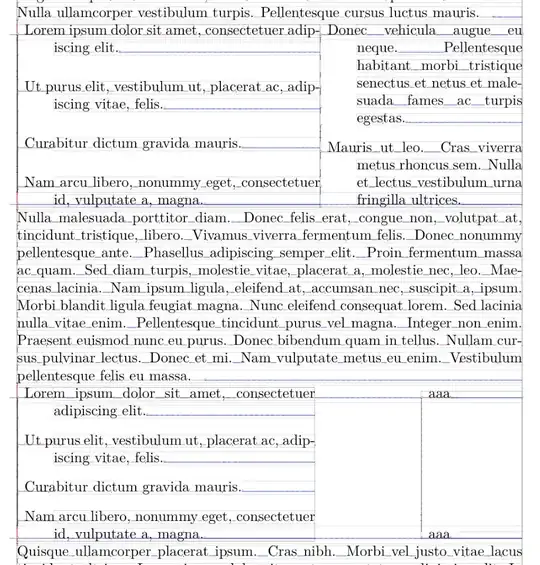
In the image below you see that now even when the text in one of the boxes have no ascenders or descenders, the baseline alignment is still correct. Note that by using the measured top-line-height and bottom-line-depth, the spacing will still be correct if you have material that exceeds the "normal" height/depth of a line (e.g. when you have math material or super/subscripts). Without this computation, things may overprint.
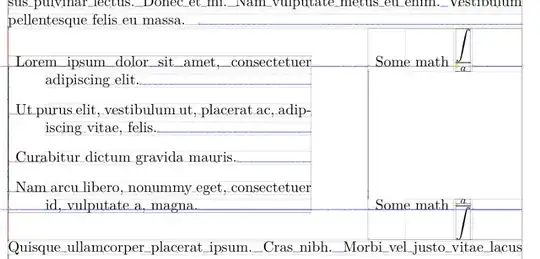
Note also that this solution aligns the baselines of the top and bottom lines of the material in the two boxes. If one of the boxes have extra tall or extra deep material, the visual alignment may be poorer. Here I show what happens with some outrageous math.