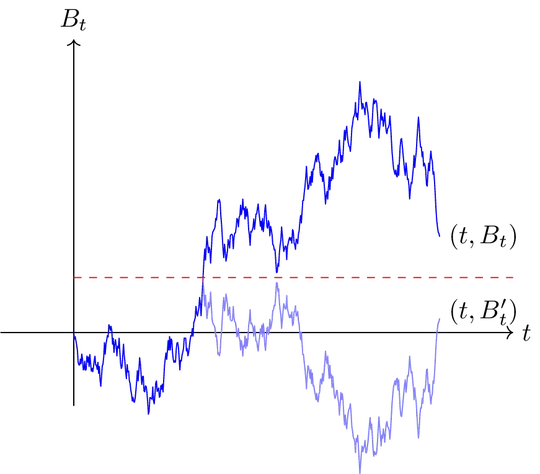
If you want to mirror only part of the path, I believe the usage of the libraries spath3 and intersections is the easiest approach:
- Name/save both the blue squiggly and the red dashed path.
- Split the squiggly path at the intersection with the red dashed one.
- Remove the component before the intersection.
- Draw the remaining path with the reflection transformation.
I'm using the ext.transformations.mirror library of my tikz-ext package but feel free to use any solutions provided to Can we mirror a part in tikz ("axial symmetry", "reflection")?
We could also set the same seed and draw the blue path again but this time clipped so that everything left of the intersection is clipped away but the clipping area needs to be chosen properly.
I've set line join=round so that it doesn't flip-flop between miter and bevel.
You will find that the reflected path sits on top of the original path. If this is not wanted we can change the order of drawing.
Code
\documentclass[tikz]{standalone}
%\documentclass{article}
%\usepackage{tikz}
\usetikzlibrary{
  arrows.meta,                % arrow tips
  ext.transformations.mirror, % reflect over axis
  intersections,              % find intersection between paths
  spath3}                     % split and transform paths
\begin{document}
\begin{tikzpicture}[line join=round]
\pgfmathsetseed{952}
\draw[->] (-1,0) -- (6,0) node[right] {$t$};
\draw[->] (0,-1) -- (0,4) node[above] {$B_t$};
\draw[spath/save=horiz, red, dashed] (0,0.75) -- (6,0.75);
\draw[blue, spath/save=squiggly] (0,0)
  foreach \x in {1,...,500}{ -- ++(0.01,rand*-0.2) }
  node[right, black] {$(t,B_t)$};
\draw[
  draw=blue!50,
  spath/.cd,
    split at intersections with={squiggly}{horiz},
    remove components={squiggly}{1},
    use={squiggly, transform={ymirror=0.75}}
] node[anchor=base west] {$(t,B'_t)$};
\end{tikzpicture}
\end{document}
Output


spath3but that shouldn't be necessary here. – Qrrbrbirlbel Dec 26 '23 at 00:11\documentclass{<class>}. – cfr Dec 26 '23 at 00:43