Consider using the report (or book) class that provides a \chapter, since that's what is displayed in your image.
The following minimal example provides the levels you need in the following commands:
\chapter\section\subsection\subsubsection\paragraph
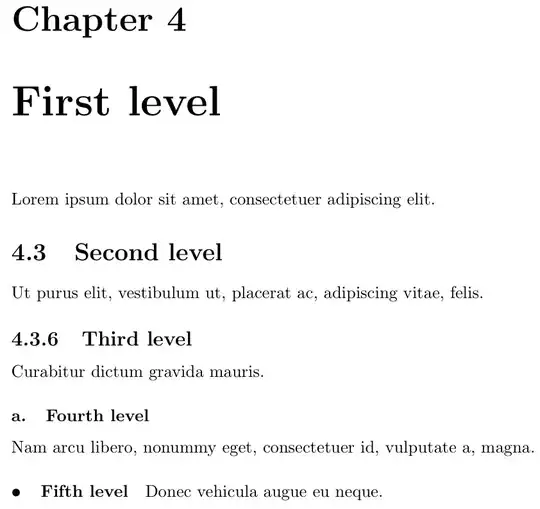
\documentclass{report}
\usepackage{lipsum}
\setcounter{secnumdepth}{3}% Show sectional unit numbering up to level 3 (\subsubsection)
\makeatletter
\renewcommand\paragraph{@startsection{paragraph}{4}{\z@}%
                                        {3.25ex @plus1ex @minus.2ex}%
                                        {-1em}%
                                        {\normalfont\normalsize\bfseries\textbullet\quad}}
\let\old@seccntformat@seccntformat
\renewcommand{@seccntformat}[1]{%
  \csname the#1\endcsname
  \ifnum\pdfstrcmp{#1}{subsubsection}=0 .\fi% Add period after \subsubsection number
  \quad
}
\makeatother
\renewcommand{\thesubsubsection}{\alph{subsubsection}}% Update formatting of \subsubsection heading numbering
\begin{document}
\setcounter{chapter}{3}% Just for this example
\chapter{First level}
\lipsum[1][1]
\setcounter{section}{2}% Just for this example
\section{Second level}
\lipsum[1][2]
\setcounter{subsection}{5}% Just for this example
\subsection{Third level}
\lipsum[1][3]
\subsubsection{Fourth level}
\lipsum[1][4]
\paragraph{Fifth level}
\lipsum[1][5]
\end{document}


etoc,tocbasic,tocloftetc.. There are already several questions/answers about using these on TEX.SX. And please always show a minimal working example and use it to explain the wanted changes. – cabohah Jan 03 '24 at 09:43tocis only part of the question. Formatting the hierarchy of sections is the most important. I was looking for that on google, but did not find any answers, I was probably using the wrong keywords as I know pretty much nothing about this topic orLatexin general. I thought tha the image provided was enough to convey the idea and show how the document should look when applying the desired formatting.@cabohah thanks for the recommendations, as they provide me with an starting point.
– OppositeDragon Jan 03 '24 at 14:40