You want the explanation. OK, here it is.
Letters and digits are assigned math class 7, which means the same as class 0 (ordinary symbols) as far as spacing is concerned, but the letter or digit is taken from the math font corresponding to the current math group (math family, in plain TeX parlance).
Thus \mathit{1} or \mathbf{1} will choose the character at the slot 0x31 (hexadecimal, 49 in decimal) of the font assigned at startup to the “math italic” or “math bold”. This also works for \mathcal{1} and \mathbb{1}, but the fonts used by \mathcal and \mathbb don't necessarily have a 1 at that slot and in most font setups only uppercase letters are supported for \mathcal and \mathbb. What you get from \mathbb{1} is quite unpredictable.
Some math fonts have extended support for \mathcal or \mathbb to cover the whole alphabet (uppercase and lowercase).
If you're happy with your current font setup, but need a double stroked 1, you can look for a font that supports it. For instance, stix2 does

How can you get it in your document without loading stix2, which would completely change the document fonts?
You look into stix2.sty to find
\DeclareSymbolFontAlphabet{\mathbb} {symbols3}
Now we look for symbols3
\DeclareSymbolFont{symbols3} {LS1}{stix2bb} {m} {n}
OK, now we look for the file ls1stix2bb.fd
\ProvidesFile{ls1stix2bb.fd}
[2018/04/02 v2.0.0-latex stix2 %
blackboard LS1 %
font definitions]
\DeclareFontFamily{LS1}{stix2bb}{\skewchar\font127 }
\DeclareFontShape{LS1}{stix2bb}{m}{n} {<-> stix2-mathbb}{}
\DeclareFontShape{LS1}{stix2bb}{m}{it}{<-> stix2-mathbbit}{}
\DeclareFontShape{LS1}{stix2bb}{b}{n} {<->sub * stix2bb/m/n}{}
\DeclareFontShape{LS1}{stix2bb}{b}{it}{<->sub * stix2bb/m/it}{}
\endinput
and we just need the first one. But we can avoid defining a font encoding, because we just need ASCII characters.
\documentclass{article}
\usepackage{amsmath}
\usepackage{amssymb}
%%% put this in your document preamble
\DeclareFontFamily{U}{stix2bb}{}
\DeclareFontShape{U}{stix2bb}{m}{n} {<-> stix2-mathbb}{}
\NewDocumentCommand{\indicator}{}{\text{\usefont{U}{stix2bb}{m}{n}1}}
%%%
\begin{document}
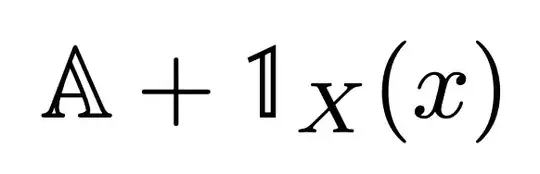
$\mathbb{A}+\indicator_{X}(x)$
\end{document}


dsfontpackage and write\mathds{1}. (I suppose "ds" is short for "double-struck".) – Mico Jan 04 '24 at 03:35\mathbbfont, so you need a workaround. – bonk Jan 04 '24 at 03:39\nVdash(not double vertical, dash). If you are fine with using unicode fonts (with xelatex or lualatex), then many fonts such as NewCM, LM, Stix2 provide with double-struck 1. – Apoorv Potnis Jan 04 '24 at 05:57