You can place a node via a join on a chain by simply setting up a to path that does just that: place a node.
Inside a to path, you have access to \tikztostart and \tikztotarget – as well as \tikztonodes but we're going to ignore this here … or do you need text somewhere?
The difference can then be calculated as before, as can its veclen and, additionally, also its direction/angle via atan2. The results can then be used with a node as before which is now the only (visual) output of the to path.
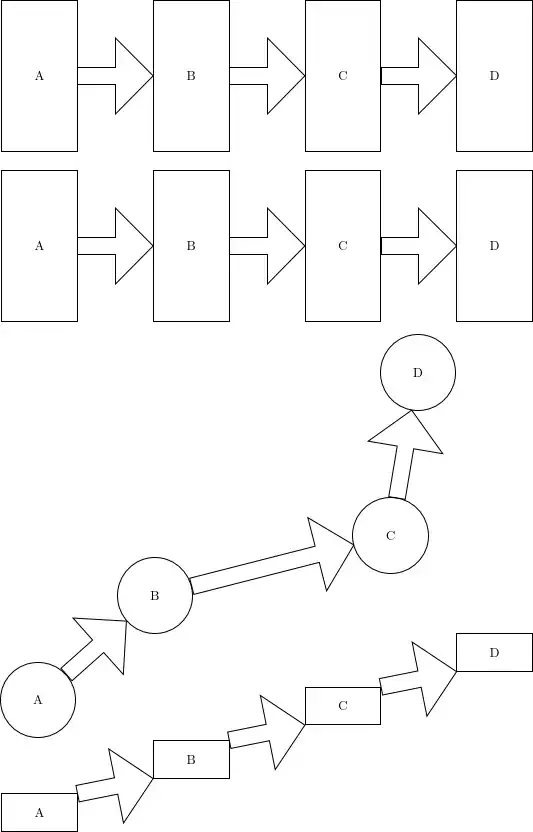
This is all done in the myarr with anchors style:
\tikzset{
  myarr with anchors/.style 2 args={
    to path={
      let \p0=($(\tikztotarget.#2)-(\tikztostart.#1)$) in
      node[myarr node,
           minimum height={veclen(\x0,\y0)},
           shape border rotate={atan2(\y0,\x0)}] at (\tikztostart.#1) {}}}}
For simple chains, it is then as easy as
\tikz[
  start chain=going right, node distance=2cm and 2cm,
  every join/.style={myarr with anchors={east}{west}},
  every on chain/.append style={draw, minimum width=2cm, minimum height=4cm}]
\node foreach \t in {A, ..., D} [on chain, join]{\t};
I do like more automatic approaches where it will find the points on the border on its own.
For this, I provide the myarr style which uses an edge to find the points on the border and then uses these in the same calculation as before.
Optionally, it does also accept two arguments that are either empty (automatic approach or not a node) or contain an anchor specification (with the .).
Reference: Can we use `let` (from `TikZ`) inside a node's style definition?.
Code
\documentclass[tikz]{standalone}
\usetikzlibrary{shapes.arrows, calc, chains}
\tikzset{
  myarr node/.style={
    shape=single arrow, draw=black, minimum width=20mm, anchor=tail,
    shape border uses incircle, single arrow head extend=+1pt,
    inner sep=+0pt, outer sep=+0pt},
  %
  myarr with anchors/.style 2 args={
    to path={
      let \p0=($(\tikztotarget.#2)-(\tikztostart.#1)$) in
      node[myarr node,
           minimum height={veclen(\x0,\y0)},
           shape border rotate={atan2(\y0,\x0)}] at (\tikztostart.#1) {}}},
  %
  myarr/.default={}{},
  myarr/.style 2 args={
    to path={
      \expanded{
        (\tikztostart#1) edge[path only, overlay, line to]
          coordinate[at start] (@start)
          coordinate[at end]   (@end) (\tikztotarget#2)}
      let \p0=($(@end)-(@start)$) in
      node[myarr node,
           minimum height={veclen(\x0,\y0)},
           shape border rotate={atan2(\y0,\x0)}] at (@start) {}}}}
\begin{document}
\pgfmathsetseed{872607}
\tikz[
  start chain=going right, node distance=2cm and 2cm,
  every join/.style={myarr with anchors={east}{west}},
  every on chain/.append style={draw, minimum width=2cm, minimum height=4cm}]
\node foreach \t in {A, ..., D} [on chain, join]{\t};
\tikz[
  start chain=going right, node distance=2cm and 2cm,
  every join/.style=myarr,
  every on chain/.append style={draw, minimum width=2cm, minimum height=4cm}]
\node foreach \t in {A, ..., D} [on chain, join]{\t};
\tikz[
  start chain=going above right, node distance=.4cm and 2cm,
  every join/.style=myarr,
  every on chain/.append style={draw, circle, minimum size=2cm}]
\node foreach \t in {A, ..., D} [on chain, join, shift={(3rand, 3rand)}]{\t};
\tikz[
  start chain=going above right, node distance=.4cm and 2cm,
  every join/.style={myarr={.north east}{.south west}},
  every on chain/.append style={draw, minimum width=2cm, minimum height=1cm}]
\node foreach \t in {A, ..., D} [on chain, join]{\t};
\end{document}
Output


chains joinmethod. You can usejoin=withto add connections back to earlier nodes in the chain, but these are edges rather than nodes and they connect a new node on the chain with an earlier one. You could adaptevery join, maybe, to alter the way the nodes are joined. But you'd have to do that when specifying the chain rather than after. What exactly are you trying to do? – cfr Jan 04 '24 at 05:19