You can use different group chars, not used in the code, e.g.
\documentclass{article}
\usepackage{fancyvrb}
\begin{document}
\begin{Verbatim}[{commandchars=\\[]}]
void main() {
  print("Hello!"); \label[foo]
}
\end{Verbatim}
\end{document}
or
\documentclass{article}
\usepackage{fancyvrb}
\begin{document}
\begin{Verbatim}[{commandchars=\\$/}]
void main() {
  print("Hello!"); \label$foo/
}
\end{Verbatim}
\end{document}
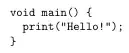
Note: With PDFLaTeX you cannot use UTF8 characters as value of commandchars. But with an UTF8 engine, e.g., LuaLaTeX also something like:
% This is a LuaLaTeX example!
\documentclass{article}
\usepackage{fancyvrb}
\begin{document}
\begin{Verbatim}[{commandchars=§«»}]
void main() {
  print("Hello!"); §label«foo»
}
\end{Verbatim}
\end{document}
can be used.
Another alternative would be to use package listings instead of fancyvrb. In this case, you would need only one escape character, e.g.:
\documentclass{article}
\usepackage{listings}
\begin{document}
\begin{lstlisting}[escapechar=~]
void main() {
  print("Hello!"); ~\label{foo}~
}
\end{lstlisting}
\end{document}
or even:
\documentclass{article}
\usepackage{listings}
\begin{document}
\begin{lstlisting}[escapechar=¡]
void main() {
  print("Hello!"); ¡\label{foo}¡
}
\end{lstlisting}
\end{document}
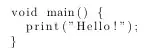
or
\documentclass{article}
\usepackage{xcolor}
\usepackage{listings}
\lstset{columns=flexible,basicstyle=\ttfamily,identifierstyle=\color{blue}}
\begin{document}
\begin{lstlisting}[language=Java,escapechar=¡]
void main() {
  print("Hello!"); ¡\label{foo}¡
}
\end{lstlisting}
\end{document}
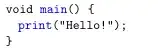
See also section 8 of the listings manual for more hints and an alternative to reference line numbers even if you need all characters to be usable in the code.
If you really insist in using ! as \label inside code but only if it is not followed by ", I would recommend to also delimit the foo with an additional !:
\documentclass{article}
\usepackage{fancyvrb}
\makeatletter
\let\!!
\begingroup
\catcode`\!=\active
\gdef!{\@ifnextchar"{\!}{\labeltill}}
\gdef\labeltill#1!{\label{#1}}
\endgroup
\makeatother
\begin{document}
\begin{Verbatim}[codes*={\catcode`\!\active}]
void main() {
  print("Hello!"); !foo!
}
\end{Verbatim}
\end{document}
However using a character, that is never used as part of the code would be a better idea:
\documentclass{article}
\usepackage{fancyvrb}
\begingroup
\catcode`\^=\active
\gdef^#1^{\label{#1}}
\endgroup
\begin{document}
\begin{Verbatim}[codes*={\catcode`\^\active}}
void main() {
  print("Hello!"); ^foo^
}
\end{Verbatim}
\end{document}
Nevertheless, I don't like this solution because I think it can go wrong too easily. And with every case in which one of the last two solutions fails, the complexity of the code increases. In contrast, changing the character in the listings examples is a trifle.


mintedorlistingswould be better. – egreg Jan 10 '24 at 10:14!in the code and the!as beginning of the label? And how to do so, if you changeprint("Hello!")intoprint("Hello!Hello!")? – cabohah Jan 10 '24 at 10:15pitonpackage does not yet support theJavalanguage. – projetmbc Jan 10 '24 at 11:38