2

I am trying to make two tables side by side. I think it's best to show you what I am trying to achieve with an example:
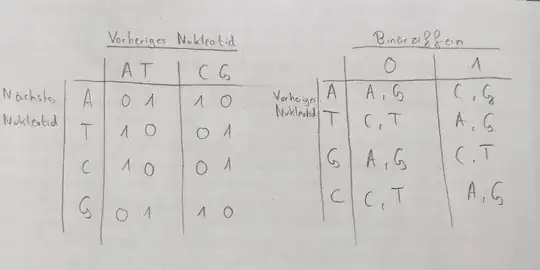
Both of the tables should be of the style of the right table. In the picture I drew the left table should be exactly the same as shown in the right image. The right table in the picture I drew only have 2 entries at the top. But besides that it is still the same style.

I tried to achieve a table like in the right image with the following:

\usepackage{multirow}

\begin{document}

\begin{table}[h!] \begin{tabular}{ll|ll|ll} \multicolumn{6}{c}{Nächstes Nukleotid} \ \hline & & A & T & C & G \ \hline \multirow{3}{4em}{Vorheriges Nukleotid} & A & 0 & 1 & 1 & 0 \ & T & 1 & 0 & 0 & 1 \ & C & 1 & 0 & 0 & 1 \ & G & 0 & 1 & 1 & 0 \end{tabular} \caption{Übersetzung Regel 888} \end{table}

\end{document}

But that only produces the following:

enter image description here

And thats not looking good in my opinion. So how can I achieve something like in the right image demonstrated?

  • A table environment is allowed to have anything. In this case, have you tried having two tabular environments? – Teepeemm Jan 24 '24 at 13:27
  • @Teepeemm Are you suggesting that I should try to make like an outer table with the "real" table (with the As, etc.) inside of it? – David Krell Jan 24 '24 at 13:48
  • I see no "As, etc.". You currently have \begin{table} \begin{tabular} ... \end{tabular} \end{table}. It is perfectly fine to have \begin{table} \begin{tabular} ... \end{tabular} \quad \begin{tabular} ... \end{tabular} \end{table}. – Teepeemm Jan 24 '24 at 14:01

2 Answers2

4

Sometimes it's better to typeset adjacent tables as one single table with twice as many columns. That way if the entries have different heights you still get good horizontal alignment.

Here is an possibility with nicematrix.

enter image description here

\documentclass{article}

\usepackage{nicematrix, tikz}

\begin{document}

\begin{NiceTabular}{r|cccccr|ccccc} \Block{2-2}{}&& \Block{1-4}{Vorheriges Nukleotid} &&&&\Block{2-2}{}&& \Block{1-4}{Binärziffern} &&& \ \cline{3-6}\cline{9-12} && A & T & C & G &&& \Block{1-2}{0} && \Block{1-2}{1}\ \Block{4-1}{Nächstes\Nukleotid} & A & 0 & 1 & 1 & 0 & \Block{4-1}{\qquad Vorheriges\Nukleotid} & A & A & G & C & G \ & T & 1 & 0 & 0 & 1 & & T & C & T & A & G \ & C & 1 & 0 & 0 & 1 & & G & A & G & C & T \ & G & 0 & 1 & 1 & 0 & & C & C & T & A & G \CodeAfter \SubMatrix.{3-3}{6-6}.[hvlines, xshift=5.5pt] \tikz \draw ([shift={(.4pt,.4pt)}]7-|3)rectangle([yshift=.4pt]3-|7); \SubMatrix.{3-9}{6-12}.[hvlines, xshift=5.5pt] \tikz \draw ([shift={(.4pt,.4pt)}]7-|9)rectangle([yshift=.4pt]3-|13); \end{NiceTabular}

\end{document}

Sandy G
  • 42,558
1

I've solved the problem like the following:

\usepackage{multirow}
\begin{document}
    \begin{table}[h!]
    \begin{tabular}{llllll}
                                                &                        & \multicolumn{4}{l}{nächstes Nukleotid}           \\ \cline{3-6} 
                                                &                        &   &                        &   &   \\
                                                &                        & A & \multicolumn{1}{l|}{T} & C & G \\ \cline{3-6} 
                                                &                        &   & \multicolumn{1}{l|}{}  &   &   \\
    \multicolumn{1}{l|}{\multirow{4}{*}{v. N.}} & \multicolumn{1}{l|}{A} & 0 & \multicolumn{1}{l|}{1} & 1 & 0 \\
    \multicolumn{1}{l|}{}                       & \multicolumn{1}{l|}{T} & 1 & \multicolumn{1}{l|}{0} & 0 & 1 \\
    \multicolumn{1}{l|}{}                       & \multicolumn{1}{l|}{C} & 1 & \multicolumn{1}{l|}{0} & 0 & 1 \\
    \multicolumn{1}{l|}{}                       & \multicolumn{1}{l|}{G} & 0 & \multicolumn{1}{l|}{1} & 1 & 0
    \end{tabular}
    \quad
    \begin{tabular}{llllll}
                                                &                        & \multicolumn{4}{l}{Binärziffer}                           \\ \cline{3-6} 
                                                &                        &   &                        &           &           \\
                                                &                        & \multicolumn{2}{l|}{0}     & \multicolumn{2}{l}{1} \\ \cline{3-6} 
                                                &                        &   & \multicolumn{1}{l|}{}  &           &           \\
    \multicolumn{1}{l|}{\multirow{4}{*}{v. N.}} & \multicolumn{1}{l|}{A} & A & \multicolumn{1}{l|}{G} & C         & T         \\
    \multicolumn{1}{l|}{}                       & \multicolumn{1}{l|}{T} & C & \multicolumn{1}{l|}{T} & A         & G         \\
    \multicolumn{1}{l|}{}                       & \multicolumn{1}{l|}{C} & C & \multicolumn{1}{l|}{T} & A         & G         \\
    \multicolumn{1}{l|}{}                       & \multicolumn{1}{l|}{G} & A & \multicolumn{1}{l|}{G} & C         & T        
    \end{tabular}
    \end{table}
\end{document}

It produces the following output:

enter image description here

  • 1
    Excellent. BTW, \begin{table}[h!] is not the best, because it doesn't give LaTeX many options on where to place your tables. It's best to drop the [h!] and let LaTeX put your tables where it thinks is best (and adjust your exposition accordingly). If you must put your table here, and don't need a caption, you can just use \begin{center} instead of \begin{table}. If you really need a caption, you can look at https://tex.stackexchange.com/a/8631/107497. – Teepeemm Jan 24 '24 at 14:40
  • Thank you! I will try to adjust my text then :-) – David Krell Jan 24 '24 at 14:45