3

I am trying to programmatically either filter out or ignore invalid unicode characters, such as U+0002 (␂), not supported by my font that generate "Text line contains an invalid character. A funny symbol that I can't read has just been input." error messages. I don't control the input text so I can't manually remove them and there are too many possible invalid characters to try and explicitly remap them all.

I'm looking for a solution similar to \makeatletter\def\UTFviii@undefined@err#1{}\makeatother from here but that works for LuaTeX and not just PdfLaTeX.

walwb
  • 65

2 Answers2

4

TeX is a very complicated program, handling all possible input requires testing all possible input.

So it's recommended for you to create a file with all the Unicode character from 0 to 1114111 and feed it into your program to test.

For the specific error you pointed out, that error message "A funny symbol that I can't read has just been input" is caused by...
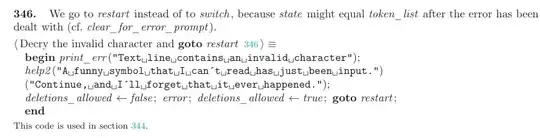
TeX source code

characters with catcode 15. It's not because the font doesn't support it.

Note that LuaTeX has another time where "funny symbol" message is printed, namely:

static void utf_error(void)
{
    const char *hlp[] = {
        "A funny symbol that I can't read has just been (re)read.",
        "Just continue, I'll change it to 0xFFFD.",
        NULL
    };
    deletions_allowed = false;
    tex_error("String contains an invalid utf-8 sequence", hlp);
    deletions_allowed = true;
}

invalid UTF-8 sequence.

In any case, use Viewing a character's catcode, and listing all characters with a given catcode we can view a list of all characters with category code 15:

\documentclass{article}
\begin{document}
\newcount\charcount
\charcount=0
\loop\ifnum\charcount<1114112 % Change to 256 if not using XeTeX/LuaTeX
  \ifnum\catcode\charcount=15
    Character \number\charcount \ has category code \number\catcode\charcount .

\fi \advance\charcount by 1 \repeat \end{document}

the output is that the only characters are 0 → 31 and 127. That is, precisely the control characters.

If you're generating the file automatically, the easiest way appears to be filtering them all out in advance.


Of course, after doing this, you may still encounter issues with % and \ etc. There are certain solutions that does not rely on category code to typeset text, such as https://wiki.luatex.org/index.php/TeX_without_TeX (but I assume they're not as easy to learn)

user202729
  • 7,143
4
\documentclass{article}

\begin{document}

ctrl-A []

\end{document}

produces

! Text line contains an invalid character.
l.5 ctrl-A [^^A
           ]
?

The classic approach would be to make the control characters printable so:

\documentclass{article}

\count0=-1 \loop \advance\count0 by 1 \ifnum\count0=9 \advance\count0 by 2 \fi \ifnum\count0=13 \advance\count0 by 1 \fi \catcode\count0=12 \ifnum\count0<31 \repeat \count0=0

\begin{document}

ctrl-A []

\end{document}

which treats them like normal characters that are (probably) not in the font, so a warning

Missing character: There is no ^^A (U+0001) in font [lmroman10-regular]:+tlig;!

and output

enter image description here

Latin Modern would show nothing, some fonts show a missing glyph marker.

Or you could replace all control characters in a Lua callback:

\documentclass{article}
\makeatletter
\directlua{
  function replacectrl (s)
%   return s:gsub("[\@percentchar c]","^^^^fffd") latin modern doesn't have �
   return s:gsub("[\@percentchar c]","?")
  end
  luatexbase.add_to_callback('process_input_buffer',replacectrl,'replace control chars')
  }
\makeatother
\begin{document}

ctrl-A []

\end{document}

produces

enter image description here

David Carlisle
  • 757,742