You need quite deep surgery.
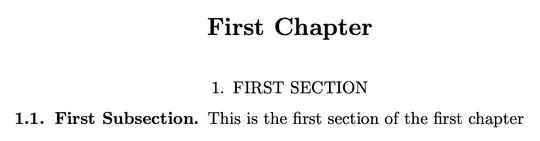
Removing “Chapter N” is not difficult: just remove the relevant part from \@makechapterhead.
Also removing boldface is easy, just remove \bfseries in the definition of \section. Uppercasing the section titles you need some more.
My idea is to change #8 in the definition of \@sect (which is replaced by the given title) by \formatsection{#8} and defining suitably \formatsection. It's necessary to do some \csname trickery in order that uppercasing is only done to sections.
Since we don't define \formatsubsection, for example, subsection titles will not be uppercased.
\documentclass{amsbook}
\usepackage{etoolbox}
\makeatletter
\def@makechapterhead#1{\global\topskip 7.5pc\relax
  \begingroup
  \fontsize{@xivpt}{18}\bfseries\centering
%    \ifnum\c@secnumdepth>\m@ne
%      \leavevmode \hskip-\leftskip
%      \rlap{\vbox to\z@{\vss
%          \centerline{\normalsize\mdseries
%              \uppercase@xp{\chaptername}\enspace\thechapter}
%          \vskip 3pc}}\hskip\leftskip\fi
     #1\par \endgroup
  \skip@34\p@ \advance\skip@-\normalbaselineskip
  \vskip\skip@ }
\def\section{%
  @startsection{section}% #1
  {1}% #2
  \z@ % #3
  {.7\linespacing@plus\linespacing}% #4
  {.5\linespacing}% #5
%  {\normalfont\bfseries\centering}% <-- original
  {\normalfont\centering}% #6
}
\patchcmd{@sect}{#8\par}{\csname format#1\endcsname{#8}\par}{}{}
\newcommand{\formatsection}[1]{\MakeUppercase{#1}}
\makeatother
\begin{document}
\title{Test}
\author{Author}
\date{\today}
\maketitle
\tableofcontents
\chapter{First Chapter}
\section{First Section}
\subsection{First Subsection}
This is the first section of the first chapter
\end{document}
My suggestion is not using amsbook, but memoir and use the provided features to change the styles for titles; or book and titlesec.


amsbookis designed to resist tampering by users. – egreg Feb 21 '24 at 11:39