Here are some options using iterations and mixing colors through opacity.
RESULT:
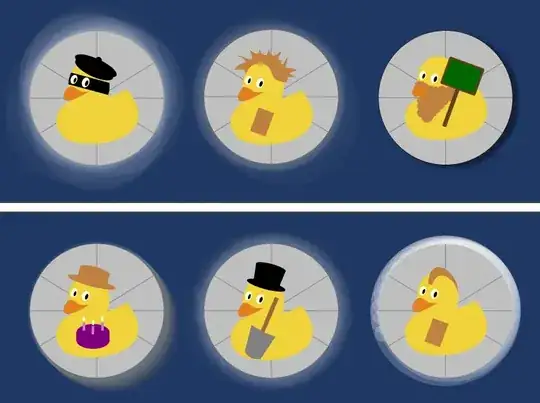
MWE:
\documentclass[12pt]{article}
\usepackage{tikz}
\usepackage{duckuments}% Added for MWE implementation
\usepackage{tikzpagenodes}
\usetikzlibrary{arrows, shapes, positioning, shadows.blur,decorations.pathmorphing}
\usepackage[most]{tcolorbox}
\usepackage[left=0.1cm, right=0.1cm, top=0.1cm, bottom=0.1cm]{geometry}
\definecolor{titleBack}{HTML}{203864}
\begin{document}
\tcbset{colback=titleBack}

\begin{tcolorbox}
    \begin{minipage}{0.25\linewidth}
        \begin{tikzpicture}
            \foreach \x in {1,2,...,60}{
                \fill[white, fill opacity=0.03](\x*0.015cm*rand,-\x*0.015cm*rand) circle (2cm);
            }
            \clip (0, 0) circle (2cm) node(Vishakha){\includegraphics[width=8cm]{example-image-duck}};
        \end{tikzpicture}
    \end{minipage}
    \begin{minipage}{0.25\linewidth}
        \begin{tikzpicture}
            \foreach \x in {1,2,...,50}{
                \pgfmathparse{0.9*rnd+0.3}
                \definecolor{Rcolor}{rgb}{\pgfmathresult,\pgfmathresult,\pgfmathresult}
                \fill[titleBack!50!Rcolor, fill opacity=0.05](0+\x*0.01cm*rand*rand,0-\x*0.01cm*rand*rand) circle (2cm+\x*0.005cm);
            }
            \clip (0, 0) circle (2cm) node(Vishakha){\includegraphics[width=8cm]{example-image-duck}};
        \end{tikzpicture}
    \end{minipage}
    \begin{minipage}{0.25\linewidth}
        \begin{tikzpicture}
            \draw[blur shadow={
                shadow blur steps=15,
                shadow blur extra rounding=5pt,
                shadow xshift=5pt}] (0, 0) circle (2cm);
            \clip (0, 0) circle (2cm) node(Vishakha){\includegraphics[width=8cm]{example-image-duck}};
        \end{tikzpicture}
    \end{minipage}

\end{tcolorbox}

\begin{tcolorbox}
    \begin{minipage}{0.25\linewidth}
        \begin{tikzpicture}
            \foreach \x in {1,2,...,60}{
                \fill[black!\x!white, fill opacity=0.02](\x*0.007cm,-\x*0.007cm) circle (2.1cm-\x*0.0005cm);
            }
            \clip (0, 0) circle (2cm) node(Vishakha){\includegraphics[width=8cm]{example-image-duck}};
        \end{tikzpicture}
    \end{minipage}
    \begin{minipage}{0.25\linewidth}
        \begin{tikzpicture}[pencildraw/.style={
                decorate,
                decoration={random steps,segment length=4pt,amplitude=2pt}
            }
        ]
            \foreach \x in {1,2,...,20}{
                \fill[white, fill opacity=0.02,pencildraw](0+\x*0.01cm*rand,0-\x*0.0cm*rand) circle (2cm+\x*0.02cm);
            }
            \clip (0, 0) circle (2cm) node(Vishakha){\includegraphics[width=8cm]{example-image-duck}};
        \end{tikzpicture}
    \end{minipage}
    \begin{minipage}{0.25\linewidth}
        \begin{tikzpicture}
            \foreach \x in {0,1,2,...,20}{
                \fill[white, fill opacity=0.2](\x*10:\x*0.1cm) circle (2.25cm-\x*0.1cm);
            }
            \clip (0, 0) circle (2cm) node(Vishakha){\includegraphics[width=8cm]{example-image-duck}};
        \end{tikzpicture}
    \end{minipage}

\end{tcolorbox}


\end{document}