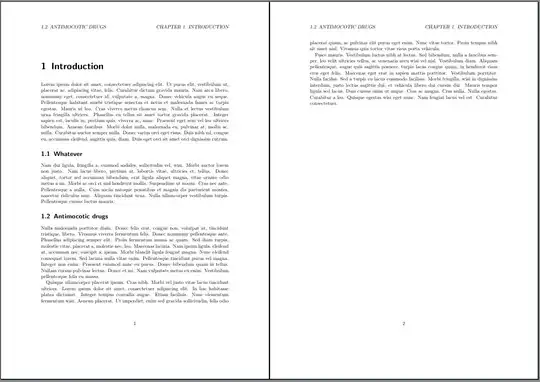
It is not absolutely clear whether “left header” means the left aligned header or header of left pages. Because you write, “on each page the same”, I think you mean the first. And I also guess, that you want the page header also on chapter starting pages. So with the KOMA-Script report class scrreprt this would be, for example:
\documentclass{scrreprt}
\usepackage[automark,autooneside=false,markcase=upper]{scrlayer-scrpage}
\ihead{\rightbotmark}
\chead{}
\ohead{\leftmark}
\renewcommand{\chaptermarkformat}{\chapapp~\thechapter. }
\renewcommand{\chapterpagestyle}{headings}% If chapter pages should also use
                                % running heads
\usepackage{mwe}% for demonstration only
\begin{document}
\chapter{Introduction}
\lipsum[1]
\section{Whatever}
\lipsum[2]
\section{Antimocotic drugs}
\lipsum[3-5]
\end{document}
If you don't want the slanted font in the page header just add:
\setkomafont{pageheadfoot}{}
to the document preamble.
See the KOMA-Script manuals for more information about scrlayer-scrpage and all the other commands. And please also try out what happens, if you remove options or commands.
The KOMA-Script author also provides additional information and examples about how change the head and foot of the page in English and in German and also about how to change headings of parts, chapters, section etc. in English and in German.
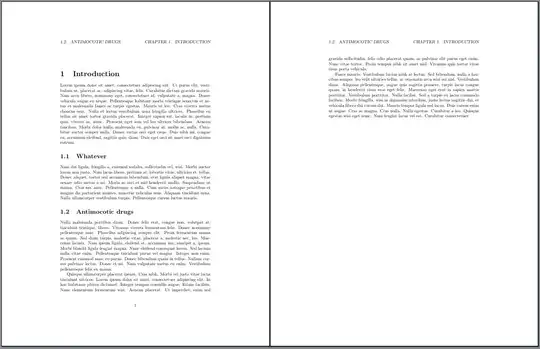
You can get something similar with the standard class report additionally using package titlesec:
\documentclass{report}
\usepackage{titlesec}
\titleformat{\chapter}
  {\normalfont\LARGE\bfseries}{\thechapter}{1em}{}
\titlespacing*{\chapter}{0pt}{3.5ex plus 1ex minus .2ex}{2.3ex plus .2ex}
\usepackage[automark,autooneside=false,markcase=upper]{scrlayer-scrpage}
\ihead{\rightbotmark}% star version to use the same on plain pages, e.g., chapter starting pages
\chead{}
\ohead{\leftmark}
\usepackage{mwe}% for demonstration only
\begin{document}
\chapter{Introduction}
\lipsum[1]
\section{Whatever}
\lipsum[2]
\section{Antimocotic drugs}
\lipsum[3-5]
\end{document}
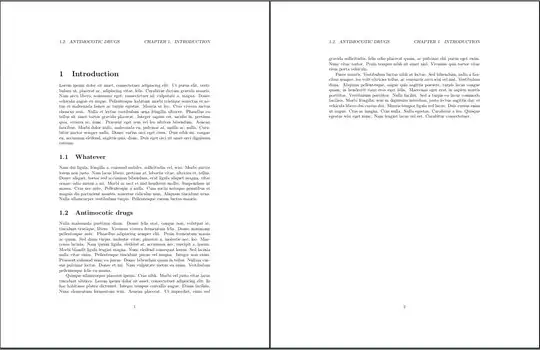
With report and alternative to scrlayer-scrpage would be using fancyhdr:
\documentclass{report}
\usepackage{titlesec}
\titleformat{\chapter}
  {\normalfont\LARGE\bfseries}{\thechapter}{1em}{}
\titlespacing*{\chapter}{0pt}{3.5ex plus 1ex minus .2ex}{2.3ex plus .2ex}
\usepackage{fancyhdr}
\fancyhead[L]{\slshape\LastMark{2e-right}}
\makeatletter\let\ps@plain\ps@fancy\makeatother% make plain pages (e.g. chapter starting pages) the same like fancy
\renewcommand*\headrulewidth{0pt}
\pagestyle{fancy}
\usepackage{mwe}% for demonstration only
\begin{document}
\chapter{Introduction}
\lipsum[1]
\section{Whatever}
\lipsum[2]
\section{Antimocotic drugs}
\lipsum[3-5]
\end{document}
To remove the dot after the section number in the page header (as shown in your question), you would additionally need:
\renewcommand*{\sectionmark}[1]{\markright{\MakeUppercase{\thesection\ #1}}}
with both report solutions.


twosideand\pagestyle{headings}. Your chapter format is the default of KOMA-Script classes. Maybe you can try itsreportlike class:\documentclass[twoside]{scrreprt}. – jlab Mar 10 '24 at 09:28twosidewould not be needed. But maybe I'm wrong. – cabohah Mar 10 '24 at 10:06