UPDATE:
After a small revision I replaced the use of controls with sinusoidal functions, it looks better, also the control of the thickness and width, for the curves errors will occur when the value of Coil2=1, it will only serve for counterclockwise curves; If coil2=-1 is set, it will only serve hourly curves, this is because nodes cannot be obtained from a subsequent making.
U-RESULT:
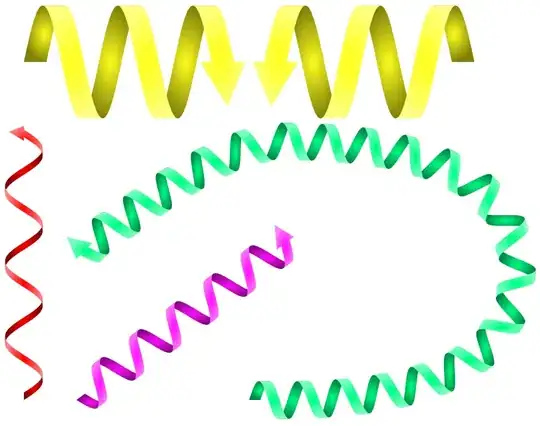
U-MWE:
\documentclass[tikz,border=3.14pt]{standalone}
\usetikzlibrary{decorations.markings,calc}
\begin{document}
    %from https://tex.stackexchange.com/a/449744/154390
    \begin{tikzpicture}[
        CoilColor/.store in=\coilcolor,CoilColor=black,
        Steps/.store in=\Steps,Steps=0.1,
        Thickness/.store in=\Thickness,Thickness=4pt,
        W/.store in=\W,W=5mm,
        Coil2/.style={
            draw=none,
            postaction={
                decorate,
                decoration={
                    markings,
                    mark= between positions 0 and 1 step \Steps
                    with {
                        \begin{scope}[yscale=#1]
                            \pgfmathparse{int(\pgfdecoratedpathlength/28.45100\Steps)}
                            \edef\H{\pgfmathresult/100}
                            \ifnum\pgfkeysvalueof{/pgf/decoration/mark info/sequence number}=1
                            \shade[inner color=\coilcolor,outer color=\coilcolor!50!black]
                            (0,0)
                                sin (\H/4,\W/2) coordinate (b)
                                -- ++(\Thickness,0)
                                cos ++(-\H/4,-\W/2)
                                -- (0,0);
                            \fi
                            \ifnum\pgfkeysvalueof{/pgf/decoration/mark info/sequence number}>1
                            \coordinate (b) at (d);
                            \fi
                            \path (b)
                                cos ++(\H/4,-\W/2)
                                sin ++(\H/4,-\W/2) coordinate (a)
                                -- ++(\Thickness,0)
                                cos ++(-\H/4,\W/2)
                                sin ++(-\H/4,\W/2)
                                -- (b);
                            \path (b)++(\H,0)coordinate (d);
                            \shade[inner color=\coilcolor,outer color=\coilcolor!50!black]
                            (a)
                            cos ++(\H/4,\W/2)
                            sin ++(\H/4,\W/2)
                            -- ++(\Thickness,0)
                            cos ++(-\H/4,-\W/2)
                            sin ++(-\H/4,-\W/2)
                            -- (a);
                            \shade[outer color=\coilcolor!50!white,inner color=\coilcolor]
                            (b)
                            cos ++(\H/4,-\W/2)
                            sin ++(\H/4,-\W/2)
                            -- ++(\Thickness,0)
                            cos ++(-\H/4,\W/2)
                            sin ++(-\H/4,\W/2)
                            -- (b);
                        \end{scope}
                    }
                }
            },
            postaction={
                decorate,
                decoration={
                    markings,
                    mark=at position 1
                    with {
                        \begin{scope}[yscale=#1]
                            \pgfmathparse{int(\pgfdecoratedpathlength/28.45100\Steps)}
                            \edef\H{\pgfmathresult/100}
                            \shade[outer color=\coilcolor!50!white,inner color=\coilcolor]
                                (d)
                                cos ++(\H/4,-\W/2) coordinate (temp)
                                -- ++(-\Thickness/2,0)
                                -- ++(\Thickness/2+\Thickness0.7,-\Thickness2)
                                -- ($(temp)+(\Thickness+\Thickness/2,0)$)
                                --($(temp)+(\Thickness,0)$)
                                sin ++(-\H/4,\W/2)
                                -- (d);
                        \end{scope}
                    }
                }
            }
        }
        ]
    \draw[Coil2=1,CoilColor=yellow,Steps=1,Thickness=3mm,W=1.5cm] (0,0) -- ++ (1cm,0);
    \draw[Coil2=-1,CoilColor=yellow,Steps=1,Thickness=3mm,W=1.5cm] (6cm,0) -- ++ (-1cm,0);
    \draw[Coil2=-1,CoilColor=red,Steps=0.5,Curvature=0.1,Thickness=1mm] (0,-4.5cm) -- ++ (0,20mm);
    \draw[Coil2=-1,CoilColor=magenta,Steps=0.25] (0.7,-4.5cm) -- ++(2,1.5);
    \draw[Coil2=1,CoilColor=green!50!cyan,Steps=0.05,Thickness=1.5mm,W=0.5cm]
    (2,-4.5cm)++(1,0)
        to[in=-90,out=00]++(30mm,15mm)
        to[in=0,out=90]++(-30mm,15mm)
        to[in=-135,out=180]++(-20mm,-10mm)
        -- ++ (-2mm,-2mm);

\end{tikzpicture}

\end{document}
Previous attempt
Here is an adaptation of the code that I once made in the post about coils, I added the arrow at the end although it is not the same since I would have to modify many more things but the edges are thin so that they can be used in curves, they could be applied to make protein figures perhaps , I may then have time to test if it's possible to do what you suggest.
RESULT:

MWE:
\documentclass[tikz,border=3.14pt]{standalone}
\usetikzlibrary{decorations.markings}
\begin{document}
    %from https://tex.stackexchange.com/a/449744/154390
    \begin{tikzpicture}[
        CoilColor/.store in=\coilcolor,CoilColor=black,
        S/.store in=\S,S=0.1,
        W/.store in=\W,W=0.4,
        Coil2/.style={
            draw=none,
            postaction={
                decorate,
                decoration={
                    markings,
                    mark= between positions 0 and 1 step \S
                    with {
                        \begin{scope}[yscale=#1]
                            \pgfmathparse{int(\pgfdecoratedpathlength/28.45100\S)}
                            \edef\Hight{\pgfmathresult}
                            \ifnum\pgfkeysvalueof{/pgf/decoration/mark info/sequence number}=1
                            \path (0,0)++(90: \Hight/200 and \W) coordinate (b);
                            \fi
                            \ifnum\pgfkeysvalueof{/pgf/decoration/mark info/sequence number}>1
                            \coordinate (b) at (d);
                            \fi
                            \path (b) arc (90:-135: \Hight/200 and \W) coordinate (a);
                            \path (b) arc (90:-45: \Hight/200 and \W) coordinate (c);
                            \path (b)++(\Hight/100,0) coordinate (d);
                            \draw[fill,\coilcolor!70!black]
                            (c)
                            .. controls +(-0.175,0) and +(-0.275,0) .. (d)
                            .. controls +(-0.325,0) and +(-0.225,0) .. (c);
                            \draw[white,line width=2pt]
                            (b)
                            .. controls +(0.3,0) and +(0.2,0) .. (c);
                            \draw[fill,\coilcolor]
                            (b)
                            .. controls +(0.275,0) and +(0.175,0) .. (c)
                            .. controls +(0.225,0) and +(0.325,0) .. (b);
                        \end{scope}
                    }
                }
            },
            postaction={
                decorate,
                decoration={
                    markings,
                    mark=at position 0.99
                    with {
                        \begin{scope}[yscale=#1]
                            \pgfmathparse{int(\pgfdecoratedpathlength/28.45100\S)}
                            \edef\Hi{\pgfmathresult}
                            \draw[fill,\coilcolor!70!black]
                                (d)
                                    .. controls +(0.2,0) and +(0,0) .. ++(\Hi/150,-\W)
                                    -- ++(2pt,-0.5pt)
                                    -- ++(-4pt,-6pt)
                                    -- ++(-2pt,7.5pt)
                                    -- ++(2pt,-0.8pt).. controls +(0,0) and +(0.2,0) ..(d);
                        \end{scope}
                    }
                }
            }
        }
        ]
    \draw[Coil2=-1,CoilColor=red,S=0.2] (0,0) -- ++ (0,2);
    \draw[Coil2=1,CoilColor=orange,S=0.2] (0.7,2) -- ++ (2,0);
    \draw[Coil2=-1,CoilColor=magenta,S=0.2] (0.7,-0.5) -- ++(2,1.5);
    \draw[Coil2=-1,CoilColor=green!50!cyan,S=0.12,draw] (3,0) to[in=180,out=00] ++(3,1.5);


\end{tikzpicture}

\end{document}


