You can use the fwlw ("First Word, Last Word") package; a little example using a footer defined with the fancyhdr package:
\documentclass{article}
\usepackage[latin]{babel}
\usepackage[a6paper,footskip=0pt]{geometry}
\usepackage{fwlw}
\usepackage{fancyhdr}
\usepackage[veryoldstyle]{kpfonts}
\usepackage{lipsum}
\fancyhf{}
\fancyfoot[R]{\usebox\NextWordBox}
\renewcommand\headrulewidth{0pt}
\pagestyle{fancy}

\begin{document}

\lipsum[4-60]

\end{document}
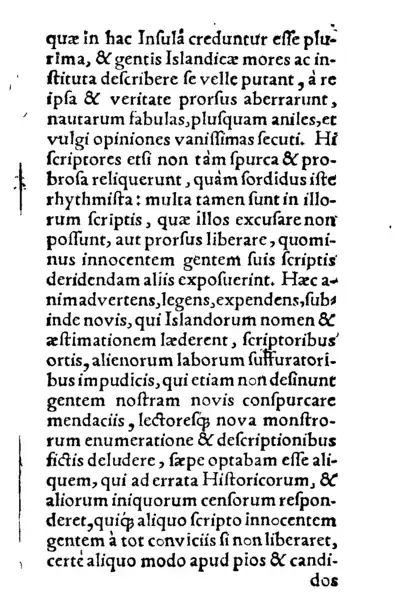
An image of the first four pages:

The package gives access to the first word on the current page (\FirstWordBox), the first word on the next page (\NextWordBox), and the last word on the current page (\LastWordBox).
The package also offers a predefined page style NextWordFoot to read ahead to the first word on the next page:
\documentclass{article}
\usepackage[latin]{babel}
\usepackage[a6paper,footskip=0pt]{geometry}
\usepackage{fwlw}
\usepackage[veryoldstyle]{kpfonts}
\usepackage{lipsum}

\pagestyle{NextWordFoot}

\begin{document}

\lipsum[4-60]

\end{document}



\enlargethispage{\baselineskip}automagically, if one word (not a whole line full of text) is otherwise printed on the next page. – Keks Dose Oct 03 '12 at 18:47post_linebreak_filterto analyze the paragraphs and thenatbegshito find the last line on the page and add the information you've got from step one. Easy ;-)) – topskip Oct 03 '12 at 19:45