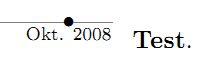
You can produce the desired result by setting \tlwidth, \tltextstart, and \tltextend appropriately, as the following simple example shows:
\documentclass{moderncv}
\moderncvstyle{casual}
\usepackage[firstyear=1999,lastyear=2012]{moderntimeline}

\tltextstart[north]{\scriptsize}
\tltextend[south]{\scriptsize}
\tlwidth{-2pt}

\firstname{John}
\familyname{Doe}

\begin{document}

\makecvtitle

\tlcventry[cyan!60!black]{2007}{2010}{test}{test}{test}{}{test}

\tldatecventry[brown]{2011}{test}{}{test}{test}{}{test}

\end{document}

With the above solution the bars are below the timeline; to keep the bars above the timeline, instead of changing \tlwidth to a negative value, one can change the value for \tl@textstartabove:
\documentclass{moderncv}
\moderncvstyle{casual}
\usepackage[firstyear=1999,lastyear=2012]{moderntimeline}

\makeatletter
\pgfmathsetmacro\tl@textstartabove{\tl@width-2pt}
\makeatother

\tltextstart[north]{\scriptsize}
\tltextend[south]{\scriptsize}

\firstname{John}
\familyname{Doe}

\begin{document}

\makecvtitle

\tlcventry[cyan!60!black]{2007}{2010}{test}{test}{test}{}{test}

\tldatecventry[brown]{2011}{test}{}{test}{test}{}{test}

\end{document}