3

I created a tree using TikZ and would like to add tabular explanation data to the right of it.

The figure definition currently looks like this:

\begin{figure*}[h!]
  \input{tikz/praefixeigenschaft}
  \label{f:praefixeigenschaft}
\end{figure*}

...and renders to the following tree:
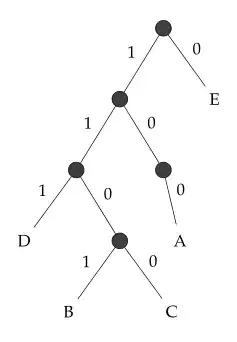
tree

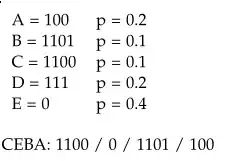
The explanation text is defined as follows:

\begin{tabular}{l l}
  A = 100 & p = 0.2 \\
  B = 1101 & p = 0.1 \\
  C = 1100 & p = 0.1 \\
  D = 111 & p = 0.2 \\
  E = 0 & p = 0.4 \\
\end{tabular}

CEBA: 1100 / 0 / 1101 / 100

...and renders to:
text

I tried both placing the figure in a table and floating the figure using the wrapfig package, but both attempts were not fruitful.

How can I add the explanation text to the right of the figure (like in simple HTML table layout)?

1 Answers1

1

As you don't give a caption to the figure and try to fix it at the position in text with the [!h] parameter, you maybe won't need the figure environment at all. You could consider my example code below, where I replaced your figure with some text as you don't give the source code of it.

\documentclass{standalone}
\usepackage{tikz}
\begin{document}
\noindent\begin{minipage}{.5\linewidth}%
The image
\end{minipage}%
\begin{minipage}{.5\linewidth}
\begin{tabular}{l l}
  A = 100 & p = 0.2 \\
  B = 1101 & p = 0.1 \\
  C = 1100 & p = 0.1 \\
  D = 111 & p = 0.2 \\
  E = 0 & p = 0.4 \\
\end{tabular}

CEBA: 1100 / 0 / 1101 / 100
\end{minipage}
\end{document}

This renders as follows:

enter image description here

Benedikt Bauer
  • 6,590
  • 2
  • 34
  • 60
  • 1
    [!h] doesn't fix the position of the figure, it can still float. – Torbjørn T. Dec 30 '12 at 13:43
  • Thanks for your answer. This seems to work using the standalone documentclass, but not inside the normal scrartcl class. Is there a way to fix this, or do I have to include the standalone file in the main document? – Danilo Bargen Dec 30 '12 at 13:44
  • @TorbjørnT. right, I should have written "try to fix it". – Benedikt Bauer Dec 30 '12 at 13:47
  • @DaniloBargen Benedikt's code works fine in scrartcl as well, so there is something else that's wrong. – Torbjørn T. Dec 30 '12 at 13:48
  • @DaniloBargen What exactly does not work? Do you get errors or warnings? Does it render correctly? If you get an overfull box warning you have to add a % sign right after the first \end{minipage}. I will edit my post to take this into account. – Benedikt Bauer Dec 30 '12 at 13:50
  • @BenediktBauer oh, i just realized whitespace matters... at first it didn't align side-by-side. thanks, your example works now. – Danilo Bargen Dec 30 '12 at 13:54
  • Looks great now, thanks all for your help! :) http://tmp.dbrgn.ch/screenshots/20121230_151437.png – Danilo Bargen Dec 30 '12 at 14:15