Here's a simple solution. It still needs some tweaking but the idea, how to proceed is the following:
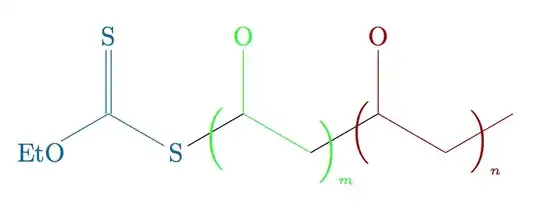
\documentclass{article}

\usepackage{chemfig}

\definecolor{col1}{RGB}{0,102,153}
\definecolor{col2}{RGB}{0,252,0}
\definecolor{col3}{RGB}{150,0,0}

\newcommand\setpolymerdelim[2]{\def\delimleft{#1}\def\delimright{#2}}
\def\makebraces[#1,#2]#3#4#5{%
\edef\delimhalfdim{\the\dimexpr(#1+#2)/2}%
\edef\delimvshift{\the\dimexpr(#1-#2)/2}%
\chemmove{%
\node[at=(#4),yshift=(\delimvshift)]
{$\left\delimleft\vrule height\delimhalfdim depth\delimhalfdim
width0pt\right.$};%
\node[at=(#5),yshift=(\delimvshift)]
{$\left.\vrule height\delimhalfdim depth\delimhalfdim
width0pt\right\delimright_{\rlap{\tiny$#3$}}$};}}
\setpolymerdelim()

\begin{document}

\chemfig{
\textcolor{col1}{EtO}-[:30,,,,col1](=[:90,,,,col1]\textcolor{col1}{S})-[:-30,,,,col1]\textcolor{col1}{S}
-[@{left}:30](-[:90,,,,col2]\textcolor{col2}{O})-[:-30,,,,col2]-[@{right}:30,0.5]-[@{lleft}:30,0.5](-[:90,,,,col3]\textcolor{col3}{O})-[:-30,,,,col3]-[@{rright}:30,,,,col3]
}
{\color{col2}\makebraces[5pt,12pt]{m}{left}{right}}
{\color{col3}\makebraces[5pt,12pt]{n}{lleft}{rright}}

\end{document}
But as cgnieder mentioned, you have to probably color "manually" each bond separately...


\chemfig. I am not aware of a way of coloring parts of molecules other than using the optional arguments of each bond, though. – cgnieder Mar 03 '13 at 07:11