1

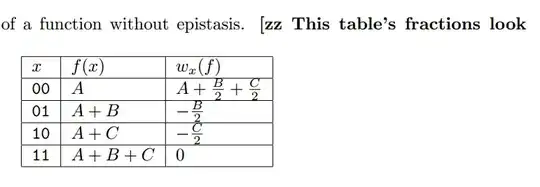
I am having some problems with my table cutting the tops and bottoms off of my fractions.

See image. The horizontal padding seems fine as is, but I couldn't figure out how to increase the vertical cell padding.
Werner
  • 603,163
  • I notice this question is marked as duplicate, but I really think the OP was asking the wrong question (see my answer). Marking the question as duplicate means the OP cannot get any suggestions for solutions to his problem. –  Mar 05 '13 at 07:05
  • @werner et al. (Apologies to the OP for repeating this comment.) I notice this question is marked as duplicate, but I really think the OP was asking the wrong question (see my answer. The answer even got accepted.). Marking the question as duplicate means the OP cannot get any suggestions for solutions to his problem. –  Mar 05 '13 at 23:45
  • @MarcvanDongen: The only alternative to your answer would be contained within the linked duplicate, as far as I can tell. If the OP wishes to update/change the question to be more in line with your answer (if your suggestion of "asking the wrong question" is true), then one can most certainly vote to re-open this question. – Werner Mar 05 '13 at 23:51
  • @Werner Thanks. Perhaps you should offer this option to the OP. –  Mar 05 '13 at 23:55
  • @MaxRunFast: If the linked post (referencing this as a duplicate) solves your problem and/or is fully related, then we can leave this question as-is. However, if you require more input from the community, please revise your current post; comment to request a re-open; or advise otherwise. – Werner Mar 06 '13 at 00:02

1 Answers1

2

There's a much simpler solution. Don't use the \frac command for simple fractions like the ones in the table. Simply write $B/2$ and $C/2$ and your output will look perfect.